為了在 C# 中使用 Excel,需先做準備工作:在電腦中找到 TlbImp 與 Excel9.olb,複製到一個資料夾,在 DOS 視窗執行 TlbImp Excel9.olb,將產生三個檔案:Excel.dll、Office.dll 與 VBIDE.dll。
透過選單 Project → Add Reference,在彈出對話框選擇 COM imports,點擊 Browse 選中上述三個 DLL,確定。
// 建立一個 Excel 檔案
int i;
Excel.Application myExcel = new Excel.Application();
myExcel.Application.Workbooks.Add(true);
// 讓 Excel 檔案可見
myExcel.Visible = true;
// 第一行為報表名稱
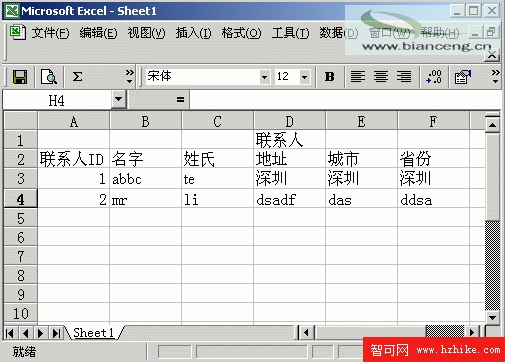
myExcel.Cells[1, 4] = "聯絡人";
myExcel.Cells[2, 1] = "聯絡人ID";
myExcel.Cells[2, 2] = "名字";
myExcel.Cells[2, 3] = "姓氏";
myExcel.Cells[2, 4] = "地址";
myExcel.Cells[2, 5] = "城市";
myExcel.Cells[2, 6] = "省份";
// 逐行寫入資料
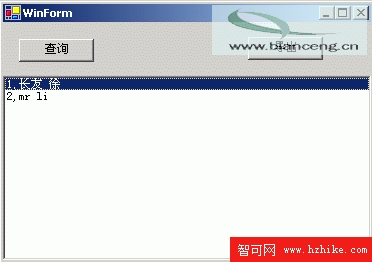
listBox1.Items.Clear();
odbcConnection1.Open();
OdbcDataReader myreader = odbcCommand1.ExecuteReader();
try
{
    i = 2;
    while (myreader.Read())
    {
        i = i + 1;
        myExcel.Cells[i, 1] = myreader.GetString(0);
        myExcel.Cells[i, 2] = myreader.GetString(1);
        myExcel.Cells[i, 3] = myreader.GetString(2);
        myExcel.Cells[i, 4] = myreader.GetString(3);
        myExcel.Cells[i, 5] = myreader.GetString(4);
        myExcel.Cells[i, 6] = myreader.GetString(5);
    }
}
finally
{
    myreader.Close();
    odbcConnection1.Close();
}
using System;
using System.Drawing;
using System.Collections;
using System.ComponentModel;
using System.Windows.Forms;
using System.Data;
using System.Data.Odbc;
using System.IO;
using System.Reflection;

namespace DBApp
{
    public class WinForm : System.Windows.Forms.Form
    {
        private System.ComponentModel.Container components = null;
        private System.Data.Odbc.OdbcConnection odbcConnection1;
        private System.Data.Odbc.OdbcCommand odbcCommand1;
        private System.Windows.Forms.ListBox listBox1;
        private System.Windows.Forms.Button button1;
        private System.Windows.Forms.Button button2;

        public WinForm()
        {
            InitializeComponent();
        }

        protected override void Dispose(bool disposing)
        {
            if (disposing && components != null)
                components.Dispose();
            base.Dispose(disposing);
        }

        #region Windows Form Designer generated code
        private void InitializeComponent()
        {
            this.odbcConnection1 = new System.Data.Odbc.OdbcConnection();
            this.listBox1 = new System.Windows.Forms.ListBox();
            this.button1 = new System.Windows.Forms.Button();
            this.odbcCommand1 = new System.Data.Odbc.OdbcCommand();
            this.button2 = new System.Windows.Forms.Button();
            this.SuspendLayout();
            // odbcConnection1
            this.odbcConnection1.ConnectionString = "DSN=mydb;Uid=admin;Pwd=;";
            // listBox1
            this.listBox1.Dock = System.Windows.Forms.DockStyle.Bottom;
            this.listBox1.ItemHeight = 12;
            this.listBox1.Location = new System.Drawing.Point(0, 53);
            this.listBox1.Name = "listBox1";
            this.listBox1.Size = new System.Drawing.Size(368, 184);
            this.listBox1.TabIndex = 0;
            // button1
            this.button1.Location = new System.Drawing.Point(16, 16);
            this.button1.Name = "button1";
            this.button1.TabIndex = 1;
            this.button1.Text = "查詢";
            this.button1.Click += new System.EventHandler(this.button1_Click);
            // odbcCommand1
            this.odbcCommand1.CommandText = "select * from 聯系人 ";
            this.odbcCommand1.Connection = this.odbcConnection1;
            // button2
            this.button2.Location = new System.Drawing.Point(245, 14);
            this.button2.Name = "button2";
            this.button2.TabIndex = 2;
            this.button2.Text = "匯出";
            this.button2.Click += new System.EventHandler(this.button2_Click);
            // WinForm
            this.AutoScaleBaseSize = new System.Drawing.Size(6, 14);
            this.ClientSize = new System.Drawing.Size(368, 237);
            this.Controls.Add(this.button2);
            this.Controls.Add(this.button1);
            this.Controls.Add(this.listBox1);
            this.Name = "WinForm";
            this.Text = "WinForm";
            this.Load += new System.EventHandler(this.WinForm_Load);
            this.ResumeLayout(false);
        }
        #endregion

        [STAThread]
        static void Main()
        {
            Application.Run(new WinForm());
        }

        private void WinForm_Load(object sender, System.EventArgs e) { }

        private void button1_Click(object sender, System.EventArgs e)
        {
            listBox1.Items.Clear();
            odbcConnection1.Open();
            OdbcDataReader myreader = odbcCommand1.ExecuteReader();
            try
            {
                while (myreader.Read())
                {
                    listBox1.Items.Add(myreader.GetString(0) + "," + myreader.GetString(1) + " " + myreader.GetString(2));
                }
            }
            finally
            {
                myreader.Close();
                odbcConnection1.Close();
            }
        }

        private void button2_Click(object sender, System.EventArgs e)
        {
            // 建立一個 Excel 檔案
            int i;
            Excel.Application myExcel = new Excel.Application();
            myExcel.Application.Workbooks.Add(true);
            // 讓 Excel 檔案可見
            myExcel.Visible = true;
            // 第一行為報表名稱
            myExcel.Cells[1, 4] = "聯絡人";
            myExcel.Cells[2, 1] = "聯絡人ID";
            myExcel.Cells[2, 2] = "名字";
            myExcel.Cells[2, 3] = "姓氏";
            myExcel.Cells[2, 4] = "地址";
            myExcel.Cells[2, 5] = "城市";
            myExcel.Cells[2, 6] = "省份";
            // 逐行寫入資料
            listBox1.Items.Clear();
            odbcConnection1.Open();
            OdbcDataReader myreader = odbcCommand1.ExecuteReader();
            try
            {
                i = 2;
                while (myreader.Read())
                {
                    i = i + 1;
                    myExcel.Cells[i, 1] = myreader.GetString(0);
                    myExcel.Cells[i, 2] = myreader.GetString(1);
                    myExcel.Cells[i, 3] = myreader.GetString(2);
                    myExcel.Cells[i, 4] = myreader.GetString(3);
                    myExcel.Cells[i, 5] = myreader.GetString(4);
                    myExcel.Cells[i, 6] = myreader.GetString(5);
                }
            }
            finally
            {
                myreader.Close();
                odbcConnection1.Close();
            }
        }
    }
}
按 F9 執行程式