using System;
using System.Drawing;
using System.Collections;
using System.ComponentModel;
using System.Windows.Forms;
using System.Data;
using System.Data.SqlClient;
using Excel; // 需先匯入轉換後的 DLL

public class Form1 : Form
{
    private Button button1;
    private Container components = null;

    public Form1()
    {
        InitializeComponent();
    }

    protected override void Dispose(bool disposing)
    {
        if (disposing && components != null) components.Dispose();
        base.Dispose(disposing);
    }

    private void InitializeComponent()
    {
        button1 = new Button();
        SuspendLayout();
        button1.Location = new Point(32, 72);
        button1.Name = "button1";
        button1.Size = new Size(100, 30);
        button1.TabIndex = 0;
        button1.Text = "呼叫 Excel 檔案!";
        button1.Click += new EventHandler(button1_Click);
        AutoScaleBaseSize = new Size(5, 13);
        ClientSize = new Size(292, 273);
        Controls.Add(button1);
        Name = "Form1";
        Text = "如何用 Visual C# 呼叫 Excel 表格!";
        ResumeLayout(false);
    }

    static void Main() { Application.Run(new Form1()); }

    private void button1_Click(object sender, EventArgs e)
    {
        Excel.Application excel = new Excel.Application();
        Excel.Application.Workbooks.Add(true);
        Excel.Cells[1, 1] = "第一行第一列";
        Excel.Cells[1, 2] = "第一行第二列";
        Excel.Cells[2, 1] = "第二行第一列";
        Excel.Cells[2, 2] = "第二行第二列";
        Excel.Cells[3, 1] = "第三行第一列";
        Excel.Cells[3, 2] = "第三行第二列";
        Excel.Visible = true;
    }
}csc.exe /r:system.dll /r:system.Windows.forms.dll /r:system.drawing.dll /r:Excel.dll /r:Office.dll /r:vbide.dll Excel.cs產生 Excel.exe,執行畫面:
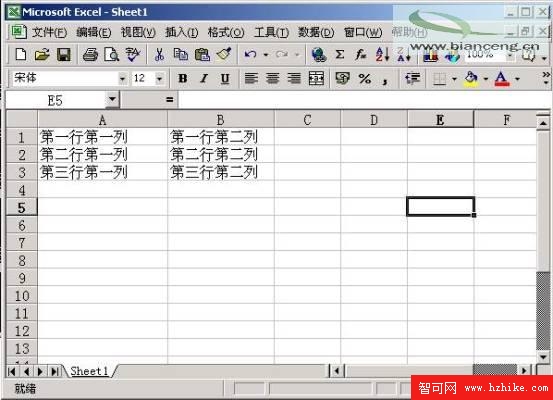
圖02:Visual C# 呼叫 Excel 表格並存儲資料的程式執行介面
Word COM 組件 MSWORD9.OLB 轉換後產生 Word.dll、Office.dll、VBIDE.dll。呼叫 Word 同樣簡單:
Word.Application word = new Word.Application();
Word.Application.Visible = true;
其他操作邏輯與 Excel 類似,因 Word 以文件為主,操作較少,不再逐一說明。
本文介紹 Visual C# 處理 Excel 常見情況,對 Office 套件其他成員具有借鑑意義。