理解代碼含義後,讓程式真正跑起來。Visual Studio 可直接 F5,無 VS 環境需安裝 .NET Framework SDK(內建 csc.exe 編譯器)。
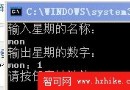
csc welcome.cs正常情況:產生 welcome.exe,執行提示輸入姓名,回車後顯示歡迎訊息。
C/C++:編譯 → 目標檔 .obj → 連結 → .exe/.dll
C#:原始碼直接編譯為執行檔或 DLL,單一步驟完成,csc.exe 內建連結功能。
| 選項 | 用途 | 範例 |
|---|---|---|
/out:檔名 | 指定輸出檔名 | csc /out:MyApp.exe welcome.cs |
/target:exe | 產生控制台執行檔(預設) | csc /target:exe welcome.cs |
/target:winexe | 產生 Windows GUI 執行檔(無控制台視窗) | csc /target:winexe App.cs |
/target:library | 產生 DLL 類別庫 | csc /target:library Lib.cs |
/target:module | 產生模組(無資訊清單,供 al.exe 組合) | csc /target:module Mod.cs |
/debug | 產生偵錯資訊(.pdb) | csc /debug welcome.cs |
/optimize | 啟用程式碼優化 | csc /optimize welcome.cs |
/define:SYMBOL | 定義前置處理器符號 | csc /define:DEBUG welcome.cs |
/reference:組件.dll | 參考外部組件 | csc /reference:Newtonsoft.Json.dll App.cs |
/recurse:*.cs | 遞迴搜尋子目錄原始碼 | csc /recurse:*.cs |
/nooutput | 僅語法檢查,不產出檔案 | csc /nooutput welcome.cs |
/nowarn | 抑制警告訊息 | csc /nowarn welcome.cs |
/warnaserror | 視警告為錯誤 | csc /warnaserror welcome.cs |
/unsafe | 允許 unsafe 區塊編譯 | csc /unsafe UnsafeCode.cs |
/doc:檔案.xml | 產生 XML 文件檔 | csc /doc:ApiDoc.xml Lib.cs |
/win32icon:圖示.ico | 嵌入應用程式圖示 | csc /win32icon:app.ico App.cs |
/win32res:資源.res | 嵌入 Win32 資源檔 | csc /win32res:app.res App.cs |
/baseaddress:位址 | 指定 DLL 偏好載入位址 | csc /baseaddress:0x40000000 Lib.cs |
/bugreport:檔案 | 產生錯誤回報檔 | csc /bugreport:report.txt App.cs |
/codepage:ID | 指定原始碼編碼代碼頁 | csc /codepage:65001 App.cs |
/fullpaths | 輸出絕對路徑 | csc /fullpaths App.cs |
/incremental | 啟用遞增編譯 | csc /incremental App.cs |
/main:類別名 | 指定 Main 方法所在類別 | csc /main:Program App.cs |
/nologo | 隱藏啟動版權資訊 | csc /nologo App.cs |
/help 或 /? | 顯示所有選項 | csc /? |
@response.rsp將常用選項寫入文字檔,編譯時 csc @response.rsp 套用,避免命令列過長。
/incremental僅重新編譯變更檔案,大型專案顯著縮短建構時間。
/nooutputCI/CD 前置檢查:快速驗證語法無誤再進行完整建構。
csc /? 或查閱 MSDN 線上文件。