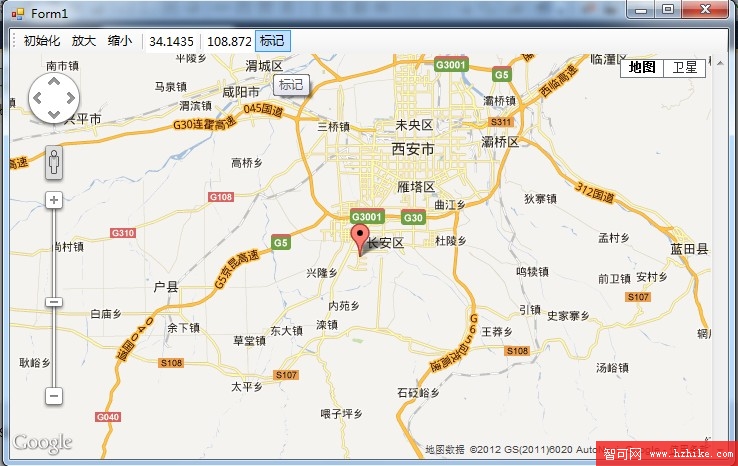
在 WinForm 桌面應用中嵌入地圖,最輕量的方案是使用 WebBrowser 控制項載入本地 HTML,透過 ObjectForScripting / InvokeScript 實現 C# 與 JavaScript 雙向通訊。本文提供一套完整可運行範例:本地 HTML 初始化 Google Maps JS API,C# 呼叫 JS 實現縮放、標記、定位,並附帶 API Key 申請、HTTPS 遷移、WebView2 現代化替代方案說明。
┌─────────────────────────────────────┐
│           WinForm 主視窗             │
│  ┌───────────────────────────────┐  │
│  │      WebBrowser 控制項         │  │
│  │  ┌─────────────────────────┐  │  │
│  │  │   本地 map.html          │  │  │
│  │  │  - Google Maps JS API    │  │  │
│  │  │  - JS 函數:init/zoom/   │  │  │
│  │  │    mark/center           │  │  │
│  │  └─────────────────────────┘  │  │
│  └───────────────────────────────┘  │
│  ToolStrip: 縮放/標記/定位按鈕       │
└─────────────────────────────────────┘
C# ──InvokeScript("jsFunc", args)──▶ JS
JS ──window.external.CSharpMethod()──▶ C# (需 ObjectForScripting + ComVisible)
file:// 協議無法限制,建議部署到本地 HTTP 伺服器或使用 localhost)。放在專案目錄,設置 複製到輸出目錄 = 複製較新。
<!DOCTYPE html>
<html>
<head>
  <meta charset="utf-8" />
  <meta name="viewport" content="initial-scale=1.0, user-scalable=no" />
  <title>Embedded Google Map</title>
  <style>html, body, #map { height: 100%; margin: 0; padding: 0; }</style>
  <script src="https://maps.googleapis.com/maps/api/js?key=YOUR_API_KEY&callback=initMap" async defer></script>
  <script>
    var map, marker;

    function initMap() {
      var center = { lat: 34.259442, lng: 108.947071 }; // 西安預設
      map = new google.maps.Map(document.getElementById('map'), {
        zoom: 10, center: center, mapTypeId: 'roadmap'
      });
      // 可選:暴露給 C# 呼叫的全域函數
      window.mapApi = {
        zoomIn: () => map.setZoom(map.getZoom() + 1),
        zoomOut: () => map.setZoom(map.getZoom() - 1),
        setCenter: (lat, lng) => map.setCenter({ lat: parseFloat(lat), lng: parseFloat(lng) }),
        addMarker: (lat, lng, title) => {
          if (marker) marker.setMap(null);
          marker = new google.maps.Marker({
            position: { lat: parseFloat(lat), lng: parseFloat(lng) },
            map: map, title: title, draggable: true
          });
        }
      };
    }
  </script>
</head>
<body><div id="map"></div></body>
</html>
using System;
using System.Windows.Forms;

public partial class MainForm : Form
{
    public MainForm()
    {
        InitializeComponent();
        string htmlPath = System.IO.Path.Combine(Application.StartupPath, "map.html");
        webBrowser1.Url = new Uri(htmlPath);
        // 允許 JS 呼叫 C#(需類別標記 [ComVisible(true)])
        webBrowser1.ObjectForScripting = new ScriptBridge(this);
    }

    // 工具列按鈕 → 呼叫 JS
    private void btnZoomIn_Click(object sender, EventArgs e) =>
        webBrowser1.Document?.InvokeScript("eval", new object[] { "window.mapApi.zoomIn()" });

    private void btnZoomOut_Click(object sender, EventArgs e) =>
        webBrowser1.Document?.InvokeScript("eval", new object[] { "window.mapApi.zoomOut()" });

    private void btnMark_Click(object sender, EventArgs e)
    {
        if (double.TryParse(txtLat.Text, out double lat) && double.TryParse(txtLng.Text, out double lng))
        {
            string js = $"window.mapApi.addMarker({lat}, {lng}, 'C# 標記')";
            webBrowser1.Document?.InvokeScript("eval", new object[] { js });
        }
        else MessageBox.Show("請輸入有效經緯度");
    }

    private void btnCenter_Click(object sender, EventArgs e)
    {
        if (double.TryParse(txtLat.Text, out double lat) && double.TryParse(txtLng.Text, out double lng))
        {
            string js = $"window.mapApi.setCenter({lat}, {lng})";
            webBrowser1.Document?.InvokeScript("eval", new object[] { js });
        }
    }
}

// 供 JS 呼叫的橋接類(需註冊 COM)
[System.Runtime.InteropServices.ComVisible(true)]
public class ScriptBridge
{
    private readonly MainForm _form;
    public ScriptBridge(MainForm form) => _form = form;

    public void OnMarkerDragEnd(double lat, double lng)
    {
        _form.Invoke((Action)(() => {
            _form.txtLat.Text = lat.ToString();
            _form.txtLng.Text = lng.ToString();
        }));
    }

    public void Log(string msg) => System.Diagnostics.Debug.WriteLine("[JS] " + msg);
}
在 HTML 中:window.external.OnMarkerDragEnd(marker.getPosition().lat(), marker.getPosition().lng())。
前提:
① 類別標記 [ComVisible(true)]
② 專案屬性 → Build → 勾選 Register for COM interop(需管理員權限)或手動 regasm /codebase YourAssembly.dll
③ webBrowser1.ObjectForScripting = new ScriptBridge(this);
FEATURE_BROWSER_EMULATION 強制)。// NuGet: Microsoft.Web.WebView2
using Microsoft.Web.WebView2.WinForms;
var webView = new WebView2();
await webView.EnsureCoreWebView2Async();
webView.CoreWebView2.NavigateToString(htmlContent); // 或 CoreWebView2.Navigate("https://localhost/map.html")
// C# → JS
await webView.CoreWebView2.ExecuteScriptAsync("window.mapApi.zoomIn()");
// JS → C# (WebMessage)
webView.CoreWebView2.WebMessageReceived += (s, e) => { var data = e.WebMessageAsJson; ... };
// HTML: window.chrome.webview.postMessage(JSON.stringify({type:'drag', lat, lng}));
優勢:Chromium 內核、支援 ES6+/WebGL、效能高、支援 HTTPS/本地檔、無 COM 註冊麻煩。
缺點:需分發 ~100MB Runtime(或靜態連結)、最低 Windows 10 1809+。
本文提供了基於 WebBrowser + Google Maps JS API 的完整嵌入方案,涵蓋 HTML 模板、C# 呼叫 JS、JS 反向呼叫 C#、COM 互操作註冊等關鍵技術點。鑑於 IE 內核即將退役,新專案強烈建議直接採用 WebView2;存量專案可暫時維持,並規劃遷移路徑。掌握「前端地圖庫 + 宿主控制項 + 雙向通訊」這一模式,即可在任何 .NET 桌面技術棧中靈活嵌入地圖功能。