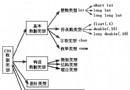
C 語言檔案操作核心三步驟:fopen 開啟 → 讀寫操作 → fclose 關閉。本課示範最基本的逐字元讀取模式。
#include
#include

void readFile() {
    FILE *file;      // 檔案指標
    char c;          // 暫存單一字元

    file = fopen("c:\\test.txt", "r"); // 開啟檔案 (Windows 路徑需雙反斜線)
    if (NULL == file) {                // 檢查開啟是否成功
        printf("can't open this file, make sure the file exist!!!\n");
        exit(1);                       // 終止程式
    }
    puts("open file successful!!!");
    puts("READ FILE NOW:");

    c = fgetc(file);                   // 讀取第一個字元
    while (c != EOF) {                 // EOF 為檔案結束標誌 (通常為 -1)
        putchar(c);                    // 輸出到螢幕
        c = fgetc(file);               // 讀取下一個字元
    }
    printf("\n");
    fclose(file);                      // 釋放資源,刷新緩衝區
} | 函式 | 用途 | 回傳值 |
|---|---|---|
fopen(path, mode) | 開啟檔案 | 成功:檔案指標;失敗:NULL |
fgetc(fp) | 讀取單一字元 | 字元值 (int);EOF 表示結束/錯誤 |
putchar(c) | 輸出單一字元到 stdout | 成功:字元值;失敗:EOF |
fclose(fp) | 關閉檔案 | 成功:0;失敗:EOF |
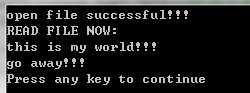
fgets(buf, size, fp) — 適合文字處理fread(ptr, size, count, fp) — 適合結構體/圖片/影音fscanf(fp, fmt, ...) — 類 scanf 從檔案讀取fopen 回傳值,失敗時給出明確錯誤訊息 (可用 perror)ferror(fp) 檢測讀寫過程中的錯誤旗標feof(fp) 區分「正常結束」與「讀取錯誤」setvbuf 調整緩衝區大小提升效能Windows 使用反斜線 \\,Linux/macOS 使用正斜線 /。可定義巨集:
#ifdef _WIN32
#define PATH_SEP '\\'
#else
#define PATH_SEP '/'
#endif
或使用標準庫 stdio.h 的相對路徑,編譯器會自動處理。