本系列記錄從零構建一個精簡版 QQ 客戶端/服務端的核心代碼。採用 Qt 5、TCP 登錄驗證、UDP 即時通訊、SQLite 存儲、無邊框透明 UI。原則:少廢話,多代碼。
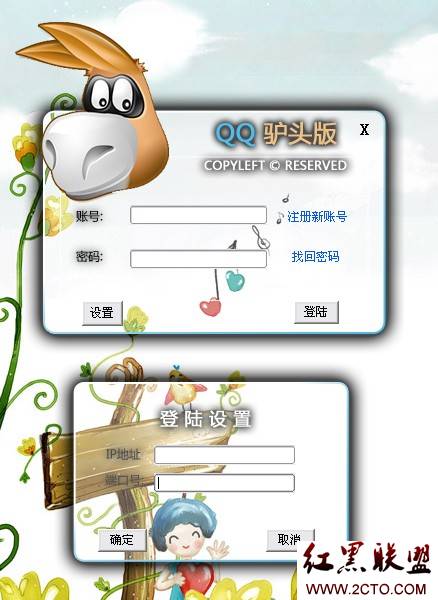
void Login::on_loginButton() {
    usrname = ui->usrnameLineEdit->text().trimmed();
    password = ui->pwdLineEdit->text().trimmed();

    // 簡易 QQ 號格式校驗
    QRegExp rx("^[1-9]\\d{4,7}$");
    if (!rx.exactMatch(usrname)) {
        QMessageBox::warning(this, "提示", "請輸入正確 QQ 號");
        return;
    }

    tcpSocket->abort(); // 取消現有連接
    tcpSocket->connectToHost(QHostAddress(serverIp), serverPort);

    // 發送登錄請求
    QString msgType = "MSG_USER_LOGIN";
    QByteArray block;
    QDataStream out(&block, QIODevice::WriteOnly);
    out.setVersion(QDataStream::Qt_4_6);
    out << (quint16)0 << msgType << usrname << password;
    out.device()->seek(0);
    out << (quint16)(block.size() - sizeof(quint16));
    tcpSocket->write(block);
}

// 登錄響應處理
void Login::on_readyRead() {
    QByteArray block = tcpSocket->readAll();
    QDataStream in(&block, QIODevice::ReadOnly);
    quint16 len; QString msgType;
    in >> len >> msgType;

    if (msgType == "MSG_ID_NOTEXIST") {
        QMessageBox::warning(this, "提示", "該號碼不存在,請先註冊");
        clearInputs();
    }
    else if (msgType == "MSG_PWD_ERROR") {
        QMessageBox::information(this, "提示", "密碼錯誤");
        clearInputs();
    }
    else if (msgType == "MSG_LOGIN_ALREADY") {
        QMessageBox::information(this, "提示", "請勿重複登錄");
        clearInputs();
    }
    else if (msgType == "MSG_LOGIN_SUCCESS") {
        Panel *panel = new Panel(usrname, serverIp, serverPort);
        panel->setWindowTitle("QQcopy");
        panel->setWindowFlags(Qt::FramelessWindowHint);
        panel->setAttribute(Qt::WA_TranslucentBackground);
        panel->show();
        this->close();
    }
}
class TcpServer : public QTcpServer {
protected:
    void incomingConnection(qintptr socketDescriptor) override {
        TcpConnThread *thread = new TcpConnThread(socketDescriptor, this);
        connect(thread, &QThread::finished, thread, &QThread::deleteLater);
        thread->start(); // 每連接一線程
    }
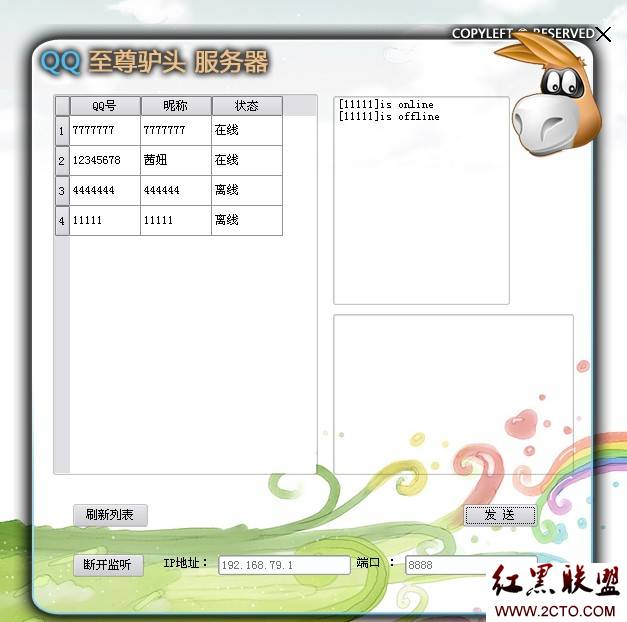
};Daemon::Daemon(QWidget *parent) : QMainWindow(parent), ui(new Ui::Daemon) {
ui->setupUi(this);
setWindowTitle("QQ Server");
ui->btnListen->setText("開始監聽");
ui->editIp->setEnabled(true);
ui->editPort->setEnabled(true);
db = new SqliteDB;
refreshTableView();
}
void Daemon::refreshTableView() {
db->connectDB();
myModel = new MySqlQueryModel;
myModel->setQuery("SELECT id, name, logstat FROM user ORDER BY logstat DESC");
myModel->setHeaderData(0, Qt::Horizontal, "QQ號");
myModel->setHeaderData(1, Qt::Horizontal, "昵稱");
myModel->setHeaderData(2, Qt::Horizontal, "狀態");
ui->tableView->setModel(myModel);
ui->tableView->setColumnWidth(0, 71);
ui->tableView->setColumnWidth(1, 71);
ui->tableView->setColumnWidth(2, 71);
db->closeDB();
}
void Daemon::on_sendBroadcast() {
    QByteArray datagram;
    QDataStream out(&datagram, QIODevice::WriteOnly);
    out.setVersion(QDataStream::Qt_4_6);
    QString type = "MSG_SERVER_INFO";
    out << (quint16)0 << type << ui->textEdit->toPlainText();
    out.device()->seek(0);
    out << (quint16)(datagram.size() - sizeof(quint16));

    // 局域網廣播地址 192.168.1.255,端口 6666
    if (!udpSocket->writeDatagram(datagram, QHostAddress("192.168.1.255"), 6666))
        QMessageBox::warning(this, "廣播", "發送失敗");
    ui->textEdit->clear();
}| 模塊 | 協議/技術 | 關鍵點 |
|---|---|---|
| 客戶端登錄 | TCP + QDataStream | 可靠傳輸,雙向確認 |
| 服務端監聽 | QTcpServer + QThread | 每連接一線程,簡單可靠 |
| 即時通訊/廣播 | UDP + 廣播地址 | 低延遲,無連接開銷 |
| 數據持久化 | SQLite + QSqlQueryModel | 輕量級,無需獨立數據庫服務 |
| UI 風格 | 無邊框 + 透明背景 | 自定義標題欄、邊框陰影、圓角 |
完整項目代碼已上傳至個人資源,免積分下載。歡迎加群交流:
下一篇將講解好友列表、聊天窗口、UDP 消息收發等客戶端核心邏輯。