本教學以 Ubuntu 11.10 為例,示範如何從零開始建立 C 語言存取 MySQL 的開發環境。
sudo apt-get install mysql-server mysql-client編譯連結 MySQL 客戶端程式需安裝開發套件:
sudo apt-get install libmysqlclient15-dev
mysql -u rick -p
CREATE DATABASE foo;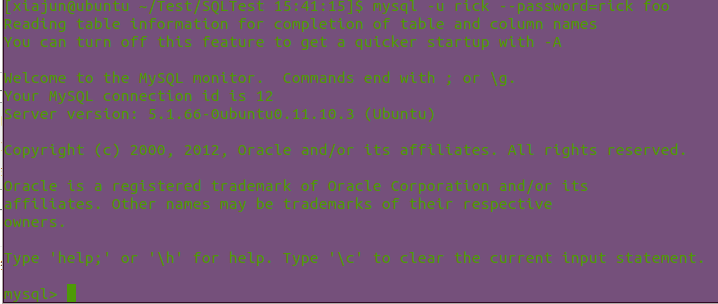
CREATE TABLE children(
  childno int(11) NOT NULL auto_increment,
  fname varchar(30),
  age int(11),
  PRIMARY KEY (childno)
);

INSERT INTO children(childno,fname,age) VALUES(1,'Jenny',21);
INSERT INTO children(childno,fname,age) VALUES(2,'Andrew',17);
INSERT INTO children(childno,fname,age) VALUES(3,'Gavin',8);
INSERT INTO children(childno,fname,age) VALUES(4,'Duncan',6);
INSERT INTO children(childno,fname,age) VALUES(5,'Emma',4);
INSERT INTO children(childno,fname,age) VALUES(6,'Alex',15);
INSERT INTO children(childno,fname,age) VALUES(7,'Adrian',9);
#include <stdlib.h>
#include <stdio.h>
#include "mysql.h"

int main(int argc, char *argv[]) {
    MYSQL *conn_ptr;
    conn_ptr = mysql_init(NULL);
    if (!conn_ptr) {
        fprintf(stderr, "mysql_init failed\n");
        return EXIT_FAILURE;
    }

    conn_ptr = mysql_real_connect(conn_ptr, "localhost", "rick", "rick", "foo", 0, NULL, 0);
    if (conn_ptr)
        printf("Connection success\n");
    else
        printf("Connection failed\n");

    mysql_close(conn_ptr);
    return EXIT_SUCCESS;
}
編譯關鍵: 必須指定標頭檔路徑、函式庫路徑並連結
mysqlclient函式庫。
若未安裝libmysqlclient15-dev,編譯時會出現找不到mysql.h的錯誤。

#include <stdlib.h>
#include <stdio.h>
#include "mysql.h"

int main() {
    MYSQL my_connection;
    int res;

    mysql_init(&my_connection);
    if (mysql_real_connect(&my_connection, "localhost", "rick", "rick", "foo", 0, NULL, 0)) {
        printf("Connection success\n");
        // 執行 INSERT 語句
        res = mysql_query(&my_connection, "INSERT INTO children(fname,age) VALUES('Ann',3)");
        if (!res)
            printf("Inserted %lu rows\n", (unsigned long)mysql_affected_rows(&my_connection));
        else
            fprintf(stderr, "Insert error %d: %s\n", mysql_errno(&my_connection), mysql_error(&my_connection));

        mysql_close(&my_connection);
    } else {
        fprintf(stderr, "Connection failed\n");
        if (mysql_errno(&my_connection))
            fprintf(stderr, "Connection error %d: %s\n", mysql_errno(&my_connection), mysql_error(&my_connection));
    }
    return EXIT_SUCCESS;
}

重要提醒:
mysql_affected_rows()回傳的是實際被修改的行數,而非 WHERE 條件符合的行數。