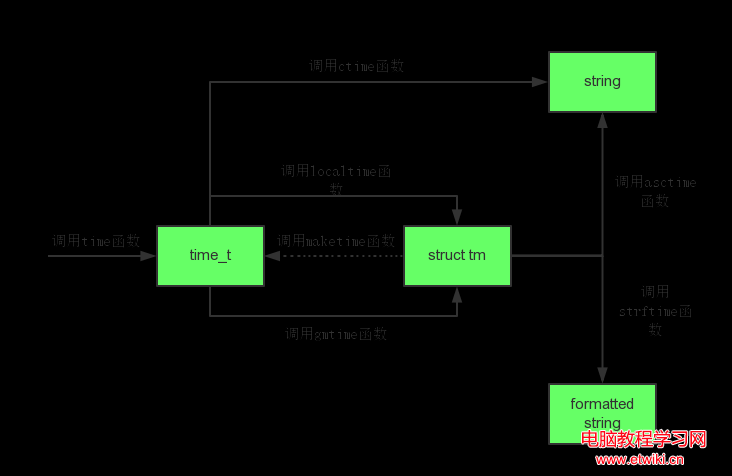
在 Linux 系統程式開發中,時間處理是高頻且易錯的核心任務。本文系統整理 C 標準庫 <ctime>/<time.h> 中 9 個核心時間函數的關係圖譜、使用場景、執行緒安全陷阱,並提供生產級代碼範例與避坑指南,助你一次搞定時間操作,無需反覆查閱文檔。
| 函數 | 功能 | 返回類型 | 標準 |
|---|---|---|---|
time() | 獲取當前 Unix 時間戳(自 1970-01-01 00:00:00 UTC 秒數) | time_t | C89 |
localtime() | 將 time_t 轉為本地時間 struct tm | struct tm* | C89 |
gmtime() | 將 time_t 轉為 UTC 時間 struct tm | struct tm* | C89 |
mktime() | 將 struct tm(本地時間)轉為 time_t,並修正欄位 | time_t | C89 |
strftime() | 按格式化字串將 struct tm 輸出為字串 | size_t | C89 |
ctime() | 將 time_t 轉為固定格式字串(等同 asctime(localtime())) | char* | C89 |
asctime() | 將 struct tm 轉為固定格式字串 | char* | C89 |
difftime() | 計算兩 time_t 差值(秒) | double | C89 |
clock() | 獲取程式啟動至今的 CPU 時鐘嘀嗒數 | clock_t | C89 |
struct tm 詳細定義struct tm {
int tm_sec; // 秒 [0, 60] 含閏秒
int tm_min; // 分 [0, 59]
int tm_hour; // 時 [0, 23]
int tm_mday; // 日 [1, 31]
int tm_mon; // 月 [0, 11] 0=1月
int tm_year; // 年 從1900年起差值
int tm_wday; // 週 [0, 6] 0=週日
int tm_yday; // 年內天數 [0, 365]
int tm_isdst; // 夏令時標誌 >0生效 =0不生效 <0未知
};time_t raw = time(NULL);
char* str = ctime(&raw); // "Wed Feb 13 16:06:10 2013\n\0"
// 注意:返回靜態緩衝區指標,非執行緒安全time_t raw = time(NULL);
struct tm* local = localtime(&raw); // 本地時間
// struct tm* utc = gmtime(&raw); // UTC 時間
int year = local->tm_year + 1900;
int month = local->tm_mon + 1; // 0-based → 1-based
int day = local->tm_mday;time_t raw = time(NULL);
struct tm* local = localtime(&raw);
char buffer[256];
strftime(buffer, sizeof(buffer), "%Y年%m月%d日 %H:%M:%S", local);
// 結果:"2024年03月15日 14:30:45"| 佔位符 | 含義 | 範例 | |
|---|---|---|---|
%Y | 四位數年份 | 2024 | |
%m | 兩位數月份 | 03 | |
%d | 兩位數日期 | 15 | |
%H | 24小時制 | 14 | |
%M | 分鐘 | 30 | |
%S | 秒 | 45 | |
%F | 等同 %Y-%m-%d | 2024-03-15 | |
%T | 等同 %H:%M:%S | 14:30:45 |
| 方案 | 適用標準 | 用法 | 優缺點 |
|---|---|---|---|
localtime_r() | POSIX (Linux/Unix) | struct tm buf; localtime_r(&t, &buf); | 執行緒安全,需自備 struct tm 緩衝區,非標準 C++ |
localtime_s() | C11 / MSVC | struct tm buf; localtime_s(&buf, &t); | 標準 C11,Windows/MSVC 支援良好 |
C++20 <chrono> | C++20 | auto now = system_clock::now(); auto zt = zoned_time(current_zone(), now); | 現代、型別安全、支援時區資料庫,編譯器支援需較新版本 |
| 鎖保護 | 通用 | mutex mtx; lock_guard lk(mtx); auto* tm = localtime(&t); | 效能開銷大,易死鎖,不推薦高頻場景 |
| 複製緩衝區 | 通用 | struct tm tm_copy = *localtime(&t); | 單執行緒或低頻場景可用,高併發仍有競爭窗口 |
#include <ctime>
#include <mutex>
#include <string>

std::string getCurrentTimeStr() {
    static std::mutex mtx;
    std::lock_guard<std::mutex> lock(mtx);
    time_t now = time(nullptr);
    struct tm tm_buf;
    #ifdef _WIN32
        localtime_s(&tm_buf, &now);
    #else
        localtime_r(&now, &tm_buf);
    #endif
    char buffer[64];
    strftime(buffer, sizeof(buffer), "%Y-%m-%d %H:%M:%S", &tm_buf);
    return std::string(buffer);
}time_t start = time(nullptr);
// ... 執行任務 ...
time_t end = time(nullptr);
double elapsed = difftime(end, start); // 秒數,double 精度// 計算 30 天後的日期
time_t now = time(nullptr);
struct tm tm = *localtime(&now);
tm.tm_mday += 30;
mktime(&tm); // 自動修正月份/年份進位
// tm 即為 30 天后的分解時間// 驗證 mktime 與 localtime 互為逆操作
time_t t1 = time(nullptr);
struct tm tm1 = *localtime(&t1);
time_t t2 = mktime(&tm1);
assert(t1 == t2); // 通常成立,夏令時邊界可能差 3600 秒clock() 精度受限於 CLOCKS_PER_SEC(通常 100 萬/秒),現代高效能計時請使用:
<chrono>:high_resolution_clock、steady_clock,奈秒級精度clock_gettime(CLOCK_MONOTONIC, &ts),單調時鐘,不受系統時間調整影響RDTSC/RDTSCP,週期級計時,需處理 CPU 頻率縮放time() 獲取時間戳作為統一基準localtime_r()/localtime_s() 而非 localtime()strftime(),避免 ctime()/asctime() 固定格式限制mktime() 行為<chrono> 或 clock_gettime()<chrono> 或 Howard Hinnant's date 庫)時間操作看似簡單,實則暗藏執行緒安全、夏令時、時區、精度等多重陷阱。建立標準化的時間工具類,封裝平台差異,配合完善的單元測試,才能在生產環境中從容應對各種時間相關需求。不積跬步,無以至千里——將這份指南收藏,下次遇到時間操作,一次搞定!