Microsoft Agent 是早期 Windows 平台提供的動畫角色互動技術,支援文字轉語音(TTS)與語音辨識。雖然已停止更新,但在維護舊系統或特定嵌入式案例中仍具參考價值。本文說明如何在 C# 中透過 COM Interop 呼叫 Agent 控制項,載入角色並實現語音輸出。
Agent 控制項為 ActiveX 元件,需使用 AxImp.exe 產生互通組件:
AxImp.exe agentctl.dll
將產生 AxAgentObjects.dll(Windows Forms 包裝)與 AgentObjects.dll(COM 介面),加入專案參考即可使用。
using AgentObjects;
using AxAgentObjects;

public class AgentController
{
    private AxAgent _axAgent;
    private IAgentCtlCharacterEx _character;

    public AgentController(AxAgent axAgentControl)
    {
        _axAgent = axAgentControl;
    }

    public void LoadCharacter(string characterId, string acsPath)
    {
        _axAgent.Characters.Load(characterId, acsPath);
        _character = _axAgent.Characters[characterId];
        _character.LanguageID = 0x0409; // 美式英語
        _character.Show(null);
    }

    public void Speak(string text)
    {
        _character?.Speak(text, null);
    }

    public void PlayAnimation(string animationName)
    {
        _character?.Play(animationName);
    }
}
using System;
using System.Drawing;
using System.Windows.Forms;
using AgentObjects;
using AxAgentObjects;

public class AgentDemoForm : Form
{
    private AxAgent _axAgent;
    private IAgentCtlCharacterEx _character;
    private TextBox _txtInput;
    private Button _btnLoad, _btnSpeak;

    public AgentDemoForm()
    {
        InitializeComponent();
    }

    private void InitializeComponent()
    {
        _axAgent = new AxAgent();
        ((System.ComponentModel.ISupportInitialize)_axAgent).BeginInit();

        _txtInput = new TextBox { Location = new Point(12, 12), Size = new Size(300, 100), Multiline = true };
        _btnLoad = new Button { Text = "載入角色", Location = new Point(12, 120), Size = new Size(100, 30) };
        _btnSpeak = new Button { Text = "朗讀", Location = new Point(120, 120), Size = new Size(80, 30) };

        _btnLoad.Click += BtnLoad_Click;
        _btnSpeak.Click += BtnSpeak_Click;

        this.Controls.AddRange(new Control[] { _txtInput, _btnLoad, _btnSpeak, _axAgent });
        this.Text = "Microsoft Agent TTS Demo";
        this.ClientSize = new Size(340, 180);

        ((System.ComponentModel.ISupportInitialize)_axAgent).EndInit();
    }

    private void BtnLoad_Click(object sender, EventArgs e)
    {
        using OpenFileDialog dlg = new OpenFileDialog
        {
            Filter = "Agent Characters (*.acs)|*.acs",
            InitialDirectory = @"C:\Windows\MSAgent\Chars"
        };
        if (dlg.ShowDialog() == DialogResult.OK)
        {
            try { _axAgent.Characters.Unload("Char"); } catch { }
            _axAgent.Characters.Load("Char", dlg.FileName);
            _character = _axAgent.Characters["Char"];
            _character.LanguageID = 0x0409;
            _character.Show(null);
            _character.Play("Announce");
        }
    }

    private void BtnSpeak_Click(object sender, EventArgs e)
    {
        if (!string.IsNullOrWhiteSpace(_txtInput.Text))
            _character?.Speak(_txtInput.Text, null);
    }

    [STAThread]
    static void Main()
    {
        Application.EnableVisualStyles();
        Application.SetCompatibleTextRenderingDefault(false);
        Application.Run(new AgentDemoForm());
    }
}
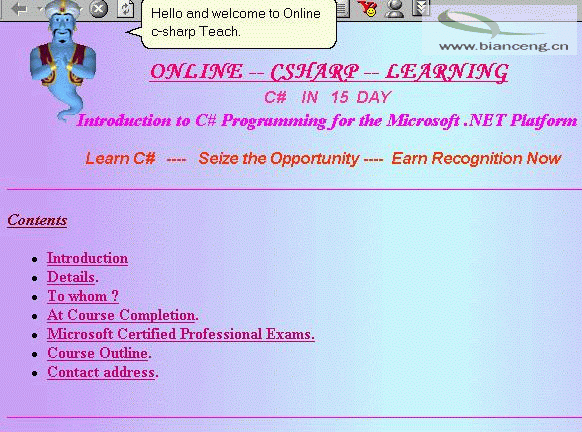
圖 1:角色選擇對話框
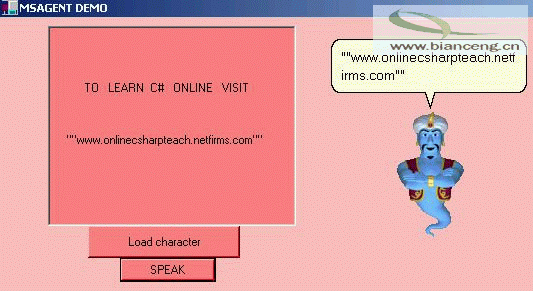
圖 2:角色朗讀文字
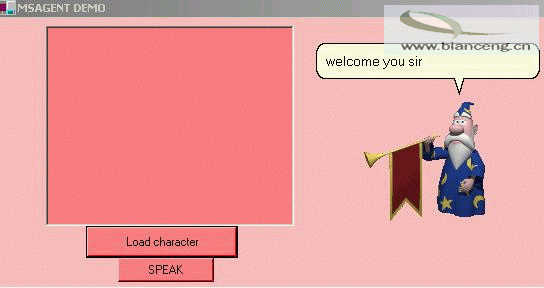
圖 3:播放宣告動畫
Microsoft Agent 已於 Windows 7 後移除,新專案建議採用:
本文示範透過 AxImp 產生互通組件,在 C# 中載入 Microsoft Agent 角色並實現 TTS 輸出。雖技術屬舊世代,但完整展示了 COM Interop、ActiveX 控制項包裝、非同步語音播放等核心概念,對維護舊系統或學習元件互通性仍有參考價值。