FileStream 僅支援位元組層級操作,處理文字檔需自行編解碼。StreamReader/StreamWriter 封裝字元編碼與緩衝,提供以行、字元、字串為單位的高階文字讀寫 API,是文字檔處理的首選工具。
// 從 FileStream 建立(可控制 FileMode/FileAccess)
FileStream fs = new FileStream(@"c:\abc.txt", FileMode.Open, FileAccess.ReadWrite);
StreamReader sr = new StreamReader(fs); // 預設 UTF-8

// 直接指定路徑建立(最常用)
StreamReader sr2 = new StreamReader(@"c:\abc.txt");
支援指定 Encoding、detectEncodingFromByteOrderMarks、bufferSize、leaveOpen 等進階選項。
FileStream fs = new FileStream(@"c:\abc.txt", FileMode.Open, FileAccess.ReadWrite);
StreamReader sr = new StreamReader(fs);

string line = sr.ReadLine(); // 讀取一行(不含換行符)
while (line != null)
{
    Console.WriteLine(line);
    line = sr.ReadLine();
}

sr.Close();  // 關閉 Reader(若 leaveOpen=false 也會關閉底層 Stream)
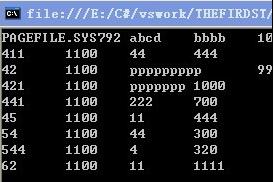
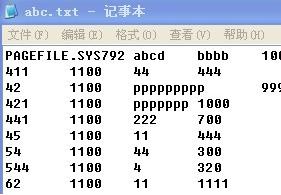
fs.Close(); // 確保釋放檔案鎖定輸出結果:主控台逐行顯示檔案內容,與檔案原文完全一致。
Read():讀單一字元,回傳 int(-1 表結束)ReadBlock(char[], index, count):填滿緩衝區或結束ReadToEnd():一次性讀完所有內容(大檔慎用)CurrentEncoding:獲取實際使用編碼// 追加模式開啟
FileStream fs = new FileStream(@"C:\abc.txt", FileMode.Append, FileAccess.Write);
StreamWriter sw = new StreamWriter(fs); // 預設 UTF-8
for (char c = 'a'; c <= 'z'; c++)
sw.Write(c); // 寫入單字元(無換行)
sw.Close(); fs.Close();FileMode.Append 將寫入位置定位至檔案末尾,保留原有內容。
| 方法 | 說明 |
|---|---|
Write(value) | 寫入各類型 ToString 結果 |
WriteLine(value) | 寫入並附加換行符 |
Write(char[]) | 寫入字元陣列 |
Flush() | 強制將緩衝區寫入底層流 |
// 重新開啟讀取驗證
FileStream fs2 = new FileStream(@"c:\abc.txt", FileMode.Open, FileAccess.ReadWrite);
StreamReader sr2 = new StreamReader(fs2);
string line = sr2.ReadLine();
while (line != null) { Console.WriteLine(line); line = sr2.ReadLine(); }
sr2.Close(); fs2.Close();
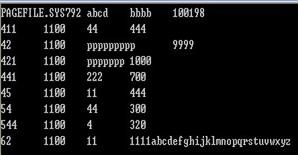
輸出顯示原有內容後接續 abcdefghijklmnopqrstuvwxyz,確認追加成功。
using (var sr = new StreamReader(@"c:\abc.txt"))
using (var sw = new StreamWriter(@"c:\out.txt"))
{
    string line;
    while ((line = sr.ReadLine()) != null)
        sw.WriteLine(line.ToUpper());
}new StreamReader(path, Encoding.GetEncoding("big5")) 避免亂碼ReadToEnd() 造成記憶體壓力File.ReadLines()、File.WriteAllLinesAsync() 等高階 API,內建非同步與資源管理Encoding.UTF8 含 BOM(EF BB BF)new UTF8Encoding(false) 建立無 BOM 實例StreamReader/StreamWriter 是文字檔處理的基石,掌握其建構選項、緩衝機制與編碼處理,能避免 90% 的檔案亂碼與資源洩漏問題。