利用 Excel 支援的 XML Spreadsheet 格式(XMLSS),以 XmlDocument 建構符合結構的 XML,儲存為 .xls 副檔名,Excel 即可直接開啟。支援合併儲存格、公式、樣式等進階功能。
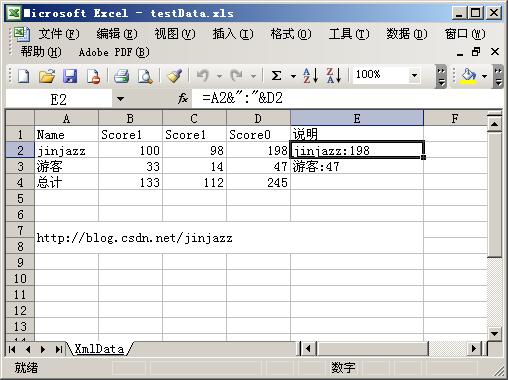
包含:公式欄位(D、E 欄)、總計列(SUM 公式)、合併儲存格(第 7、8 列)。
using System; using System.Xml; using System.Text;
namespace ConsoleApplication17 {
class Program {
static void Main() {
ExcelWriter ew = new ExcelWriter();
ew.CreateSheet("XmlData");
ew.CreateColumn(5, 100); // 欄寬
// 標題列
ew.CreateRow();
ew.CreateCellString("Name");
ew.CreateCellString("Score1");
ew.CreateCellString("Score2");
ew.CreateCellString("Score0");
ew.CreateCellString("說明");
// 資料列 1
ew.CreateRow();
ew.CreateCellString("jinjazz");
ew.CreateCellNumber(100);
ew.CreateCellNumber(98);
ew.CreateCell(0, "Number", "RC[-2]+RC[-1]", 1, 1); // R1C1 相對參考公式
ew.CreateCell(0, "String", "RC[-4]&\"\":"&RC[-1]", 1, 1);
// 資料列 2
ew.CreateRow();
ew.CreateCellString("游客");
ew.CreateCellNumber(33);
ew.CreateCellNumber(14);
ew.CreateCell(0, "Number", "RC[-2]+RC[-1]", 1, 1);
ew.CreateCell(0, "String", "RC[-4]&\"\":"&RC[-1]", 1, 1);
// 總計列
ew.CreateRow();
ew.CreateCellString("總計");
ew.CreateCell(0, "Number", "SUM(R[-2]C:R[-1]C)", 1, 1);
ew.CreateCell(0, "Number", "SUM(R[-2]C:R[-1]C)", 1, 1);
ew.CreateCell(0, "Number", "SUM(R[-2]C:R[-1]C)", 1, 1);
// 空三列
ew.CreateRow(); ew.CreateRow(); ew.CreateRow();
// 合併儲存格:跨 2 列 5 欄
ew.CreateCell("https://blog.csdn.net/jinjazz", "String", null, 2, 5);
ew.Save(@"c:\testData.xls");
}
}
public class ExcelWriter {
string ssns = "urn:schemas-microsoft-com:office:spreadsheet";
XmlDocument _doc = new XmlDocument();
XmlNode _sheet, _row;
public ExcelWriter() {
StringBuilder sb = new StringBuilder();
sb.Append("");
sb.Append("");
sb.Append(" ");
_doc.LoadXml(sb.ToString());
}
public void CreateSheet(string name) {
XmlNode ws = _doc.CreateNode(XmlNodeType.Element, "Worksheet", ssns);
XmlAttribute xa = _doc.CreateAttribute("ss", "Name", ssns); xa.Value = name;
ws.Attributes.Append(xa);
_doc.ChildNodes[2].AppendChild(ws);
ws.AppendChild(_doc.CreateNode(XmlNodeType.Element, "Table", ssns));
_sheet = ws;
}
public void CreateRow() {
_row = _doc.CreateNode(XmlNodeType.Element, "Row", ssns);
_sheet.ChildNodes[0].AppendChild(_row);
}
public void CreateColumn(int index, float width) {
XmlNode col = _doc.CreateNode(XmlNodeType.Element, "Column", ssns);
XmlAttribute xa = _doc.CreateAttribute("ss", "Index", ssns); xa.Value = index.ToString();
col.Attributes.Append(xa);
xa = _doc.CreateAttribute("ss", "Width", ssns); xa.Value = width.ToString();
col.Attributes.Append(xa);
_sheet.ChildNodes[0].AppendChild(col);
}
// 通用建立儲存格(支援公式、合併、型別)
public void CreateCell(object value, string type, string formula, int rowSpan, int colSpan) {
XmlNode cell = _doc.CreateNode(XmlNodeType.Element, "Cell", ssns);
_row.AppendChild(cell);
if (!string.IsNullOrEmpty(formula)) {
XmlAttribute xa = _doc.CreateAttribute("ss", "Formula", ssns);
xa.Value = "=" + formula; cell.Attributes.Append(xa);
}
if (--colSpan > 0) { // MergeAcross
XmlAttribute xa = _doc.CreateAttribute("ss", "MergeAcross", ssns);
xa.Value = colSpan.ToString(); cell.Attributes.Append(xa);
}
if (--rowSpan > 0) { // MergeDown
XmlAttribute xa = _doc.CreateAttribute("ss", "MergeDown", ssns);
xa.Value = rowSpan.ToString(); cell.Attributes.Append(xa);
}
XmlNode data = _doc.CreateNode(XmlNodeType.Element, "Data", ssns);
XmlAttribute xa = _doc.CreateAttribute("ss", "Type", ssns);
xa.Value = type; data.Attributes.Append(xa);
data.InnerText = value?.ToString() ?? "";
cell.AppendChild(data);
}
public void CreateCellNumber(double v) => CreateCell(v, "Number", null, 1, 1);
public void CreateCellString(string v) => CreateCell(v, "String", null, 1, 1);
public void Save(string path) => _doc.Save(path);
}
}| 元素/屬性 | 用途 |
|---|---|
Workbook/Worksheet/Table/Row/Cell/Data | 基本階層結構 |
ss:Formula | 公式,使用 R1C1 相對參考(如 RC[-2] 為左邊兩格) |
ss:MergeAcross | 向右合併儲存格數 |
ss:MergeDown | 向下合併儲存格數 |
ss:Type | 資料型別:String、Number、DateTime 等 |
Style | 字型、對齊、框線、底色等 |
伺服器端匯出報表、批次產生 Excel、不想引用 Office 組件的專案。