SW_SHOWNOACTIVATE)public void SetBackgroundBitmap(Image image, Color transparentColor)
{
BackgroundBitmap = new Bitmap(image);
this.Width = BackgroundBitmap.Width;
this.Height = BackgroundBitmap.Height;
this.Region = BitmapToRegion(BackgroundBitmap, transparentColor);
this.FormBorderStyle = FormBorderStyle.None; // 移除標題列與邊框
}
public Region BitmapToRegion(Bitmap bmp, Color transparentColor)
{
var path = new GraphicsPath();
for (int y = 0; y < bmp.Height; y++)
{
for (int x = 0; x < bmp.Width; x++)
{
if (bmp.GetPixel(x, y) == transparentColor) continue;
int x0 = x;
while (x < bmp.Width && bmp.GetPixel(x, y) != transparentColor) x++;
path.AddRectangle(new Rectangle(x0, y, x - x0, 1));
}
}
var region = new Region(path);
path.Dispose();
return region;
}protected override void OnPaintBackground(PaintEventArgs e)
{
Graphics g = e.Graphics;
g.PageUnit = GraphicsUnit.Pixel;
// 記憶體離屏繪圖
using (Bitmap offscreen = new Bitmap(BackgroundBitmap.Width, BackgroundBitmap.Height))
using (Graphics offG = Graphics.FromImage(offscreen))
{
if (BackgroundBitmap != null)
offG.DrawImage(BackgroundBitmap, 0, 0);
DrawText(offG); // 繪製標題與內容文字
g.DrawImage(offscreen, 0, 0); // 一次性貼上螢幕
}
}
void DrawText(Graphics g)
{
g.DrawString(TitleText, TitleFont, TitleBrush, TitleRect);
g.DrawString(ContentText, ContentFont, ContentBrush, ContentRect);
}[DllImport("user32.dll")]
private static extern bool ShowWindow(IntPtr hWnd, int nCmdShow);
private const int SW_SHOWNOACTIVATE = 4;
public void ShowForm(string title, string content, ...)
{
// 計算初始位置 (螢幕右下角外)
WorkArea = Screen.GetWorkingArea(WorkArea);
this.Top = WorkArea.Height + this.Height;
this.Left = WorkArea.Width - this.Width;
// 設定各區域矩形 (標題、內容、關閉鈕、拖曳區)
// ...
CurrentState = State.SlidingIn;
timer1.Enabled = true;
ShowWindow(this.Handle, SW_SHOWNOACTIVATE); // 關鍵:不搶焦點
}void timer1_Tick(object sender, EventArgs e)
{
switch (CurrentState)
{
case State.SlidingIn:
this.Top -= SlideSpeed;
if (this.Top <= WorkArea.Height - this.Height)
{
this.Top = WorkArea.Height - this.Height;
CurrentState = State.Staying;
stayTimer.Enabled = true;
}
break;
case State.SlidingOut:
this.Top += SlideSpeed;
if (this.Top >= WorkArea.Height + this.Height)
{
this.Hide();
CurrentState = State.Hidden;
}
break;
}
this.SetBounds(this.Left, this.Top, this.Width, this.Height);
}[DllImport("user32.dll")]
static extern int SendMessage(IntPtr hWnd, int Msg, int wParam, int lParam);
[DllImport("user32.dll")]
static extern bool ReleaseCapture();
const int WM_NCLBUTTONDOWN = 0xA1;
const int HT_CAPTION = 0x2;
private void TaskbarForm_MouseDown(object sender, MouseEventArgs e)
{
if (e.Button == MouseButtons.Left)
{
if (TitleBarRect.Contains(e.Location)) // 標題列區域
{
ReleaseCapture();
SendMessage(Handle, WM_NCLBUTTONDOWN, HT_CAPTION, 0);
}
else if (CloseBtnRect.Contains(e.Location))
{
Hide(); // 關閉
}
else if (ContentRect.Contains(e.Location))
{
Process.Start("https://www.example.com"); // 自訂動作
}
}
}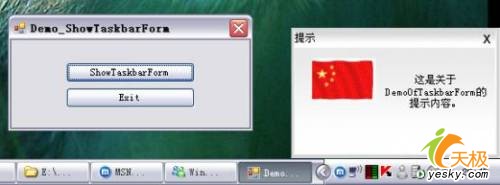
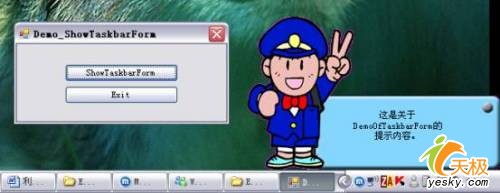
Form1:主視窗,按鈕觸發通知視窗TaskbarForm:通知視窗核心邏輯 (繼承 Form).bmp/.png),背景色設為粉紅 (#FF00FF) 作為透明色結合 Region、GraphicsPath、雙重緩衝、ShowWindow(SW_SHOWNOACTIVATE)、SendMessage(WM_NCLBUTTONDOWN) 等技術,可在純 C# WinForms 中實作媲美 QQ/MSN 的專業級通知視窗,且具備換膚、動畫、無焦點干擾等優秀使用者體驗特性。