GDI+(Graphics Device Interface Plus)是 Windows 提供的 2D 圖形圖像處理介面。在 C# 中,透過 System.Drawing 命名空間即可存取其豐富功能,核心類別包括:
簡單說:Graphics 是畫布,Pen 是鉛筆,Brush 是顏料,Color 是顏色盤。
Graphics g = e.Graphics;Graphics g = this.CreateGraphics();Graphics g = Graphics.FromImage(bitmap);在表單的 Paint 事件中撰寫:
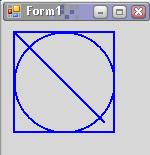
private void Form1_Paint(object sender, PaintEventArgs e)
{
    Graphics g = e.Graphics;           // 取得畫布
    using (Pen p = new Pen(Color.Blue, 2)) // 建立藍色、寬度 2 的畫筆
    {
        g.DrawLine(p, 10, 10, 100, 100);      // 畫直線
        g.DrawRectangle(p, 10, 10, 100, 100); // 畫矩形
        g.DrawEllipse(p, 10, 10, 100, 100);   // 畫橢圓
    }
}
關鍵點: 善用 using 區塊確保 Pen、Brush、Graphics 等非託管資源及時釋放。
WinForms 採用裝置座標:原點 (0,0) 在視窗左上角,X 軸向右、Y 軸向下。這與數學直角座標系 Y 軸方向相反,繪圖時需注意。
下一篇將介紹 Pen 進階樣式(虛線、箭頭)、五種 Brush 填充模式、座標轉換(旋轉/平移)與影像繪製。