本系列首篇,奠基 MiniORM 實現基石:反射 與 自定義 Attribute 的結合,實現運行時動態獲取對象-數據庫映射規則。
反射允許運行時動態獲取類型信息 (屬性、方法、特性等) 並動態調用/賦值。
public class Person {
    public string Name { get; set; }
    public int Age { get; set; }
    public string Sex { get; set; }
}

// 運行時獲取屬性值
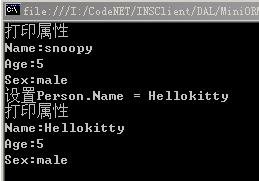
Person p = new Person { Name = "snoopy", Age = 5, Sex = "male" };
PropertyInfo[] props = p.GetType().GetProperties();
foreach (var prop in props) {
    Console.WriteLine($"{prop.Name}: {prop.GetValue(p, null)}");
}

// 運行時設置屬性值
foreach (var prop in props) {
    if (prop.Name == "Name") prop.SetValue(p, "Hellokitty", null);
}
Attribute 是運行時掛載在程式元素 (類、屬性、方法) 上的元數據類,必須繼承 System.Attribute。
public class DataFieldAttribute : Attribute {
    public string FieldName { get; set; } // 數據庫列名
    public string FieldType { get; set; } // 數據庫類型
    public DataFieldAttribute(string fieldName, string fieldType) { ... }
}
public class Person {
    [DataFieldAttribute("name", "nvarchar")] public string Name { get; set; }
    [DataFieldAttribute("age", "int")] public int Age { get; set; }
    [DataFieldAttribute("sex", "nvarchar")] public string Sex { get; set; }
}
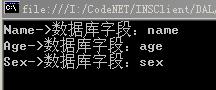
Person p = new Person { Name = "snoopy", Age = 5, Sex = "male" };
PropertyInfo[] props = p.GetType().GetProperties();
foreach (var prop in props) {
    object[] attrs = prop.GetCustomAttributes(typeof(DataFieldAttribute), false);
    if (attrs.Length > 0) {
        var dfa = (DataFieldAttribute)attrs[0];
        Console.WriteLine($"{prop.Name} -> DB Column: {dfa.FieldName} ({dfa.FieldType})");
    }
}
DataObjectAttribute)掌握「反射獲取元數據 + Attribute 定義規則」這一核心模式,即可構建輕量級 ORM 框架雛形。