前兩篇文章範例都傳輸字串,有時想在服務端與客戶端間傳遞檔案。假設客戶端顯示選單,輸入 S1、S2、S3 分別發送 Client01.jpg、Client02.jpg、Client03.jpg 到服務端;輸入 R1、R2、R3 則從服務端接收 Server01.jpg、Server02.jpg、Server03.jpg。如何完成?有兩種做法:
第一種方式較好,但採用第二種方式。原因可回顧 Part 1 聊天程式模式講述,下一篇將建立採用第三種模式的聊天程式,本文練習為下一篇鋪墊。
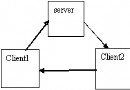
流程:客戶端開闢資料連接埠偵聽(假設 8005)→ 發送控制字串 <protocol><file name="client01.jpg" mode="send" port="8005" /></protocol> → 服務端依客戶端 IP 與連接埠建立連線 → 客戶端偵聽到連線開始發送檔案 → 傳送完畢雙方關閉連線。
流程類似,差別在資料流寫入方向。客戶端開闢資料連接埠(假設 8006)→ 發送 <protocol><file name="Server01.jpg" mode="receive" port="8006" /></protocol> → 服務端連線 → 客戶端建立連線,服務端寫入資料流 → 傳送完畢雙方關閉連線。
功能:獲取完整協定資訊(服務端可能將多請求合併或拆分),方便獲取屬性資訊(XML 解析)。必須宣告為實例而非靜態,因每個 TcpClient 對應一個 ProtocolHandler,內部 partialProtocol 不能共享,用於暫存被截斷字串。
public class ProtocolHandler {
private string partialProtocol;
public ProtocolHandler() { partialProtocol = ""; }
public string[] GetProtocol(string input) { return GetProtocol(input, null); }
private string[] GetProtocol(string input, List outputList) {
if (outputList == null) outputList = new List();
if (String.IsNullOrEmpty(input)) return outputList.ToArray();
if (!String.IsNullOrEmpty(partialProtocol)) input = partialProtocol + input;
string pattern = "(^.*? )";
if (Regex.IsMatch(input, pattern)) {
string match = Regex.Match(input, pattern).Groups[0].Value;
outputList.Add(match);
partialProtocol = "";
input = input.Substring(match.Length);
GetProtocol(input, outputList);
} else {
partialProtocol = input;
}
return outputList.ToArray();
}
}
public enum FileRequestMode { Send = 0, Receive }
public struct FileProtocol {
private readonly FileRequestMode mode;
private readonly int port;
private readonly string fileName;
public FileProtocol(FileRequestMode mode, int port, string fileName) {
this.mode = mode; this.port = port; this.fileName = fileName;
}
public FileRequestMode Mode { get { return mode; } }
public int Port { get { return port; } }
public string FileName { get { return fileName; } }
public override string ToString() {
return String.Format("public class ProtocolHelper {
private XmlNode fileNode, root;
public ProtocolHelper(string protocol) {
XmlDocument doc = new XmlDocument();
doc.LoadXml(protocol);
root = doc.DocumentElement;
fileNode = root.SelectSingleNode("file");
}
private FileRequestMode GetFileMode() {
string mode = fileNode.Attributes["mode"].Value.ToLower();
return mode == "send" ? FileRequestMode.Send : FileRequestMode.Receive;
}
public FileProtocol GetProtocol() {
FileRequestMode mode = GetFileMode();
string fileName = fileNode.Attributes["name"].Value;
int port = Convert.ToInt32(fileNode.Attributes["port"].Value);
return new FileProtocol(mode, port, fileName);
}
}
class Server {
    static void Main(string[] args) {
        Console.WriteLine("Server is running ... ");
        IPAddress ip = IPAddress.Parse("127.0.0.1");
        TcpListener listener = new TcpListener(ip, 8500);
        listener.Start();
        Console.WriteLine("Start Listening ...");
        while (true) {
            TcpClient client = listener.AcceptTcpClient();
            RemoteClient wrapper = new RemoteClient(client);
            wrapper.BeginRead();
        }
    }
}

public class RemoteClient {
    private TcpClient client;
    private NetworkStream streamToClient;
    private const int BufferSize = 8192;
    private byte[] buffer;
    private ProtocolHandler handler;

    public RemoteClient(TcpClient client) {
        this.client = client;
        Console.WriteLine("\nClient Connected! {0} <-- {1}", client.Client.LocalEndPoint, client.Client.RemoteEndPoint);
        streamToClient = client.GetStream();
        buffer = new byte[BufferSize];
        handler = new ProtocolHandler();
    }

    public void BeginRead() {
        AsyncCallback callBack = new AsyncCallback(OnReadComplete);
        streamToClient.BeginRead(buffer, 0, BufferSize, callBack, null);
    }

    private void OnReadComplete(IAsyncResult ar) {
        int bytesRead = 0;
        try {
            lock (streamToClient) {
                bytesRead = streamToClient.EndRead(ar);
                Console.WriteLine("Reading data, {0} bytes ...", bytesRead);
            }
            if (bytesRead == 0) throw new Exception("讀取到 0 位元組");
            string msg = Encoding.Unicode.GetString(buffer, 0, bytesRead);
            Array.Clear(buffer, 0, buffer.Length);
            string[] protocolArray = handler.GetProtocol(msg);
            foreach (string pro in protocolArray) {
                ParameterizedThreadStart start = new ParameterizedThreadStart(handleProtocol);
                start.BeginInvoke(pro, null, null);
            }
            lock (streamToClient) {
                AsyncCallback callBack = new AsyncCallback(OnReadComplete);
                streamToClient.BeginRead(buffer, 0, BufferSize, callBack, null);
            }
        } catch (Exception ex) {
            if (streamToClient != null) streamToClient.Dispose();
            client.Close();
            Console.WriteLine(ex.Message);
        }
    }

    private void handleProtocol(object obj) {
        string pro = obj as string;
        ProtocolHelper helper = new ProtocolHelper(pro);
        FileProtocol protocol = helper.GetProtocol();
        if (protocol.Mode == FileRequestMode.Send) {
            receiveFile(protocol);
        } else if (protocol.Mode == FileRequestMode.Receive) {
            // sendFile(protocol); // 下篇實作
        }
    }

    private void receiveFile(FileProtocol protocol) {
        IPEndPoint endpoint = client.Client.RemoteEndPoint as IPEndPoint;
        IPAddress ip = endpoint.Address;
        endpoint = new IPEndPoint(ip, protocol.Port);
        TcpClient localClient;
        try {
            localClient = new TcpClient();
            localClient.Connect(endpoint);
        } catch {
            Console.WriteLine("無法連接到客戶端 --> {0}", endpoint);
            return;
        }
        NetworkStream streamToClient = localClient.GetStream();
        string path = Environment.CurrentDirectory + "/" + generateFileName(protocol.FileName);
        byte[] fileBuffer = new byte[1024];
        FileStream fs = new FileStream(path, FileMode.CreateNew, FileAccess.Write);
        int bytesRead, totalBytes = 0;
        do {
            bytesRead = streamToClient.Read(buffer, 0, BufferSize);
            fs.Write(buffer, 0, bytesRead);
            totalBytes += bytesRead;
            Console.WriteLine("Receiving {0} bytes ...", totalBytes);
        } while (bytesRead > 0);
        Console.WriteLine("Total {0} bytes received, Done!", totalBytes);
        streamToClient.Dispose();
        fs.Dispose();
        localClient.Close();
    }

    private string generateFileName(string fileName) {
        DateTime now = DateTime.Now;
        return String.Format("{0}_{1}_{2}_{3}", now.Minute, now.Second, now.Millisecond, fileName);
    }
}
class Client {
    static void Main(string[] args) {
        ConsoleKey key;
        ServerClient client = new ServerClient();
        string filePath = Environment.CurrentDirectory + "/Client01.jpg";
        if (File.Exists(filePath))
            client.BeginSendFile(filePath);
        Console.WriteLine("\n\n輸入 \"Q\" 鍵退出。");
        do { key = Console.ReadKey(true).Key; } while (key != ConsoleKey.Q);
    }
}

public class ServerClient {
    private const int BufferSize = 8192;
    private byte[] buffer;
    private TcpClient client;
    private NetworkStream streamToServer;

    public ServerClient() {
        try {
            client = new TcpClient();
            client.Connect("localhost", 8500);
        } catch (Exception ex) {
            Console.WriteLine(ex.Message);
            return;
        }
        buffer = new byte[BufferSize];
        Console.WriteLine("Server Connected! {0} --> {1}", client.Client.LocalEndPoint, client.Client.RemoteEndPoint);
        streamToServer = client.GetStream();
    }

    public void SendMessage(string msg) {
        byte[] temp = Encoding.Unicode.GetBytes(msg);
        try {
            lock (streamToServer) {
                streamToServer.Write(temp, 0, temp.Length);
            }
            Console.WriteLine("Sent: {0}", msg);
        } catch (Exception ex) {
            Console.WriteLine(ex.Message);
        }
    }

    public void BeginSendFile(string filePath) {
        ParameterizedThreadStart start = new ParameterizedThreadStart(BeginSendFile);
        start.BeginInvoke(filePath, null, null);
    }

    private void BeginSendFile(object obj) {
        SendFile(obj as string);
    }

    public void SendFile(string filePath) {
        IPAddress ip = IPAddress.Parse("127.0.0.1");
        TcpListener listener = new TcpListener(ip, 0);
        listener.Start();
        IPEndPoint endPoint = listener.LocalEndpoint as IPEndPoint;
        int listeningPort = endPoint.Port;
        string fileName = Path.GetFileName(filePath);
        FileProtocol protocol = new FileProtocol(FileRequestMode.Send, listeningPort, fileName);
        string pro = protocol.ToString();
        SendMessage(pro);
        TcpClient localClient = listener.AcceptTcpClient();
        Console.WriteLine("Start sending file...");
        NetworkStream stream = localClient.GetStream();
        FileStream fs = new FileStream(filePath, FileMode.Open, FileAccess.Read);
        byte[] fileBuffer = new byte[1024];
        int bytesRead, totalBytes = 0;
        SendStatus status = new SendStatus(filePath);
        try {
            do {
                Thread.Sleep(10);
                bytesRead = fs.Read(fileBuffer, 0, fileBuffer.Length);
                stream.Write(fileBuffer, 0, bytesRead);
                totalBytes += bytesRead;
                status.PrintStatus(totalBytes);
            } while (bytesRead > 0);
            Console.WriteLine("Total {0} bytes sent, Done!", totalBytes);
        } catch {
            Console.WriteLine("Server has lost...");
        }
        stream.Dispose();
        fs.Dispose();
        localClient.Close();
        listener.Stop();
    }
}
public class SendStatus {
    private FileInfo info;
    private long fileBytes;
    public SendStatus(string filePath) {
        info = new FileInfo(filePath);
        fileBytes = info.Length;
    }
    public void PrintStatus(int sent) {
        string percent = GetPercent(sent);
        Console.WriteLine("Sending {0} bytes, {1}% ...", sent, percent);
    }
    public string GetPercent(int sent) {
        decimal allBytes = Convert.ToDecimal(fileBytes);
        decimal currentSent = Convert.ToDecimal(sent);
        decimal percent = (currentSent / allBytes) * 100;
        percent = Math.Round(percent, 1);
        return percent.ToString() == "100.0" ? "100" : percent.ToString();
    }
}
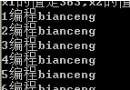
服務端顯示接收進度與總位元組數,客戶端顯示發送進度百分比,服務端 Bin\Debug 目錄可見接收到的圖片檔案。本文完成發送檔案部分,接收檔案將在下篇完成。