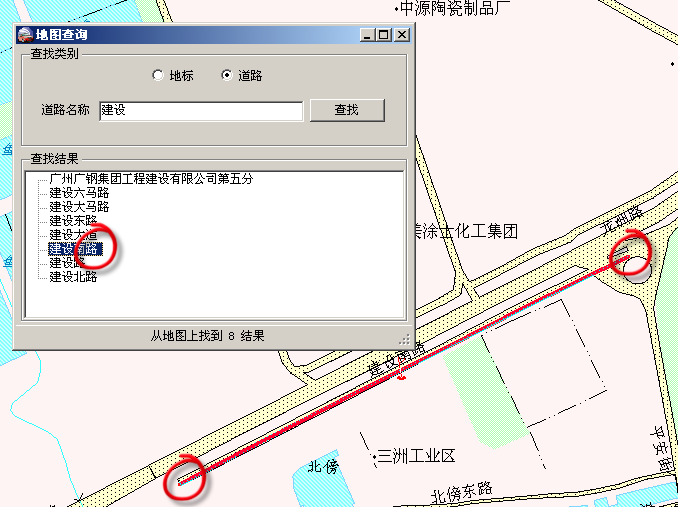
GIS 地標/道路搜尋類似資料庫模糊查詢,找到後雙擊定位並放大 (類 Google Maps Fly to)。MapX 資料按圖層儲存,遍歷所有圖層耗時,實務上於設定檔指定 感興趣圖層清單,僅搜尋指定圖層提升效能。
var resultList = new Dictionary();
var allResultList = new Dictionary();

foreach (string layerName in targetLayerNames)
{
    if (string.IsNullOrEmpty(layerName)) continue;
    try
    {
        // 建立模糊條件:NAME like "%關鍵字%"
        string condition = $@"NAME LIKE ""%{searchKeyword}%""";
        MapXLib.Layer layer = map.Layers._Item(layerName);
        if (layer == null) continue;

        var features = layer.Search(condition, null);
        if (features == null || features.Count == 0) continue;

        // 建立臨時 DataSet 以便讀取屬性欄位
        var ds = map.DataSets.Add(MapXLib.DatasetTypeConstants.miDataSetLayer, layer, layerName, 0, 0, 0, Missing.Value, false);

        // 遍歷符合要素
        for (int i = 1; i <= features.Count; i++)
        {
            try
            {
                object locObj = ds.get_Value(features[i], "Name");
                object idObj = ds.get_Value(features[i], "Id");
                string loc = locObj?.ToString() ?? "";
                string id = idObj?.ToString() ?? "";

                if (!string.IsNullOrEmpty(id) && features[i].FeatureID != 0)
                {
                    var info = new ResultOfSearching
                    {
                        FeatureID = features[i].FeatureID,
                        ID = id,
                        Layer = layerName,
                        Location = loc
                    };
                    if (!resultList.ContainsKey(id)) resultList.Add(id, info);
                    if (!allResultList.ContainsKey(id)) allResultList.Add(id, info);
                }
            }
            catch { /* 忽略單筆錯誤 */ }
        }

        map.DataSets.RemoveAll(); // 清理臨時 DataSet
    }
    catch (Exception ex) { LogHelper.Error(ex); }
} if (resultList.Count > 0)
{
tvwResult.BeginUpdate();
foreach (var info in resultList.Values)
{
if (!string.IsNullOrEmpty(info.Location))
{
var node = tvwResult.Nodes.Add(info.Location);
node.Tag = info; // 攜帶完整資訊供後續定位使用
}
}
tvwResult.EndUpdate();
statusLabel.Text = $"從地圖找到 {resultList.Count} 個結果";
}
else
{
statusLabel.Text = "地圖上找不到您需要的資料";
}class ResultOfSearching
{
public int FeatureID { get; set; }
public string ID { get; set; }
public string Layer { get; set; }
public string Location { get; set; }
}
來源參考:博客園原文