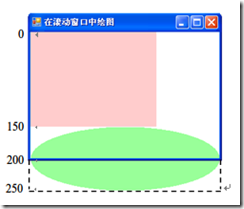
視窗客戶區 (ClientRectangle) 300×200 px,文件內容 300×250 px (矩形 200×150 + 橢圓 300×100)。設 AutoScrollMinSize = new Size(300, 250) 出現捲動條。
OnPaint,從文件原點 (0,0) 開始畫)。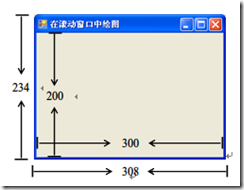
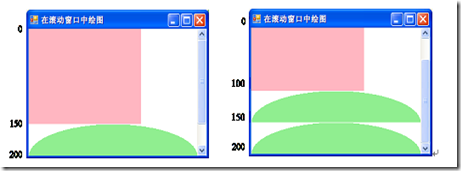
Graphics 永遠以 工作區左上角為原點 (0,0) 繪圖。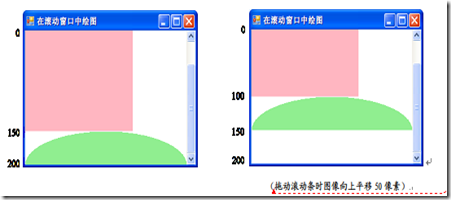
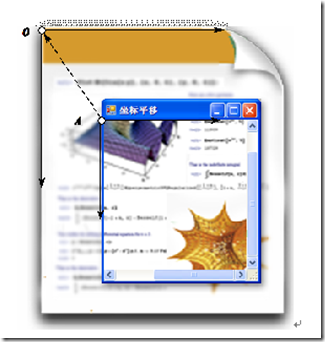
令 Graphics 原點始終對齊 文件左上角,而非工作區左上角。捲動條向下 50 px → 座標系向上平移 50 px (負向位移)。
protected override void OnPaint(PaintEventArgs e) {
    base.OnPaint(e);
    var g = e.Graphics;

    // 關鍵:座標系平移量 = 捲動條位置 (負值)
    g.TranslateTransform(AutoScrollPosition.X, AutoScrollPosition.Y);

    // 繪圖邏輯完全不變,仍以文件座標 (0,0) 為基準
    g.FillRectangle(Brushes.LightPink, 0, 0, 200, 150);
    g.FillEllipse(Brushes.LightGreen, 0, 150, 300, 100);
}
AutoScrollPosition:Point 結構,X、Y 均為 負值 (捲動條向右/下 → 文件相對視窗向左/上)。AutoScrollMinSize:文件虛擬大小,決定何時出現捲動條。
public partial class Form1 : Form {
    public Form1() {
        InitializeComponent();
        BackColor = Color.White;
        AutoScrollMinSize = new Size(300, 250); // 文件 300x250
    }

    protected override void OnPaint(PaintEventArgs e) {
        base.OnPaint(e);
        var g = e.Graphics;
        g.TranslateTransform(AutoScrollPosition.X, AutoScrollPosition.Y);
        g.FillRectangle(Brushes.LightPink, 0, 0, 200, 150);
        g.FillEllipse(Brushes.LightGreen, 0, 150, 300, 100);
    }
}
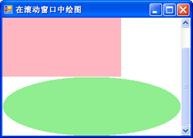
捲動繪圖核心心法:文件座標系固定,Graphics 座標系跟隨捲動條移動。一行 TranslateTransform(AutoScrollPosition.X, AutoScrollPosition.Y) 解決所有捲動錯位問題,繪圖邏輯零修改,極致優雅。