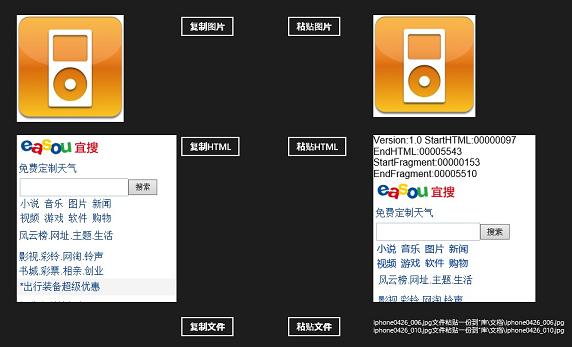
Windows 8 DataPackage 支援四種標準資料格式互傳:文字、位圖、HTML、StorageItems(檔案)。本文示範各格式的複製與貼上完整流程。
DataPackage dp = new DataPackage(); // 中繼載體// 複製文字
private void CopyText_Click(object sender, RoutedEventArgs e) {
dp.SetText(SourceText.Text);
Clipboard.SetContent(dp);
}
// 貼上文字
private async void PasteText_Click(object sender, RoutedEventArgs e) {
var content = Clipboard.GetContent();
if (content.Contains(StandardDataFormats.Text)) {
TargetText.Text = await content.GetTextAsync();
}
}// 複製圖片(從專案資產載入)
private async void CopyImage_Click(object sender, RoutedEventArgs e) {
var uri = new Uri("ms-appx:///Assets/iphone0426_006.jpg");
var file = await StorageFile.GetFileFromApplicationUriAsync(uri);
dp.SetBitmap(RandomAccessStreamReference.CreateFromFile(file));
Clipboard.SetContent(dp);
}
// 貼上圖片
private async void PasteImage_Click(object sender, RoutedEventArgs e) {
var content = Clipboard.GetContent();
if (content.Contains(StandardDataFormats.Bitmap)) {
var streamRef = await content.GetBitmapAsync();
var stream = await streamRef.OpenReadAsync();
var bitmap = new BitmapImage();
bitmap.SetSource(stream);
TargetImage.Source = bitmap;
}
}// 複製 HTML(從 WebView 取得)
private void CopyHtml_Click(object sender, RoutedEventArgs e) {
var html = HtmlFormatHelper.CreateHtmlFormat(
SourceHtml.InvokeScript("eval", new[] { "document.documentElement.outerHTML;" }));
dp.SetHtmlFormat(html);
Clipboard.SetContent(dp);
}
// 貼上 HTML
private async void PasteHtml_Click(object sender, RoutedEventArgs e) {
var content = Clipboard.GetContent();
if (content.Contains(StandardDataFormats.Html)) {
var html = await content.GetHtmlFormatAsync();
TargetHtml.NavigateToString(html);
}
}// 複製多個檔案
private async void CopyFile_Click(object sender, RoutedEventArgs e) {
var files = new List<StorageFile>();
var uri1 = new Uri("ms-appx:///Assets/iphone0426_006.jpg");
var uri2 = new Uri("ms-appx:///Assets/iphone0426_010.jpg");
files.Add(await StorageFile.GetFileFromApplicationUriAsync(uri1));
files.Add(await StorageFile.GetFileFromApplicationUriAsync(uri2));
dp.SetStorageItems(files);
Clipboard.SetContent(dp);
}
// 貼上檔案(複製到文件庫)
private async void PasteFile_Click(object sender, RoutedEventArgs e) {
var content = Clipboard.GetContent();
TargetFile.Text = "";
if (content.Contains(StandardDataFormats.StorageItems)) {
var items = await content.GetStorageItemsAsync();
foreach (var file in items) {
var copied = await file.CopyAsync(KnownFolders.DocumentsLibrary, file.Name, NameCollisionOption.ReplaceExisting);
TargetFile.Text += $"{file.Name} 已複製到 文件庫\\文件\\{file.Name}\r";
}
}
}<Grid Background="{StaticResource ApplicationPageBackgroundThemeBrush}">
<!-- 文字區 -->
<TextBox Name="SourceText" Text="複製源" .../>
<Button Name="CopyText" Content="複製文字" Click="CopyText_Click" .../>
<Button Name="PasteText" Content="貼上文字" Click="PasteText_Click" .../>
<TextBlock Name="TargetText" .../>
<!-- 圖片區 -->
<Image Name="SourceImage" Source="Assets/iphone0426_006.jpg" .../>
<Button Name="CopyImage" Content="複製圖片" Click="CopyImage_Click" .../>
<Button Name="PasteImage" Content="貼上圖片" Click="PasteImage_Click" .../>
<Image Name="TargetImage" .../>
<!-- HTML 區 -->
<WebView Name="SourceHtml" Source="https://wap.easou.com/" .../>
<Button Name="CopyHtml" Content="複製 HTML" Click="CopyHtml_Click" .../>
<Button Name="PasteHtml" Content="貼上 HTML" Click="PasteHtml_Click" .../>
<WebView Name="TargetHtml" .../>
<!-- 檔案區 -->
<Button Name="CopyFile" Content="複製檔案" Click="CopyFile_Click" .../>
<Button Name="PasteFile" Content="貼上檔案" Click="PasteFile_Click" .../>
<TextBlock Name="TargetFile" .../>
</Grid>參考:文件庫存取權限設定
原始碼下載:Win8ClipBoard2.rar