多執行緒典型應用場景:非阻塞 UI、並行處理提升吞吐量、任務拆解並行加速。本文透過「WinForms 進度條」與「多執行緒網頁爬蟲」兩個完整範例,示範如何將耗時作業移至背景執行緒並安全更新 UI。
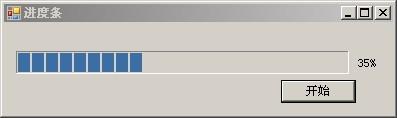
主執行緒保持回應,背景執行緒模擬長時間任務並透過 `Invoke` 更新進度條。
using System;
using System.Threading;
using System.Windows.Forms;

namespace ProgressBarSample {
    public partial class Form1 : Form {
        // 定義委派供跨執行緒呼叫
        delegate void ShowProgressDelegate(int totalStep, int currentStep);

        public Form1() { InitializeComponent(); }

        private void btnStart_Click(object sender, EventArgs e) {
            Thread progressThread = new Thread(new ParameterizedThreadStart(SetProgress));
            progressThread.IsBackground = true; // 關閉視窗時自動結束
            progressThread.Start();
        }

        void SetProgress(object state) {
            for (int i = 1; i <= 100; i++) {
                Thread.Sleep(200); // 模擬工作
                // 非同步委派呼叫更新 UI
                this.Invoke(new ShowProgressDelegate(ShowProgress), 100, i);
            }
        }

        void ShowProgress(int totalStep, int currentStep) {
            progressBar1.Maximum = totalStep;
            progressBar1.Value = currentStep;
            lbCurrent.Text = $"{currentStep * 100 / totalStep}%";
        }
    }
}
關鍵點: `IsBackground=true` 避免關閉表單時殘留執行緒;`Control.Invoke` 將 UI 更新封送至建立控制項的執行緒。
並行抓取多個 URL 標題,展示生產者-消費者雛形。
public class NetReptile {
public string Url { get; set; }
public NetReptile(string url) { Url = url; }
public string GetContent() {
using (WebClient client = new WebClient()) {
return client.DownloadString(new Uri(Url));
}
}
}
public class HtmlAnalyzer {
public string GetTitle(string html) {
var regex = new Regex("(?<=).*?(?= )");
var match = regex.Match(html);
return match.Success ? match.Value : null;
}
}
private void MultiThread() {
    string[] urls = tbUrl.Text.Split(new[] { "\r\n" }, StringSplitOptions.RemoveEmptyEntries);
    int i = 1;
    foreach (string url in urls) {
        Thread t = new Thread(new ParameterizedThreadStart(Snap));
        t.Name = "Thread" + i++;
        t.Start(url);
    }
}

private void Snap(object state) {
    string url = (string)state;
    string html = new NetReptile(url).GetContent();
    if (!string.IsNullOrEmpty(html)) {
        string title = new HtmlAnalyzer().GetTitle(html);
        Thread.Sleep(2000); // 禮貌延遲
        this.Invoke(new AddItemDelegate(AddItem), title);
    }
}

delegate void AddItemDelegate(string item);
private void AddItem(string item) { listData.Items.Add(item); }
完整原始碼下載:Reptile.rar