在 C++ 程式設計的旅程中,輸入輸出(I/O)操作是我們從第一行代碼就開始接觸的核心功能。這一切都建立在 iostream 標準庫之上。與 C 語言的 stdio.h 採用函數調用方式不同,C++ 的 iostream 庫從設計之初就採用了多重繼承與虛擬繼承,構建出一個完整的面向對象層次結構,作為標準庫組件提供給程式設計師使用。
iostream 不僅為內置類型(如 int、double 等)提供輸入輸出支持,還支援文件操作。更關鍵的是,類的設計者可以通過擴展 iostream 庫,實現自定義類型的輸入輸出操作。為什麼需要「擴展」?我們來看一個對比範例:
#include <stdio.h>
#include <iostream>
using namespace std;

class Test {
public:
    Test(int a=0, int b=0) : a(a), b(b) {}
    int a, b;
};

int main() {
    Test t(100, 50);
    printf("%???", t); // C 風格:格式不明確
    scanf("%???", t);  // C 風格:格式不明確
    cout << t << endl; // C++ 風格:同樣不夠明確
    cin >> t;        // C++ 風格:同樣不夠明確
    system("pause");
    return 0;
}
由於自定義類的特殊性,無論使用 C 風格的 printf/scanf 還是 C++ 的 cout/cin,編譯器都無法知道如何輸出或輸入 Test 對象。C 語言缺乏運算符重載機制,導致 stdio 庫無法擴展;而 C++ 則可以通過重載 << 和 >> 運算符,讓 iostream 庫識別自定義類型,從而明確輸入輸出的格式與行為。
C 風格的 I/O 本質是函數調用(printf、scanf),而 C++ 的 I/O 則是基於對象模型:cout 是 ostream 類的對象,cin 是 istream 類的對象。這體現了 C++ 面向對象的設計哲學。
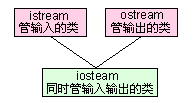
我們熟悉的輸入輸出操作分別由 istream(輸入流)和 ostream(輸出流)提供。為了支援雙向操作,iostream 類由這兩者派生而來。其繼承關係如下圖所示:
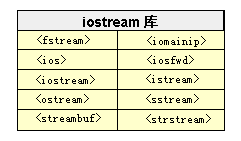
iostream 庫預定義了三個標準流對象:
istream 對象),默認關聯鍵盤,用於從設備讀取數據。ostream 對象),默認關聯顯示器,用於向設備寫入數據。ostream 對象),僅允許向螢幕輸出錯誤信息,且不經緩衝區直接輸出。輸出由重載的左移運算符(<<)完成,輸入由重載的右移運算符(>>)完成。>> a 表示將數據讀入對象 a,<< a 表示將對象 a 的數據輸出。
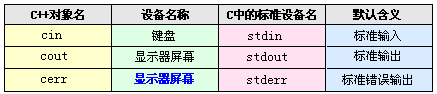
cout 是 ostream 類的全局對象,構造時關聯 C 的標準輸出設備 stdout。在 iostream.h 中,ostream 類為每種基本數據類型提供了友元函數重載 << 運算符,例如:
ostream& operator<<(ostream &temp, int source);
ostream& operator<<(ostream &temp, char *ps);
語句 cout << "www.cndev-lab.com" 實際調用的是 operator<<(ostream&, char*)。由於返回值是流對象的引用,引用可作為左值,因此支援鏈式輸出:cout << "A" << "B"。
iostream 還支援文件流操作,相關類定義在 fstream.h 中,主要包含三個類:
ifstream:輸入文件流(讀取文件)ofstream:輸出文件流(寫入文件)fstream:輸入輸出文件流(讀寫文件),由 iostream 派生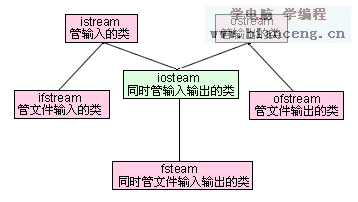
文件設備非標準默認設備,無預定義全局對象,需自行定義對象。以 ofstream 為例,其構造函數原型為:
ofstream::ofstream(const char *filename, int mode = ios::out, int openprot = filebuf::openprot);
常用 mode 屬性:
| 屬性 | 說明 |
|---|---|
ios::app | 追加模式打開文件 |
ios::ate | 打開後定位到文件尾 |
ios::binary | 二進制模式(默認文本模式) |
ios::in | 輸入模式打開 |
ios::out | 輸出模式打開 |
ios::trunc | 文件存在則清空(長度設為0) |
屬性可用按位或(|)組合,如 ios::out | ios::binary。
#include <fstream>
using namespace std;

int main() {
    ofstream myfile("c:\\1.txt", ios::out | ios::trunc, 0);
    myfile << "中國軟件開發實驗室" << endl << "網址:" << "www.cndev-lab.com";
    myfile.close();
    system("pause");
    return 0;
}
使用完畢應調用 close() 關閉文件。追加模式(ios::app)建議配合文件狀態檢查:
ofstream myfile("c:\\1.txt", ios::app, 0);
if (!myfile) { // 或 myfile.fail()
    cout << "文件打開失敗,可能為只讀!";
    exit(1);
}
也可先定義對象,再用 open() 顯式關聯文件:
ofstream myfile;
myfile.open("c:\\1.txt", ios::out | ios::app, 0);
#include <iostream>
#include <fstream>
#include <string>
using namespace std;

int main() {
    ifstream myfile;
    myfile.open("c:\\1.txt", ios::in, 0);
    if (!myfile) {
        cout << "文件讀取錯誤";
        exit(1);
    }
    char ch;
    string content;
    while (myfile.get(ch)) { // 讀到文件尾返回 false
        content += ch;
        cout.put(ch); // 或 cout << ch;
    }
    myfile.close();
    cout << content;
    system("pause");
    return 0;
}
此處使用 get() 逐字符讀取,put() 逐字符輸出。string 需包含 <string> 頭文件。
fstream 對象可對同一文件進行讀寫,初始化時必須顯式指定 mode 和 openprot:
fstream myfile;
myfile.open("c:\\1.txt", ios::out | ios::app, 0); // 寫入
// ...
myfile.close();
myfile.open("c:\\1.txt", ios::in, 0); // 讀取
// ...
字串流類控制字符串對象的輸入輸出,支援 C++ 風格(string)和 C 風格(字符數組)字符串。C 風格字串流相關類定義在 strstream.h:
istrstream:輸入字串流(從字符數組讀取)ostrstream:輸出字串流(向字符數組寫入)strstream:雙向字串流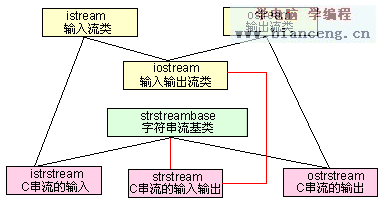
同樣無預定義對象,需通過構造函數創建。istrstream 構造函數:
istrstream::istrstream(const char *str, int size);
size=0 表示連接以 \0 結尾的字符串。
#include <iostream>
#include <strstream>
using namespace std;

int main() {
    char *name = "www.cndev-lab.com";
    int arraysize = strlen(name) + 1;
    istrstream is(name, arraysize);
    char temp;
    is >> temp;
    cout << temp;
    system("pause");
    return 0;
}
#include <iostream>
#include <strstream>
using namespace std;

int main() {
    int arraysize = 1;
    char *pbuffer = new char[arraysize];
    ostrstream ostr(pbuffer, arraysize, ios::out);
    ostr << arraysize << ends; // 必須用 ends 結束
    cout << pbuffer;
    delete[] pbuffer;
    system("pause");
    return 0;
}
輸出到 ostrstream 時需用 ends 結束字符串,否則有溢出風險。