PDF 作為跨平台電子文件交換標準,廣泛應用於報表輸出、電子發票、技術文檔等場景。本文示範如何在 Visual C++ 中整合 PDFLib 開發庫,程式化建立包含文字、圖形、影像、附件的豐富 PDF 文件。
PDFLib 是功能強大的 PDF 生成開發庫,提供簡潔 API 封裝複雜的 PDF 結構細節,無需第三方軟體支援。個人使用免費,商業產品需購買授權。本文範例基於 4.0.2 版本(無浮水印),5.0 免費版會有「WWW.PDFLIB.COM」浮水印。
except.cpp/h、pdflib.cpp/h、pdflib.dll、pdflib.lib 複製到專案目錄#include "PDFLib.hpp"
#pragma comment(lib, "PDFLib.lib")int main(void) {
try {
PDFlib pdf;
pdf.set_parameter("compatibility", "1.4"); // 相容 Acrobat 5
if (pdf.open("vckbase.pdf") == -1)
throw("開啟檔案失敗!");
// 文件資訊
pdf.set_info("Creator", "PDF Creator");
pdf.set_info("Author", "WangJun");
pdf.set_info("Title", "Convert to PDF");
pdf.set_info("Subject", "PDF Creator");
pdf.set_info("Keywords", "vckbase.com");
// 開始 A4 頁面
pdf.begin_page(a4_width, a4_height);
// 設定中文字體 (宋體)
int font_song = pdf.findfont("STSong-Light", "GB-EUC-H", 0);
pdf.setfont(font_song, 12);
// 文字輸出與樣式
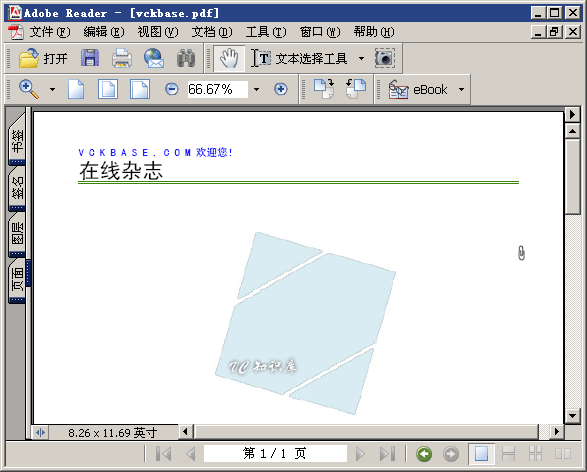
pdf.set_text_pos(50, a4_height - 50);
pdf.setcolor("fill", "rgb", 0, 0, 1, 0); // 藍色
pdf.show("VCKBASE.COM歡迎您!");
pdf.setcolor("fill", "rgb", 0, 0, 0, 0); // 黑色
pdf.setfont(font_song, 24);
pdf.continue_text("在線雜志");
// 繪製綠色雙線
pdf.setcolor("stroke", "rgb", 0.24f, 0.51f, 0.047f, 0);
pdf.moveto(50, a4_height - 80);
pdf.lineto(a4_width - 50, a4_height - 80);
pdf.moveto(50, a4_height - 78);
pdf.lineto(a4_width - 50, a4_height - 78);
pdf.stroke();
// 填充藍色矩形
pdf.setcolor("fill", "rgb", 0.04f, 0.24f, 0.62f, 0);
pdf.rect(50, 50, a4_width - 100, 70);
pdf.fill();
// 指定位置輸出文字
pdf.setcolor("fill", "rgb", 0, 1, 1, 0);
pdf.setfont(font_song, 16);
pdf.show_xy("版權所有 VCKBASE", a4_width - 280, 60);
// 插入 JPEG 影像
int img = pdf.open_image_file("jpeg", "vckbase.jpg", "", 0);
pdf.place_image(img, 200, 400, 1);
pdf.close_image(img);
// 添加附件
pdf.attach_file(a4_width - 50, 0, 0, a4_height - 150,
"vckbase.zip", "VCKBASE", "wj", "zip", "paperclip");
pdf.end_page();
pdf.close();
}
catch (PDFlib::Exception &ex) {
cerr << "錯誤: " << ex.get_message() << endl;
return -1;
}
return 0;
}PDFLib 還支援書籤、PDF 導入、表單欄位、數位簽章、透明度、ICC 色彩配置檔等進階功能。詳細 API 請參考 PDFLib 官方函數手冊(VC 知識庫可下載 5.0 版含手冊)。
完整 VC++ 專案原始碼已附於配套資源。