Linux作業系統因其開源、穩定等優勢,已成為通信軟體開發的主流平台。在C語言開發中,時常需要呼叫Shell命令來完成檔案操作、系統管理等任務。本文將通過一個完整的刪除檔案案例,詳細講解如何在C程式中安全、高效地執行Shell命令。
本範例在Linux環境下實現一個簡單的檔案刪除功能,程式透過Makefile編譯,執行流程如下圖所示:
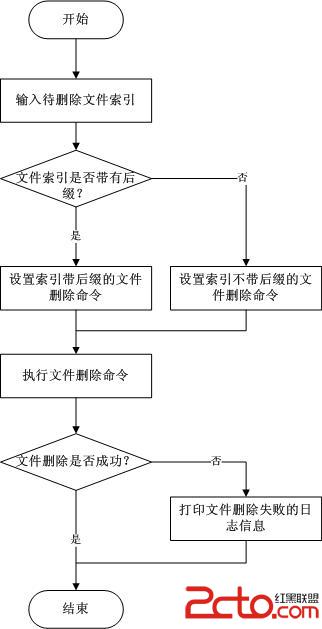
圖1 程式執行流程
執行結果可通過檢查目標目錄下檔案是否存在來驗證。
原始碼檔案為 TestShellCommand.c,編譯產物輸出至 release 目錄。同級目錄下有一個 TestFile 資料夾,存放待刪除的測試檔案。結構如下:
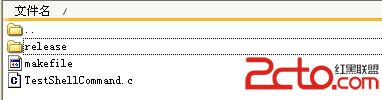
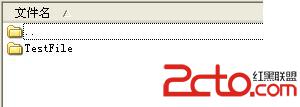
圖2 專案目錄結構
/**********************************************************************
* 版權所有 (C)2014, Zhou Zhaoxiong。
* 檔案名稱: TestShellCommand.c
* 內容摘要:測試在C語言中執行shell命令
* 當前版本: V1.0
* 作 者: Zhou Zhaoxiong
* 完成日期: 20140521
**********************************************************************/
#include <stdio.h>
#include <stdlib.h>
#include <errno.h>
#include <string.h>

// 重新定義資料型別,提高可移植性
typedef unsigned char UINT8;
typedef int INT32;
typedef unsigned int UINT32;

/**********************************************************************
* 功能描述:主函數
* 返回值: 0-執行成功 其它-執行失敗
***********************************************************************/
INT32 main()
{
    UINT8 szFileIndex[100] = {0};      // 儲存使用者輸入的檔案索引
    UINT8 szFileDirectory[100] = {0};  // 儲存檔案目錄路徑
    UINT8 szDeleteCommand[100] = {0};  // 儲存組裝好的刪除命令
    UINT8 *pIndexExt = NULL;           // 用於判斷副檔名是否存在
    UINT32 iRetVal = 0;                // system() 呼叫返回值

    printf("Input the index of source file: ");
    scanf("%s", szFileIndex);          // 讀取輸入,支援帶/不帶副檔名兩種模式

    // 設定檔案所在目錄
    strncpy(szFileDirectory, "TestFile", strlen("TestFile"));

    // 判斷輸入是否包含副檔名(含'.'字元)
    pIndexExt = strrchr(szFileIndex, '.');
    if (pIndexExt == NULL) {
        // 無副檔名:使用萬用字元刪除所有同名檔案
        snprintf(szDeleteCommand, sizeof(szDeleteCommand) - 1,
                 "rm -rf %s/%s.*", szFileDirectory, szFileIndex);
    } else {
        // 有副檔名:精確刪除指定檔案
        snprintf(szDeleteCommand, sizeof(szDeleteCommand) - 1,
                 "rm -rf %s/%s", szFileDirectory, szFileIndex);
    }

    printf("The delete command is: %s\n", szDeleteCommand);

    // 呼叫 system() 執行Shell命令
    iRetVal = system(szDeleteCommand);
    if (-1 == iRetVal) {
        // 錯誤處理:errno為0或10視為成功(視系統而定),其它記錄日誌
        if (errno != 0 && errno != 10) {
            printf("Exec %s failed!\n", szDeleteCommand);
            return -1;
        }
    }

    return 0;
}
int system(const char *string),啟動一個Shell進程執行命令。返回值需結合 errno 判斷,本例中將 errno == 0 || errno == 10 視為成功。strrchr 檢測副檔名,動態生成 rm -rf 命令。無副檔名時加 .* 萬用字元,確保同名不同副檔名檔案一併刪除。TestShellCommand : TestShellCommand.c
gcc -c -g TestShellCommand.c
gcc -g -o release/TestShellCommand TestShellCommand.o
rm *.o
編譯產生的可執行檔 TestShellCommand 位於 release 目錄,與 TestFile 同級。
在 TestFile 目錄下放置測試檔案 123456.r,執行 make 編譯後,進入 release 目錄運行程式:
zhou@linux:~/zhouzx/TestShellCommand/release> ./TestShellCommand
Input the index of source file: 123456
The delete command is: rm -rf TestFile/123456.*

zhou@linux:~/zhouzx/TestShellCommand/release> ./TestShellCommand
Input the index of source file: 123456.r
The delete command is: rm -rf TestFile/123456.r
無論輸入帶不帶副檔名,目標檔案均被成功刪除。建議實際專案中增加更多測試用例驗證健壯性。
system() 返回值與 errno,記錄詳細日誌。掌握在C語言中執行Shell命令,能大幅擴展程式處理系統級任務的能力,是Linux下C/C++開發者的必備技能。