安裝指南
Ubuntu/Debian
sudo apt-get install libncurses5-dbg libncurses5-dev
FreeBSD
cd /usr/ports/devel/ncurses-devel
make install clean
第一個 NCurses 程式
#include

int main() {
    initscr();                           // 初始化
    box(stdscr, ACS_VLINE, ACS_HLINE);   // 畫邊框
    mvaddstr(15, 2, "hello,world");      // 指定位置輸出字串
    refresh();                           // 刷新螢幕
    getch();                             // 等待按鍵
    endwin();                            // 結束
    return 0;
}
編譯與執行
gcc -lncurses 1.c -o mytest
./mytest

色彩支援
初始化色彩
if (!has_colors() || start_color() == ERR) {
    endwin();
    printf("終端不支援色彩\n");
    return 0;
}
init_pair(1, COLOR_GREEN, COLOR_BLACK);
init_pair(2, COLOR_RED, COLOR_BLACK);
init_pair(3, COLOR_WHITE, COLOR_BLUE);
使用色彩對
attron(COLOR_PAIR(1));
move(1, 10);
printw("hello,world:%d", 1);
attroff(COLOR_PAIR(1));
結合屬性
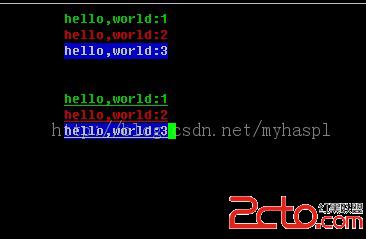
attron(COLOR_PAIR(1) | A_UNDERLINE);
完整色彩範例
#include
#include
#include

int main() {
    setlocale(LC_ALL, "");
    initscr();
    box(stdscr, ACS_VLINE, ACS_HLINE);

    if (!has_colors() || start_color() == ERR) {
        endwin(); printf("終端不支援色彩\n"); return 0;
    }

    init_pair(1, COLOR_GREEN, COLOR_BLACK);
    init_pair(2, COLOR_RED, COLOR_BLACK);
    init_pair(3, COLOR_WHITE, COLOR_BLUE);

    for (int i = 1; i <= 3; i++) {
        attron(COLOR_PAIR(i));
        move(i, 10);
        printw("hello,world:%d", i);
    }
    for (int i = 1; i <= 3; i++) {
        attron(COLOR_PAIR(i) | A_UNDERLINE);
        move(i + 5, 10);
        printw("hello,world:%d", i);
    }

    refresh(); getch(); endwin();
    return 0;
}
編譯與結果
gcc -lncurses 1.c -o mytest
./mytest