使用 UserControl(.xaml + .xaml.cs)代表具視覺介面的領域物件:Activity、Rule、Container。定位採用 Canvas.Left/Top 相對容器座標。
<UserControl x:Class="Shareidea.Web.UI.Control.Workflow.Designer.Activity"
 xmlns="https://schemas.microsoft.com/winfx/2006/xaml/presentation"
 xmlns:x="https://schemas.microsoft.com/winfx/2006/xaml"
 MouseLeftButtonDown="UserControl_MouseLeftButtonDown"
 MouseLeftButtonUp="UserControl_MouseLeftButtonUp"
 MouseMove="UserControl_MouseMove"
 MouseEnter="UserControl_MouseEnter"
 MouseLeave="UserControl_MouseLeave"
 Width="100" Height="60">
 <Canvas Name="container">
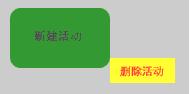
   <Rectangle HorizontalAlignment="Stretch" VerticalAlignment="Stretch" Fill="Green" />
   <Border CornerRadius="10" Background="Green" Opacity="0.9" Width="100" Height="60">
     <TextBox Name="Title" Text="新建活動" BorderBrush="Green" FontSize="12" Background="Green" Height="30" Width="60" MouseEnter="TextBox_MouseEnter" />
   </Border>
   <HyperlinkButton Name="btnDelete" Content="刪除活動" Foreground="Red" Background="Yellow" Width="65" Height="25" Canvas.Top="50" Canvas.Left="100" Click="HyperlinkButton_Click" />
 </Canvas>
</UserControl>