練習 2:使用雜湊加密密碼
將密碼雜湊後儲存於 XML 檔案中。
開啟 BugSmak.sln,預設路徑 C:\Program Files\Microsoft Enterprise Library January 2006\labs\cs\Cryptography\exercises\ex02\begin,編譯專案。
Debug → Start Without Debugging 執行Elmo,密碼預設 P@ssw0rd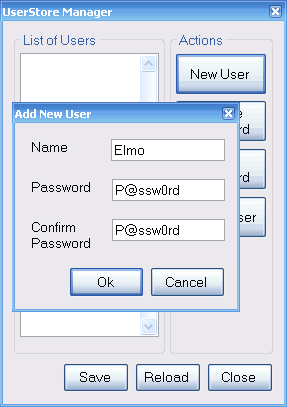
UserStore.configUserStore.config,發現密碼以明文儲存:<?xml version="1.0" encoding="utf-8"?>
<configuration>
<configSections>
<section name="userStore" type="UserStore.Configuration.UserSettings, UserStore, Version=1.0.0.0, Culture=neutral, PublicKeyToken=null" />
</configSections>
<userStore>
<users>
<add name="Elmo" password="P@ssw0rd" />
<add name="Zoe" password="P@ssw0rd" />
</users>
</userStore>
</configuration>後續練習將示範如何使用 Cryptography Application Block 將密碼雜湊後再儲存。