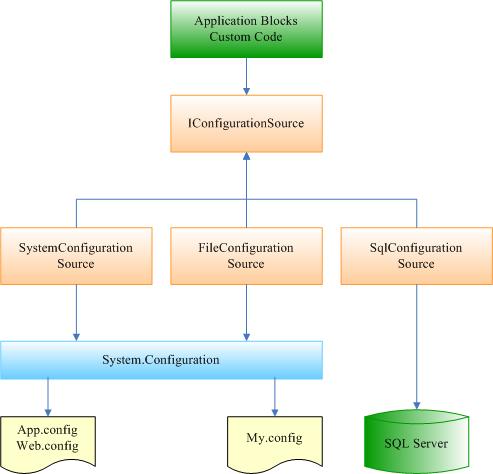
使用過 Enterprise Library 的開發者都知道,所有組態資訊預設都放在應用程式設定檔(App.config 或 Web.config)或外部設定檔中。但你是否想過將組態資訊直接儲存到資料庫?Enterprise Library 2.0 以 ConfigurationSource 取代了 1.x 版的 Configuration Application Block,以下說明如何使用 SqlConfigurationSource。
在安裝目錄的 QuickStarts 資料夾中編譯,並將下列檔案複製至 bin 目錄:
Microsoft.Practices.EnterpriseLibrary.SqlConfigurationSource.dll
Microsoft.Practices.EnterpriseLibrary.SqlConfigurationSource.Design.dll
Microsoft.Practices.EnterpriseLibrary.ConfigurationSource.SQL.XML
Interop.MSDASC.dll執行 CreateSqlConfiguration.cmd。執行前可能需要用記事本開啟 SqlConfiguration.sql,另存為 Unicode 格式:
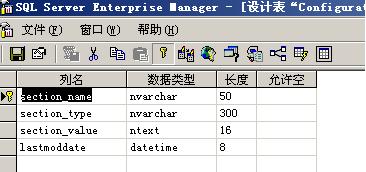
預設安裝於 Northwind 資料庫,完成後資料庫中會有一張 Configuration_Parameter 資料表與四個相關預存程序:
透過 SqlConfigurationSource,即可將企業庫的各應用程式區塊組態集中管理於資料庫,便於多伺服器環境下的統一部署與動態更新。