分頁與排序是 Web 應用程式展現資料常見功能。例如網上書店搜尋 ASP.NET 書籍可能有數百本,但希望每頁僅顯示 10 筆有效記錄,且結果可依標題、價格、頁數、作者等排序。前 23 篇教程研究建立各類報表,含介面編輯刪除資料,但未研究資料排序,分頁僅在研究 DetailsView、FormView 時見到。
開始前先花時間新增含本篇在內近四篇教程所需頁面。專案中新建 PagingAndSorting 資料夾,新增以下頁面並設定使用 Site.master 母版頁:
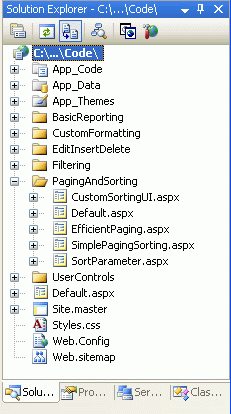
圖 1:建立 PagingAndSorting 資料夾並新增教程頁面
開啟 Default.aspx 從 UserControls 拖曳 SectionLevelTutorialListing.ascx 至設計介面。此控制項於 母版頁與站點導航 建立,遍歷網站地圖以符號列表呈現。
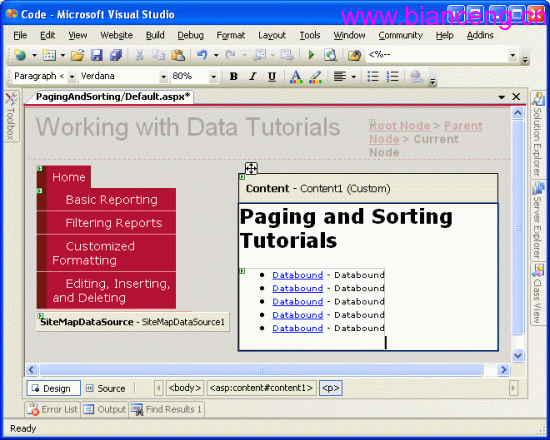
圖 2:將 SectionLevelTutorialListing.ascx 使用者控制項加入 Default.aspx
為顯示將建立的分頁排序教程,需加入網站地圖。開啟 Web.sitemap 在「編輯、插入和刪除」 siteMapNode 後加入:
<siteMapNode title="Paging and Sorting" url="~/PagingAndSorting/Default.aspx"
description="Samples of Reports that Provide Paging and Sorting Capabilities">
<siteMapNode url="~/PagingAndSorting/SimplePagingSorting.aspx"
title="Simple Paging & Sorting Examples"
description="Examines how to add simple paging and sorting support." />
<siteMapNode url="~/PagingAndSorting/EfficientPaging.aspx"
title="Efficiently Paging Through Large Result Sets"
description="Learn how to efficiently page through large result sets." />
<siteMapNode url="~/PagingAndSorting/SortParameter.aspx"
title="Sorting Data at the BLL or DAL"
description="Illustrates how to perform sorting logic in the Business Logic Layer or Data Access Layer." />
<siteMapNode url="~/PagingAndSorting/CustomSortingUI.aspx"
title="Customizing the Sorting User Interface"
description="Learn how to customize and improve the sorting user interface." />
</siteMapNode>
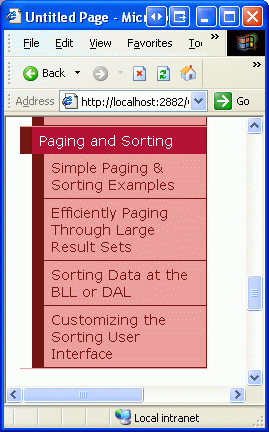
圖 3:更新網站地圖使之包含新頁面