Response.Redirect 是 ASP.NET 最常用的導向方法,但其內部 HTTP 行為與頁面生命週期交互常被忽略。本文透過 Fiddler 封包觀察與中斷點偵錯,深度解析 Response.Redirect 的完整執行流程。
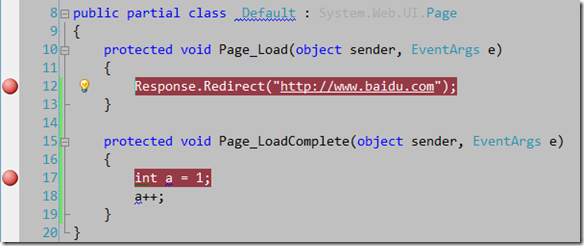
protected void Page_Load(object sender, EventArgs e)
{
    Response.Redirect("https://www.baidu.com");
}

protected void Page_LoadComplete(object sender, EventArgs e)
{
    // 觀察是否會執行到此處
}
在 Page_Load (第 12 行) 與 Page_LoadComplete (第 17 行) 設定中斷點,啟動 Fiddler 捕獲 HTTP 流量。


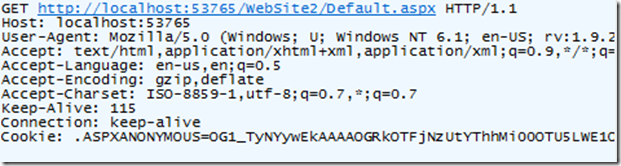
HTTP/1.1 302 Found
Location: https://www.baidu.com
Content-Type: text/html; charset=utf-8
Content-Length: 128

<html><head><title>Object moved</title></head><body>
<h2>Object moved to <a href="https://www.baidu.com">here</a>.</h2>
</body></html>Location 標頭指定目標 URLPage_Load 執行 Response.Redirect 後,立即拋出 ThreadAbortExceptionPage_LoadComplete、PreRender 等)不會執行finally 區塊仍會執行,using 區塊資源正常釋放Response.Redirect 內部實作(簡化版):
public void Redirect(string url)
{
    Redirect(url, true); // 預設 endResponse = true
}

public void Redirect(string url, bool endResponse)
{
    // ... 設定狀態碼 302、Location 標頭 ...
    if (endResponse)
    {
        HttpContext.Current.ApplicationInstance.CompleteRequest();
        // 內部呼叫 Thread.CurrentThread.Abort() 拋出 ThreadAbortException
    }
}Response.Redirect("https://www.baidu.com", false);
// 後續程式碼會繼續執行
// 需手動呼叫 CompleteRequest() 或 Context.ApplicationInstance.CompleteRequest()差異比較:
| 行為 | Redirect(url) | Redirect(url, false) |
|---|---|---|
| 拋出 ThreadAbortException | 是 | 否 |
| 後續頁面事件執行 | 否 | 是 |
| 適用場景 | 立即導向、無後續邏輯 | 需執行後續邏輯(如記錄 Log、釋放資源)再導向 |
Redirect(url, false) + Context.ApplicationInstance.CompleteRequest(),避免 ThreadAbortException 造成效能負擔與日誌雜訊Global.asax 的 Application_Error 中忽略 ThreadAbortException,避免汙染錯誤記錄Response.RedirectPermanent (301) 或手動設定 Response.StatusCode = 301try-catch 中吞沒 ThreadAbortException 而未重新拋出,會導致導向失效Response.Redirect 會立即停止伺服器執行緒ThreadAbortException,CLR 會執行 finally 區塊後終止執行緒Server.Transfer 與 Response.Redirect 可互換Response.Redirect 透過 302 狀態碼與 Location 標頭實現客戶端導向,內部以 ThreadAbortException 中斷頁面生命週期。理解其 HTTP 行為與執行緒模型,能避免常見陷阱並撰寫更健壯的導向邏輯。