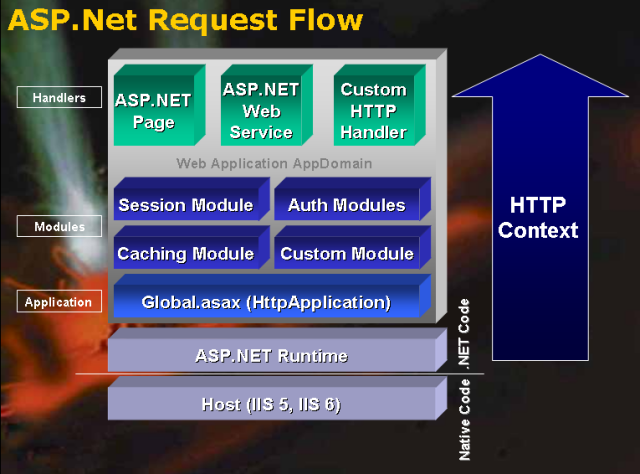
資料驅動應用常需儲存圖片、PDF、Word 文件等二進位資料。ASP.NET 2.0 搭配 ADO.NET 與 SqlDataSource,提供將二進位資料直接儲存於資料庫(varbinary(MAX))或檔案系統的兩種策略,本文深入分析優劣與完整實作範例。
| 面向 | 資料庫儲存 | 檔案系統儲存 |
|---|---|---|
| 開發工作量 | 需處理串流讀寫、參數化命令 | 單純檔案 I/O,更新只需覆寫檔案 |
| URL 直接性 | 需透過處理頁面(如 ShowImage.aspx?id=123) | 直接靜態 URL(/UploadedImages/photo.jpg) |
| 工具支援 | ImageField 無法直接顯示資料庫二進位資料 | ImageField 完美支援路徑繫結 |
| 效能 | 增加資料庫負載與網路傳輸 | 減輕資料庫,靜態檔案可透過 CDN 加速 |
| 資料完整性 | 自包含,備份/複寫/移轉單一資料庫即可 | 需同步備份檔案系統,風險較高 |
| 交易一致性 | 資料與二進位內容同步交易 | 需自行協調檔案與資料庫交易 |
CREATE TABLE Pictures (
    PictureID INT IDENTITY PRIMARY KEY,
    Title NVARCHAR(100) NOT NULL,
    Description NVARCHAR(500),
    MIMEType VARCHAR(50) NOT NULL,  -- image/jpeg, image/png, application/pdf
    ImageData VARBINARY(MAX) NOT NULL,
    UploadDate DATETIME DEFAULT GETDATE()
);protected void btnUpload_Click(object sender, EventArgs e)
{
if (FileUpload1.HasFile)
{
byte[] fileData = FileUpload1.FileBytes;
string mimeType = GetMimeType(FileUpload1.FileName); // 依副檔名對應
string title = txtTitle.Text;
using (SqlConnection conn = new SqlConnection(connStr))
using (SqlCommand cmd = new SqlCommand(
"INSERT INTO Pictures (Title, MIMEType, ImageData) VALUES (@Title, @MIMEType, @ImageData)", conn))
{
cmd.Parameters.Add("@Title", SqlDbType.NVarChar, 100).Value = title;
cmd.Parameters.Add("@MIMEType", SqlDbType.VarChar, 50).Value = mimeType;
cmd.Parameters.Add("@ImageData", SqlDbType.VarBinary, -1).Value = fileData; // -1 = MAX
conn.Open();
cmd.ExecuteNonQuery();
}
}
}建立 ImageHandler.ashx:
public class ImageHandler : IHttpHandler
{
    public void ProcessRequest(HttpContext context)
    {
        string id = context.Request.QueryString["id"];
        if (int.TryParse(id, out int pictureId))
        {
            using (SqlConnection conn = new SqlConnection(connStr))
            using (SqlCommand cmd = new SqlCommand(
                "SELECT MIMEType, ImageData FROM Pictures WHERE PictureID = @ID", conn))
            {
                cmd.Parameters.Add("@ID", SqlDbType.Int).Value = pictureId;
                conn.Open();
                using (SqlDataReader reader = cmd.ExecuteReader())
                {
                    if (reader.Read())
                    {
                        context.Response.ContentType = reader.GetString(0);
                        context.Response.BinaryWrite((byte[])reader.GetValue(1));
                    }
                }
            }
        }
    }
    public bool IsReusable => false;
}
註冊於 web.config:<add verb="*" path="ImageHandler.ashx" type="ImageHandler" />
<asp:GridView ID="gvPictures" runat="server" DataSourceID="SqlDataSource1" AutoGenerateColumns="False">
  <Columns>
    <asp:BoundField DataField="Title" HeaderText="標題" />
    <asp:TemplateField HeaderText="縮圖">
      <ItemTemplate>
        <img src='ImageHandler.ashx?id=<%# Eval("PictureID") %>' width="80" height="60" />
      </ItemTemplate>
    </asp:TemplateField>
    <asp:HyperLinkField DataNavigateUrlFields="PictureID" DataNavigateUrlFormatString="ImageHandler.ashx?id={0}" Text="檢視原圖" />
  </Columns>
</asp:GridView>FILESTREAM(SQL 2008+)或資料壓縮。OutputCache 或 CDN 快取靜態圖片回應。選擇儲存策略應依業務需求:報表整合需資料庫內含、高流量靜態內容宜檔案系統、交易一致性要求高選資料庫。ASP.NET 2.0 提供彈性實作兩者皆可。