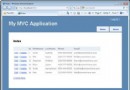
本文透過一個 WinForm 應用程式模擬瀏覽器行為,配合自訂 `MyHttpHandler`、`Controller`、`Model`、`View` 類別,完整示範 ASP.NET MVC 核心管線:請求 → 路由 → ControllerFactory → ActionInvoker → Model → View → 回應。適合初學者理解 MVC 內部運作原理。
MvcSimulation/
├── Default.cs          # WinForm 主視窗 (模擬瀏覽器)
├── WebBrowser.cs       # 簡易瀏覽器類別 (發送請求、顯示回應)
├── Request.cs          # 請求封裝 (Url, FormCollection)
├── Response.cs         # 回應封裝 (StatusCode, Body)
├── MyHttpHandler.cs    # 處理管線入口 (路由分派 → Controller)
├── ControllerBase.cs   # Controller 基類
├── HomeController.cs   # 範例 Controller
├── Model/              # 領域模型
└── View/               # 視圖渲染 (字串模板)
public class WebBrowser
{
    public static void SendRequest(string url, Dictionary formCollection)
    {
        var request = new Request { Url = url, FormCollection = formCollection };
        string response = MyHttpHandler.HandleRequest(request);

        if (!response.StartsWith("Http 200"))
            MessageBox.Show(response); // 簡易錯誤顯示
        else
            // 解析 HTML 顯示在 WebBrowser 控制項中
            RenderHtml(response);
    }
}
public class MyHttpHandler
{
    public static string HandleRequest(Request request)
    {
        // 簡易路由解析:/Controller/Action
        var segments = request.Url.Trim('/').Split('/');
        string controllerName = segments.Length > 0 ? segments[0] : "Home";
        string actionName = segments.Length > 1 ? segments[1] : "Index";

        // ControllerFactory 機制
        var controller = ControllerFactory.Create(controllerName);
        if (controller == null)
            return "Http 404: Controller not found";

        // ActionInvoker 機制
        return controller.InvokeAction(actionName, request);
    }
}
public static class ControllerFactory
{
    private static readonly Dictionary _controllers = new()
    {
        ["Home"] = typeof(HomeController),
        ["Product"] = typeof(ProductController)
    };

    public static ControllerBase Create(string name)
    {
        if (_controllers.TryGetValue(name, out var type))
            return (ControllerBase)Activator.CreateInstance(type);
        return null;
    }
}
public abstract class ControllerBase
{
    public string InvokeAction(string actionName, Request request)
    {
        var method = GetType().GetMethod(actionName);
        if (method == null) return "Http 404: Action not found";

        // 簡易參數繫結
        var parameters = method.GetParameters();
        var args = new object[parameters.Length];
        for (int i = 0; i < parameters.Length; i++)
        {
            var p = parameters[i];
            if (request.FormCollection.TryGetValue(p.Name, out var val))
                args[i] = Convert.ChangeType(val, p.ParameterType);
            else
                args[i] = p.HasDefaultValue ? p.DefaultValue : GetDefault(p.ParameterType);
        }

        var result = method.Invoke(this, args);
        return result?.ToString() ?? "Http 200 OK";
    }

    protected virtual string View(string viewName, object model = null)
    {
        return ViewEngine.Render(viewName, model);
    }
}
public class HomeController : ControllerBase
{
    public string Index()
    {
        return View("Index", new { Title = "歡迎來到 MVC 模擬器", Time = DateTime.Now });
    }

    public string About(string name = "訪客")
    {
        return View("About", new { Name = name });
    }
}
public class ProductRepository
{
    public List GetAll() => new List
    {
        new Product { Id = 1, Name = "筆記型電腦", Price = 30000 },
        new Product { Id = 2, Name = "滑鼠", Price = 500 }
    };
}

public class ProductController : ControllerBase
{
    private readonly ProductRepository _repo = new();

    public string List()
    {
        var products = _repo.GetAll();
        return View("ProductList", products);
    }
}
public static class ViewEngine
{
private static readonly Dictionary _templates = new()
{
["Index"] = @"@Model.Title
時間: @Model.Time
",
["About"] = @"關於 @Model.Name
",
["ProductList"] = @"@foreach(var p in Model){@p.Name @p.Price
"
};
public static string Render(string viewName, object model)
{
if (!_templates.TryGetValue(viewName, out var template))
return $"View '{viewName}' not found";
// 極簡模板引擎:替換 @Model.Property
var props = model?.GetType().GetProperties();
if (props != null)
{
foreach (var p in props)
{
template = template.Replace($"@Model.{p.Name}", p.GetValue(model)?.ToString() ?? "");
}
}
// 處理 @foreach (簡易實作略)
return template;
}
}
WinForm (瀏覽器)
    │ 使用者輸入 /Home/Index 按 Enter
    ▼
WebBrowser.SendRequest(url, form)
    │
    ▼
MyHttpHandler.HandleRequest(Request)
    │ 解析路由 → Home/Index
    ▼
ControllerFactory.Create("Home") → HomeController 實例
    │
    ▼
ControllerBase.InvokeAction("Index", request)
    │ 反射呼叫 HomeController.Index()
    ▼
HomeController.Index() → return View("Index", model)
    │
    ▼
ViewEngine.Render("Index", model) → HTML 字串
    │
    ▼
回傳 "Http 200\n" + HTML
    │
    ▼
WinForm 顯示 HTML
| MVC 概念 | 模擬器對應類別 | 關鍵機制 |
|---|---|---|
| 路由 | MyHttpHandler.HandleRequest | URL 解析 → Controller/Action 名稱 |
| ControllerFactory | ControllerFactory.Create | 字典對應 + Activator.CreateInstance |
| ActionInvoker | ControllerBase.InvokeAction | 反射找方法 + 參數繫結 + 呼叫 |
| Model | ProductRepository | 資料存取邏輯封裝 |
| View | ViewEngine.Render | 模板 + 模型資料 = HTML |
| ActionResult | string (HTML) | 簡化為字串回傳 |
這個極簡模擬器雖缺乏生產級功能 (非同步、安全性、快取、區域化...),但完整呈現了 **MVC 核心三角關係與管線流向**,是理解框架本質的最佳切入點。