ASP.NET 2.0 引入資料源控件 (SqlDataSource, ObjectDataSource, XmlDataSource 等) 徹底改變了資料綁定開發模式。開發者只需設定 DataSourceID,資料查詢、分頁、排序、CRUD 等複雜邏輯全自動處理。但「魔法」背後是嚴謹的架構設計。理解 IDataSource、DataSourceControl、DataSourceView 三大核心類別的協作關係,是開發客製化資料源控件、除疑難雜症、效能調優的關鍵。
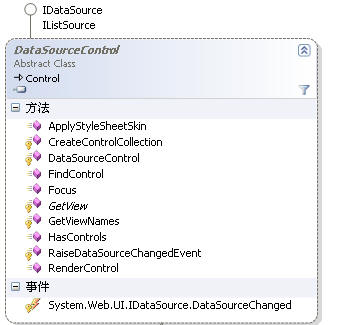
public interface IDataSource
{
    /// 取得具名資料源視圖
    DataSourceView GetView(string viewName);

    /// 取得所有視圖名稱集合
    ICollection GetViewNames();

    /// 資料源變更事件
    event EventHandler DataSourceChanged;
}
所有資料源控件必須實作此介面,定義了「資料源」的最小契約:提供視圖、通知變更。
public abstract class DataSourceControl : Control, IDataSource
{
    // 實作 IDataSource 介面
    public DataSourceView GetView(string viewName)
    {
        return GetViewInternal(viewName);
    }

    protected abstract DataSourceView GetViewInternal(string viewName);

    // 視圖名稱集合 (通常單一視圖名為空字串)
    public virtual ICollection GetViewNames()
    {
        return new string[] { String.Empty };
    }

    // 觸發 DataSourceChanged 事件
    protected void OnDataSourceChanged(EventArgs e)
    {
        EventHandler handler = (EventHandler)Events[EventDataSourceChanged];
        handler?.Invoke(this, e);
    }

    private static readonly object EventDataSourceChanged = new object();
    public event EventHandler DataSourceChanged
    {
        add { Events.AddHandler(EventDataSourceChanged, value); }
        remove { Events.RemoveHandler(EventDataSourceChanged, value); }
    }
}
DataSourceControl 處理了視圖管理、事件觸發等基礎設施,子類別只需實作 GetViewInternal 回傳具體的 DataSourceView 實例。
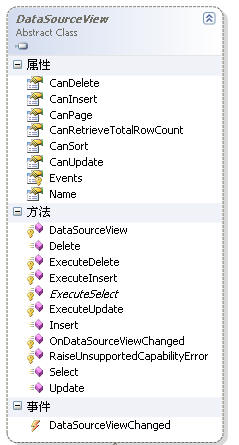
public abstract class DataSourceView : IStateManager
{
    // 核心抽象方法 - 子類別必須實作
    protected abstract IEnumerable ExecuteSelect(DataSourceSelectArguments arguments);

    // CRUD 虛擬方法 - 可選擇性覆寫
    protected virtual int ExecuteInsert(IDictionary values) { throw new NotSupportedException(); }
    protected virtual int ExecuteUpdate(IDictionary keys, IDictionary values, IDictionary oldValues) { throw new NotSupportedException(); }
    protected virtual int ExecuteDelete(IDictionary keys, IDictionary oldValues) { throw new NotSupportedException(); }

    // 能力檢查
    protected virtual bool CanExecute(string operation) { return false; }

    // 事件觸發器
    protected void OnDataSourceViewChanged(EventArgs e) { /* 通知繫結控件重新綁定 */ }

    // 狀態管理 (IStateManager)
    protected virtual void LoadViewState(object savedState) { }
    protected virtual object SaveViewState() { return null; }
    protected virtual void TrackViewState() { }
}
僅實作基本查詢功能的 MyDataSourceControl:
public class MyDataSourceView : DataSourceView
{
    private readonly MyDataSourceControl _owner;

    public MyDataSourceView(MyDataSourceControl owner, string name) : base(owner, name)
    {
        _owner = owner;
    }

    protected override IEnumerable ExecuteSelect(DataSourceSelectArguments arguments)
    {
        // 檢查不支援的能力 (分頁、排序等)
        arguments.RaiseUnsupportedCapabilitiesError(this);

        // 實際資料存取邏輯
        using (SqlConnection conn = new SqlConnection(
            "Server=localhost;Database=Northwind;uid=sa;pwd=123456"))
        {
            conn.Open();
            using (SqlCommand cmd = new SqlCommand(
                "SELECT CustomerID, ContactName, ContactTitle, CompanyName FROM Customers WHERE CustomerID LIKE '[AB]%'", conn))
            {
                // 回傳 DataReader 實現延遲載入,記憶體效率高
                return cmd.ExecuteReader(CommandBehavior.CloseConnection);
            }
        }
    }
}
public class MyDataSourceControl : DataSourceControl
{
    protected override DataSourceView GetViewInternal(string viewName)
    {
        // 單一視圖架構,忽略 viewName 參數
        return new MyDataSourceView(this, String.Empty);
    }
}
<%@ Register Assembly="CustomControls" Namespace="CustomControls" TagPrefix="cc" %>
<cc:MyDataSourceControl ID="MyDataSourceControl1" runat="server" />
<asp:GridView ID="GridView1" runat="server" DataSourceID="MyDataSourceControl1" />
public class AdvancedDataSourceView : DataSourceView
{
    public string SelectCommand { get; set; }
    public ParameterCollection SelectParameters { get; } = new ParameterCollection();

    protected override IEnumerable ExecuteSelect(DataSourceSelectArguments arguments)
    {
        using (SqlConnection conn = new SqlConnection(ConnectionString))
        using (SqlCommand cmd = new SqlCommand(SelectCommand, conn))
        {
            // 解析參數值
            foreach (Parameter param in SelectParameters)
            {
                cmd.Parameters.AddWithValue(param.Name, param.Evaluate(HttpContext.Current, null));
            }

            conn.Open();
            return cmd.ExecuteReader(CommandBehavior.CloseConnection);
        }
    }
}
DataBoundControl 透過 DataSourceID 找到 DataSourceControlDataSourceControl.GetView("") 取得 DataSourceViewDataBoundControl 檢查視圖支援的能力 (分頁、排序、CRUD)DataSourceView.ExecuteSelect(arguments) 取得資料DataBoundControl 將資料渲染為 HTMLDataBoundControl 呼叫 ExecuteUpdate/Delete → DataSourceView 執行 → OnDataSourceViewChanged 通知重新繫結| 問題 | 原因 | 解決方案 |
|---|---|---|
| 重複查詢資料庫 | 未正確實作視圖狀態,每次 Postback 重新建立連線 | 正確實作 IStateManager,快取參數與連線字串 |
| 分頁/排序不工作 | ExecuteSelect 未處理 DataSourceSelectArguments |
解析 StartRowIndex、MaximumRows、SortExpression |
| CRUD 操作無效果 | 未實作對應 ExecuteInsert/Update/Delete 或未觸發 OnDataSourceViewChanged |
完整實作 CRUD 方法並呼叫 OnDataSourceViewChanged |
| 設計時錯誤 | 缺少 Designer 屬性或 ToolboxBitmap |
加入設計時支援屬性 |
資料源控件架構採用經典的策略模式 + 模板方法模式:
DataSourceControl 為門面,管理視圖生命週期DataSourceView 為策略,封裝具體資料存取邏輯IDataSource 為契約,確保互操作性掌握此架構,不僅能開發客製化資料源控件,更能深度理解內建控件行為,快速定位生產環境疑難雜症。