滑鼠是現代電腦操作不可或缺的輸入裝置。滑鼠程式設計多涉及 Windows API,掌握相關 API 為開發進階滑鼠功能的基礎。本文整理四大主題,提供實用程式碼與範例。
利用 Windows Forms 的 MouseDown、MouseMove、MouseUp 事件,搭配 Pen 與 Graphics 類別即可實作簡易繪圖板。
using System;
using System.Collections.Generic;
using System.ComponentModel;
using System.Data;
using System.Drawing;
using System.Text;
using System.Windows.Forms;

namespace ziyiMouse1
{
    public partial class Form1 : Form
    {
        public Form1()
        {
            InitializeComponent();
            pen = new Pen(Color.FromName("black"));
            graphics = CreateGraphics();
        }

        public bool G_OnMouseDown = false;
        public Point lastPoint = Point.Empty;
        public Pen pen;
        public Graphics graphics;

        private void Form1_MouseMove(object sender, MouseEventArgs e)
        {
            if (lastPoint.Equals(Point.Empty))
                lastPoint = new Point(e.X, e.Y);

            if (G_OnMouseDown)
            {
                Point cruuPoint = new Point(e.X, e.Y);
                graphics.DrawLine(pen, cruuPoint, lastPoint);
            }
            lastPoint = new Point(e.X, e.Y);
        }

        private void Form1_MouseUp(object sender, MouseEventArgs e)
        {
            G_OnMouseDown = false;
        }

        private void Form1_MouseDown(object sender, MouseEventArgs e)
        {
            G_OnMouseDown = true;
        }

        private void Form1_Load(object sender, EventArgs e) { }
    }
}
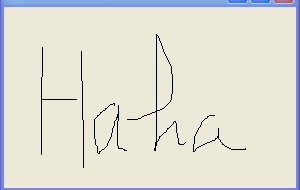
(原文略過,此處補充常用 API)
GetCursorPos:取得螢幕座標SetCursorPos:設定滑鼠位置mouse_event:模擬滑鼠事件(點擊、移動、滾輪)SetCapture / ReleaseCapture:捕捉/釋放滑鼠訊息ClipCursor:限制滑鼠活動範圍使用 SetWindowsHookEx 安裝全域滑鼠鉤子 (WH_MOUSE_LL),可攔截系統層級滑鼠事件,適用於熱鍵、巨集錄製、使用者行為分析等場景。注意:鉤子處理程序必須極快返回,否則會導致系統回應緩慢。
Cursor.Current = new Cursor("custom.cur")MouseWheel 事件參數 Delta 正值向上,負值向下SetProcessDPIAware 或 Per-Monitor DPI 感知滑鼠程式設計橫跨從簡單表單事件到系統級 API 鉤子。根據需求選擇適當層級:表單事件適合 UI 互動,API 函數適合位置控制與模擬,鉤子適合全域監控。掌握這些技術,能開發出更豐富的使用者體驗。