首頁
編程語言
C語言|JAVA編程
Python編程
網頁編程
ASP編程|PHP編程
JSP編程
數據庫
MYSQL數據庫|SqlServer數據庫
Oracle數據庫|DB2數據庫
您现在的位置: 程式碼之家 >> 編程語言 >  >> .NET 網頁程式設計 >> ASP.NET 基礎 >> 關於ASP.NET

ASP.NET MVC 核心教程(三):建立 Controller 與 View 讓網站跑起來

     編輯:關於ASP.NET

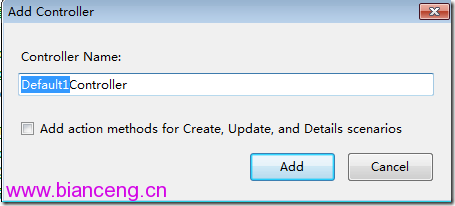
新增 Controller

在 Controllers 資料夾右鍵「新增」→「Controller」,命名 EiceController。預設產生:

public class EiceController : Controller {
    public ActionResult Index() { return View(); }
}

新增 View

在 Action 內右鍵「新增檢視」,勾選「建立強型別檢視」可指定 Model 類別。View 預設置於 Views/Eice/Index.aspx,繼承 ViewPage。
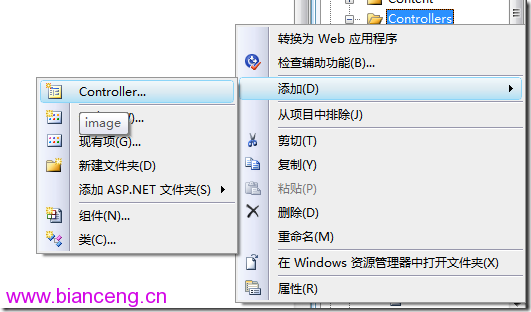
新增 Controller 對話框 新增 View 對話框

執行驗證

瀏覽 https://localhost/Eice/Index,路由預設對應至 EiceController.Index() 並渲染 View。

  1. 上一篇文章:
  2. 下一篇文章:
Copyright © 程式碼之家 All Rights Reserved