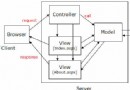
系列第四篇,解決 MVC 核心問題:表單資料如何從瀏覽器傳遞到 Controller 處理。以「公告發布系統」為例,完整示範建立輸入頁面、下拉選單繫結、表單提交與模型繫結流程。
補充 AnnounceInfo 缺少的 Category 屬性 (int),對應公告分類。
public class AnnounceController : Controller
{
    public ActionResult Release()
    {
        // 取得所有分類,轉為 SelectList 供下拉選單繫結
        ICategoryService cServ = ServiceBuilder.BuildCategoryService();
        List<CategoryInfo> categories = cServ.GetAll();
        ViewData["Categories"] = new SelectList(categories, "ID", "Name");

        return View("Release");
    }
}new SelectList(items, dataValueField, dataTextField)
// items: IEnumerable 來源集合
// dataValueField: 對應 option value 的屬性名 (ID)
// dataTextField: 對應顯示文字的屬性名 (Name)<% using (Html.BeginForm("Save", "Announce", FormMethod.Post)) { %>
<fieldset>
<legend>發布公告</legend>
<div class="editor-label">
<%= Html.LabelFor(m => m.Title) %>
</div>
<div class="editor-field">
<%= Html.TextBoxFor(m => m.Title) %>
<%= Html.ValidationMessageFor(m => m.Title) %>
</div>
<div class="editor-label">
<%= Html.LabelFor(m => m.Content) %>
</div>
<div class="editor-field">
<%= Html.TextAreaFor(m => m.Content) %>
</div>
<div class="editor-label">
<%= Html.LabelFor(m => m.Category) %>
</div>
<div class="editor-field">
<%= Html.DropDownListFor(m => m.Category, (SelectList)ViewData["Categories"], "-- 請選擇分類 --") %>
</div>
<input type="submit" value="發布" />
</fieldset>
<% } %>[HttpPost]
public ActionResult Save(AnnounceInfo model)
{
if (ModelState.IsValid)
{
IAnnounceService serv = ServiceBuilder.BuildAnnounceService();
serv.Add(model);
return RedirectToAction("Index");
}
// 驗證失敗:重新載入分類下拉選單並回傳 View
ViewData["Categories"] = new SelectList(
ServiceBuilder.BuildCategoryService().GetAll(), "ID", "Name");
return View("Release", model);
}AnnounceInfo 屬性 (Name/ID 比對)。Save(AnnounceInfo model) 直接獲得繫結後物件。ModelState.IsValid 檢查 → 成功存庫導向、失敗回傳 View 保留輸入值。| 特性 | WebForms (Model 1) | MVC (Model 2) |
|---|---|---|
| 表單提交目標 | 同名 .aspx.cs 後置程式碼 | Controller Action (路由決定) | 資料繫結 | 手動 FindControl 取值 | 自動模型繫結器 |
| 驗證 | Validator 控件 | DataAnnotations + ModelState |
| 關注點分離 | UI 與邏輯混雜 | Controller/ Model/ View 明確分離 |
掌握表單傳遞與模型繫結,即掌握 MVC 互動核心。