ASP.NET MVC 處理檔案上傳極為直觀,結合 jQuery UI Dialog 可打造優雅的上傳體驗。本文提供完整前後端程式碼,涵蓋表單編碼、模型繫結、檔案驗證、安全儲存與錯誤處理。
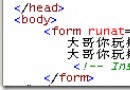
<asp:Content ID="Content2" ContentPlaceHolderID="MainContent" runat="server">
    <h2>檔案上傳</h2>

    <div id="dialog" title="上傳檔案">
        <% using (Html.BeginForm("Upload", "File", FormMethod.Post,
               new { enctype = "multipart/form-data" })) { %>
            <p>
                <input type="file" id="fileUpload" name="fileUpload" size="23" />
            </p>
            <p>
                <input type="submit" value="上傳檔案" />
            </p>
        <% } %>
    </div>

    <a href="#" onclick="$('#dialog').dialog('open'); return false;">上傳檔案</a>
</asp:Content>
enctype="multipart/form-data":必須,否則 Request.Files 為空name="fileUpload":後端 Request.Files["fileUpload"] 依此索引public class FileController : Controller
{
[HttpPost]
[ValidateAntiForgeryToken] // 防 CSRF
public ActionResult Upload(HttpPostedFileBase fileUpload)
{
if (fileUpload == null || fileUpload.ContentLength == 0)
{
ModelState.AddModelError("", "請選擇檔案");
return RedirectToAction("Index");
}
// 檔案驗證
var allowedExtensions = new[] { ".jpg", ".jpeg", ".png", ".gif", ".pdf", ".docx" };
var ext = Path.GetExtension(fileUpload.FileName).ToLowerInvariant();
if (!allowedExtensions.Contains(ext))
{
ModelState.AddModelError("", "不支援的檔案類型");
return RedirectToAction("Index");
}
if (fileUpload.ContentLength > 10 * 1024 * 1024) // 10MB
{
ModelState.AddModelError("", "檔案大小不得超過 10MB");
return RedirectToAction("Index");
}
// 安全儲存:隨機檔名 + 指定目錄
var uploadDir = Server.MapPath("~/App_Data/Uploads");
if (!Directory.Exists(uploadDir)) Directory.CreateDirectory(uploadDir);
var safeFileName = Guid.NewGuid().ToString("N") + ext;
var filePath = Path.Combine(uploadDir, safeFileName);
try
{
fileUpload.SaveAs(filePath);
// 可選:記錄至資料庫
// _fileService.Record(new FileRecord { OriginalName = fileUpload.FileName,
// StoredPath = safeFileName, Size = fileUpload.ContentLength, UploadAt = DateTime.Now });
TempData["Message"] = "上傳成功";
}
catch (Exception ex)
{
Log.Error("檔案儲存失敗", ex);
TempData["Error"] = "上傳失敗,請稍後再試";
}
return RedirectToAction("Index");
}
}
// 前端:多個 input name 相同或使用 multiple 屬性
<input type="file" name="files" multiple />

// 後端:接收 IEnumerable
[HttpPost]
public ActionResult UploadMultiple(IEnumerable files)
{
    foreach (var file in files)
    {
        if (file?.ContentLength > 0)
        {
            // 單檔處理邏輯同單檔上傳
        }
    }
    return RedirectToAction("Index");
}
// 使用 FormData + jQuery AJAX
$('#fileUpload').on('change', function() {
    var formData = new FormData();
    formData.append('fileUpload', this.files[0]);

    $.ajax({
        url: '@Url.Action("Upload", "File")',
        type: 'POST',
        data: formData,
        processData: false,
        contentType: false,
        success: function(result) {
            // 處理回應
        }
    });
});
| 風險 | 防護措施 |
|---|---|
| 惡意腳本上傳 | 驗證副檔名、MIME 類型、檔案標頭(Magic Number) |
| 路徑遍歷攻擊 | 使用 Guid 重命名,不信任原始檔名 |
| 大檔案耗盡磁碟/記憶體 | 設定 maxRequestLength (web.config) 與 requestLimits (IIS) |
| CSRF 攻擊 | [ValidateAntiForgeryToken] + 表單 @Html.AntiForgeryToken() |
| 直接存取上傳檔案 | 存放於 App_Data 或資料庫,不對外直接下載 |
<system.web>
  <httpRuntime maxRequestLength="10240" requestValidationMode="2.0" /> <!-- 10MB -->
</system.web>
<system.webServer>
  <security>
    <requestFiltering>
      <requestLimits maxAllowedContentLength="10485760" /> <!-- 10MB (bytes) -->
    </requestFiltering>
  </security>
</system.webServer>
掌握此完整流程,即可在 MVC 專案中快速建置安全、可擴充的檔案上傳功能,滿足文件管理、圖片上傳、資料匯入等多元業務需求。