ASP.NET MVC 無 Server Control 概念,無法像 WebForms 直接拖曳 FCKeditor。本文說明如何在 MVC 專案中手動引用、初始化並取得 FCKeditor 內容。
// 方式 1:Action 參數直接繫結 (名稱需與表單 name 一致)
[HttpPost]
public ActionResult Create(string txtTitle, string txtContent) { ... }

// 方式 2:FormCollection 手動取值
[HttpPost]
public ActionResult Create(FormCollection form) {
    string title = form["txtTitle"];
    string content = form["txtContent"];
}
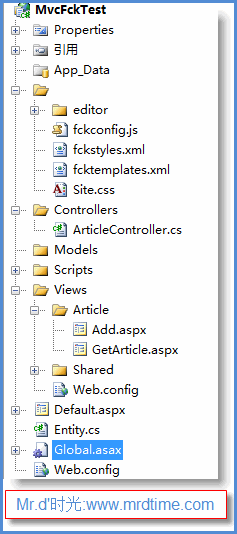
/Scripts/fckeditor/          // FCKeditor 核心檔案
/Content/FCKeditorConfig.js  // 自訂設定檔
/Views/Shared/EditorTemplates/FCKEditor.cshtml  // 編輯器部分檢視
<%@ Page Language="C#" Inherits="System.Web.Mvc.ViewPage<ArticleModel>" %>

<asp:Content ContentPlaceHolderID="MainContent" runat="server">
    <script type="text/javascript" src="<%= Url.Content("~/Scripts/fckeditor/fckeditor.js") %>"></script>

    <form method="post" action="<%= Url.Action("Create") %>">
        <label>標題:</label>
        <input type="text" name="Title" value="<%= Model.Title %>" /><br/>

        <label>內容:</label>
        <textarea name="Content" id="Content" rows="10" cols="80"><%= Model.Content %></textarea>
        <script type="text/javascript">
            var oFCKeditor = new FCKeditor('Content');
            oFCKeditor.BasePath = '<%= Url.Content("~/Scripts/fckeditor/") %>';
            oFCKeditor.Config.CustomConfigurationsPath = '<%= Url.Content("~/Content/FCKeditorConfig.js") %>';
            oFCKeditor.Value = document.getElementById('Content').value; // 初始值
            oFCKeditor.Create();
        </script>

        <input type="submit" value="送出" />
    </form>
</asp:Content>
[HttpPost]
[ValidateInput(false)] // 允許 HTML 內容,需自行防 XSS
public ActionResult Create(ArticleModel model) {
    // model.Content 即為 FCKeditor 提交的 HTML 字串
    if (ModelState.IsValid) {
        articleService.Save(model);
        return RedirectToAction("Index");
    }
    return View(model);
}
FCKConfig.ToolbarSets["Default"] = [
    ['Source', 'DocProps', '-', 'Save', 'NewPage', 'Preview', '-', 'Templates'],
    ['Cut', 'Copy', 'Paste', 'PasteText', 'PasteWord', '-', 'Print', 'SpellCheck'],
    ['Undo', 'Redo', '-', 'Find', 'Replace', '-', 'SelectAll', 'RemoveFormat'],
    ['Form', 'Checkbox', 'Radio', 'TextField', 'Textarea', 'Select', 'Button', 'ImageButton', 'HiddenField'],
    '/',
    ['Bold', 'Italic', 'Underline', 'StrikeThrough', '-', 'Subscript', 'Superscript'],
    ['OrderedList', 'UnorderedList', '-', 'Outdent', 'Indent', '-', 'Blockquote'],
    ['JustifyLeft', 'JustifyCenter', 'JustifyRight', 'JustifyFull'],
    ['Link', 'Unlink', 'Anchor'],
    ['Image', 'Flash', 'Table', 'Rule', 'Smiley', 'SpecialChar', 'PageBreak'],
    '/',
    ['Style', 'FontFormat', 'FontName', 'FontSize'],
    ['TextColor', 'BGColor'],
    ['FitWindow', 'ShowBlocks', '-', 'About']
];

FCKConfig.EnterMode = 'p'; // Enter 產生
FCKConfig.ShiftEnterMode = 'br'; // Shift+Enter 產生

FCKConfig.FullPage = false;
FCKConfig.StartupFocus = true;
[ValidateInput(false)] 開啟後,必須在輸出時使用 Html.Sanitize() (如 HtmlSanitizer 套件) 或儲存前過濾危險標籤FileManagerConnector),MVC 需自行實作對應 Action<textarea name="Content" id="editor"><%= Model.Content %></textarea>
<script src="<%= Url.Content("~/lib/ckeditor5/ckeditor.js") %>"></script>
<script>
ClassicEditor
.create(document.querySelector('#editor'), {
toolbar: ['heading', '|', 'bold', 'italic', 'link', 'bulletedList', 'numberedList', 'blockQuote']
})
.catch(error => console.error(error));
</script>