透過自訂 IRouteHandler 攔截圖片請求,驗證 Referer 標頭判斷是否為盜鏈,非法請求回傳 403 或預設圖片,保護伺服器頻寬。
UrlRoutingModule) 依路由表匹配Route 透過其 RouteHandler 取得 IHttpHandlerProcessRequest 產生回應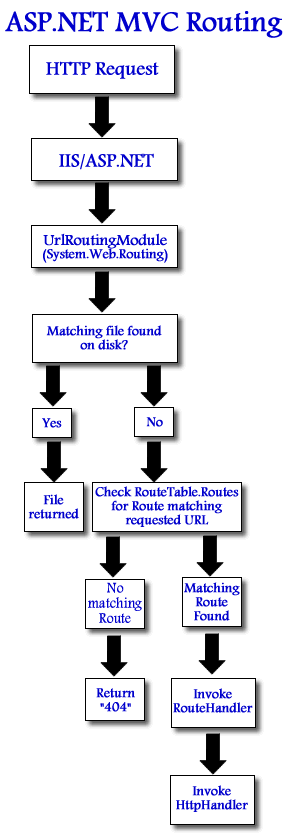
public class AntiHotlinkRouteHandler : IRouteHandler {
    private readonly string[] _allowedDomains;
    private readonly string _fallbackImageVirtualPath;

    public AntiHotlinkRouteHandler(string[] allowedDomains, string fallbackImageVirtualPath) {
        _allowedDomains = allowedDomains ?? new string[0];
        _fallbackImageVirtualPath = fallbackImageVirtualPath;
    }

    public IHttpHandler GetHttpHandler(RequestContext requestContext) {
        var context = requestContext.HttpContext;
        var referer = context.Request.UrlReferrer;

        // 允許條件:無 Referer (直接輸入網址)、同域、白名單域名
        bool isAllowed = referer == null
            || referer.Host.Equals(context.Request.Url.Host, StringComparison.OrdinalIgnoreCase)
            || _allowedDomains.Any(d => referer.Host.EndsWith(d, StringComparison.OrdinalIgnoreCase));

        if (!isAllowed) {
            // 盜鏈:回傳 403 或重導向至預設圖片
            if (!string.IsNullOrEmpty(_fallbackImageVirtualPath)) {
                context.Response.Redirect(_fallbackImageVirtualPath);
            } else {
                context.Response.StatusCode = 403;
                context.Response.StatusDescription = "Forbidden: Hotlinking not allowed";
                context.Response.End();
            }
            return new EmptyHandler(); // 結束處理
        }

        // 合法請求:交由靜態檔案處理器或自訂 Handler
        return new StaticFileHandler(); // 或實作輸出圖片邏輯
    }
}

// 空 Handler 避免後續處理
public class EmptyHandler : IHttpHandler {
    public bool IsReusable => true;
    public void ProcessRequest(HttpContext context) { }
}
public static void RegisterRoutes(RouteCollection routes) {
    routes.IgnoreRoute("{resource}.axd/{*pathInfo}");

    // 圖片防盜鏈路由:攔截 /images/ 目錄下所有請求
    var allowed = new[] { "partner.com", "cdn.mysite.com" };
    var fallback = "/Content/Images/hotlink-denied.png";

    routes.Add("ImageAntiHotlink", new Route(
        "images/{*path}",
        new RouteValueDictionary(),
        new AntiHotlinkRouteHandler(allowed, fallback)
    ));

    // 預設 MVC 路由
    routes.MapRoute(
        "Default",
        "{controller}/{action}/{id}",
        new { controller = "Home", action = "Index", id = UrlParameter.Optional }
    );
}
public class ImageDeliveryHandler : IHttpHandler {
    public void ProcessRequest(HttpContext context) {
        string virtualPath = "~/images/" + context.Request.RequestContext.RouteData.Values["path"];
        string physicalPath = context.Server.MapPath(virtualPath);

        if (!File.Exists(physicalPath)) {
            context.Response.StatusCode = 404;
            return;
        }

        // 設定快取標頭
        context.Response.Cache.SetCacheability(HttpCacheability.Public);
        context.Response.Cache.SetMaxAge(TimeSpan.FromDays(30));
        context.Response.Cache.SetLastModified(File.GetLastWriteTimeUtc(physicalPath));

        // 輸出檔案
        context.Response.ContentType = GetMimeType(Path.GetExtension(physicalPath));
        context.Response.WriteFile(physicalPath);
    }

    private string GetMimeType(string ext) {
        var map = new Dictionary {
            {".jpg", "image/jpeg"}, {".jpeg", "image/jpeg"},
            {".png", "image/png"}, {".gif", "image/gif"},
            {".webp", "image/webp"}, {".svg", "image/svg+xml"}
        };
        return map.TryGetValue(ext.ToLower(), out string mime) ? mime : "application/octet-stream";
    }

    public bool IsReusable => true;
}
在 AntiHotlinkRouteHandler 中合法請求回傳 new ImageDeliveryHandler()。
runAllManagedModulesForAllRequests="true" 或在 system.webServer/modules 註冊 UrlRoutingModuleStaticFileModule) 預設優先處理實體檔案,路由需在其之前或針對虛擬路徑web.config <rewrite> 規則或 CDN 防盜鏈設定,效能更佳| 方案 | 優點 | 缺點 |
|---|---|---|
| 自訂 RouteHandler | 整合 MVC 路由、程式碼可控、支援複雜邏輯 | 所有圖片請求經過 Managed Pipeline、效能稍低 |
| IIS URL Rewrite 模組 | 原生模組、效能極高、正則表達式靈活 | 規則寫在 web.config、複雜邏輯難維護 |
| CDN 防盜鏈 (如 Cloudflare, Azure CDN) | 邊緣攔截、不消耗源站頻寬、設定簡單 | 需使用 CDN 服務、成本較高 |
| HttpModule 攔截 | 全域攔截、可處理所有副檔名 | 影響所有請求、需小心效能 |