ASP.NET 接收 .aspx 請求後,如何將標記轉為類別、編譯成組件、載入執行?生成的臨時檔案藏在哪?如何除錯動態生成的原始碼?本文帶您走進伺服器端「黑盒子」,並提供一個可即時檢視頁面編譯後類別原始碼的除錯工具原型。
%WINDIR%\Microsoft.NET\Framework\v2.0.50727\Temporary ASP.NET Files
    \<應用程式虛擬路徑>
        \<隨機資料夾>
            \<組件名>.dll          // 編譯後組件
            \<組件名>.pdb          // 除錯符號
            \<頁面類別>.cs/.vb     // 動態生成的原始碼 (若 debug=true)
            \<其他使用者控件、母版頁等>.cs/.vb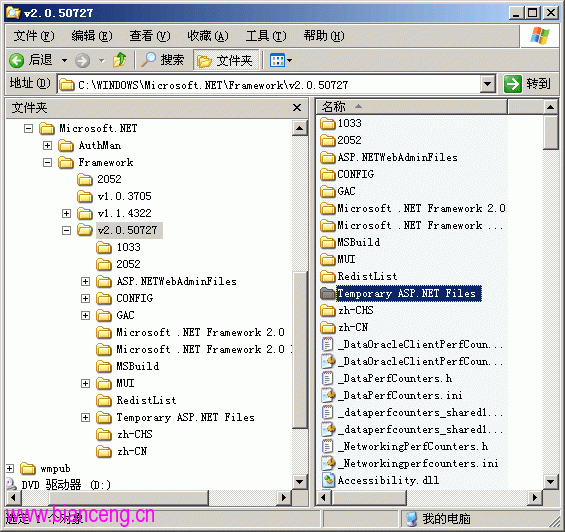
PageParser 解析 .aspx、.ascx、.master,建構控件樹。Page/UserControl 的類別 (如 ASP.default_aspx),覆寫 FrameworkInitialize() 建構控件樹,覆寫 Render() 輸出 HTML。BuildManager 呼叫編譯器 (csc.exe/vbc.exe) 產生組件。AppDomain,後續請求直接複用,除非來源檔案變更。PageHandlerFactory 建立頁面實例,觸發生命週期事件,最終 Render(HtmlTextWriter) 輸出回應。namespace ASP {
using System.Web;
using System.Web.UI;
public class default_aspx : Page {
protected TextBox TextBox1;
protected Button Button1;
private void @__BuildControlTree(default_aspx @__ctrl) {
IParserAccessor @__parser = ((IParserAccessor)(@__ctrl));
@__parser.AddParsedSubObject(new LiteralControl("\r\n\r\n"));
HtmlForm @__ctrl2 = this.@__BuildControlform1();
@__parser.AddParsedSubObject(@__ctrl2);
@__parser.AddParsedSubObject(new LiteralControl("\r\n\r\n\r\n"));
}
protected override void FrameworkInitialize() {
base.FrameworkInitialize();
this.@__BuildControlTree(this);
}
}
}public class DynamicSourceViewer : IHttpHandler
{
public void ProcessRequest(HttpContext context)
{
string virtualPath = context.Request.QueryString["path"]; // e.g. ~/Default.aspx
if (string.IsNullOrEmpty(virtualPath)) return;
// 1. 觸發編譯 (若未編譯)
BuildManager.GetCompiledType(virtualPath);
// 2. 取得生成的原始碼檔案路徑
string tempDir = HttpRuntime.CodegenDir; // Temporary ASP.NET Files 應用程式子目錄
string[] csFiles = Directory.GetFiles(tempDir, "*.cs", SearchOption.AllDirectories);
string targetFile = csFiles.FirstOrDefault(f => f.Contains("default_aspx")); // 簡易匹配
if (targetFile != null)
{
string source = File.ReadAllText(targetFile);
context.Response.ContentType = "text/plain; charset=utf-8";
context.Response.Write(source);
}
else
{
context.Response.Write("Source not found. Ensure debug=true in web.config.");
}
}
public bool IsReusable => false;
}註冊:<add verb="*" path="DynamicSource.axd" type="DynamicSourceViewer" />,瀏覽 /DynamicSource.axd?path=~/Default.aspx 即見原始碼。
| 現象 | 原因 | 解決 |
|---|---|---|
| 首次請求極慢 | 動態編譯 + JIT | 預編譯 (aspnet_compiler -v / -p "src" -f "out")、預熱排程 |
| 修改 .aspx 不生效 | 組件已載入 AppDomain,無法卸載 | 重啟網站 / 觸發 web.config 變更 / IIS 回收應用程式集區 |
| 臨時檔案佔滿磁碟 | 大量動態編譯、未清理舊版本 | 定期清理 Temporary ASP.NET Files、設定 batch="false" 減少組件數 |
| 除錯中斷點不命中 | PDB 不匹配、未生成原始碼 | web.config: compilation debug="true"、確認模組載入路徑 |
理解 ASP.NET 伺服器端動態編譯機制,不僅能解決疑難雜症,更能指導預編譯部署、除錯策略、效能調優。臨時檔案目錄是通往真相的入口,善用它,讓「黑盒子」透明化。