對於需要支援多語言的 Web 應用程式,常見的做法是透過請求 URL 中的文化特性代碼(如 en 或 en-US)來決定伺服器以何種語言呈現介面內容。在 ASP.NET MVC 中,我們可以輕鬆利用 URL 路由機制來達成這項功能。
首先建立一個簡單的 HomeController,其預設 Index 動作方法回傳一個登入視圖。作為模型的 LoginInfo 類別包含 UserName 與 Password 兩個屬性,並透過 DisplayAttribute 搭配資源檔指定顯示名稱,以實現多語言支援。
public class HomeController : Controller
{
    public ActionResult Index()
    {
        return View(new LoginInfo());
    }
}

public class LoginInfo
{
    [Display(Name = "UserName", ResourceType = typeof(Resources))]
    public string UserName { get; set; }

    [Display(Name = "Password", ResourceType = typeof(Resources))]
    [DataType(DataType.Password)]
    public string Password { get; set; }
}
對應的強型別視圖定義如下:
@model MvcApp.Models.LoginInfo
@using (Html.BeginForm())
{
    @Html.EditorForModel()
    <input type="submit" value="@MvcApp.Properties.Resources.Login" />
    <input type="button" value="@MvcApp.Properties.Resources.Cancel" />
}
在 Global.asax 中修改預設路由註冊程式碼,使請求 URL 包含文化特性資訊({culture}):
public class MvcApplication : System.Web.HttpApplication
{
    public static void RegisterRoutes(RouteCollection routes)
    {
        routes.MapRoute(
            name: "Default",
            url: "{culture}/{controller}/{action}/{id}",
            defaults: new { culture = "en", controller = "Home", action = "Index", id = UrlParameter.Optional }
        );
    }
}
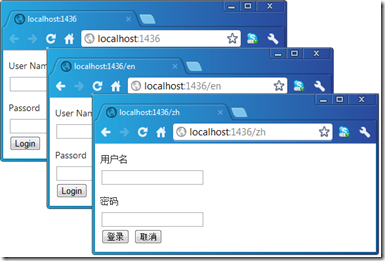
執行程式並在請求網址中指定不同的 Culture(如 en 與 zh),介面即會依預期呈現對應語言。