瀏覽器安全策略禁止 AJAX 直接觸發文件下載(無法訪問響應流保存為文件)。標準解法是動態創建隱藏 `
/**
 * 通過動態 Form 實現文件下載
 * @param {string} url - 下載接口地址
 * @param {Object} params - 表單參數 { key: value }
 * @param {string} [method='POST'] - HTTP 方法
 * @param {string} [target='_self'] - 目標窗口
 */
function downloadByForm(url, params, method = 'POST', target = '_self') {
    const form = document.createElement('form');
    form.style.display = 'none';
    form.method = method;
    form.action = url;
    form.target = target;  // '_blank' 新標籤頁,'_self' 當前頁

    // 添加參數
    Object.entries(params).forEach(([key, value]) => {
        const input = document.createElement('input');
        input.type = 'hidden';
        input.name = key;
        input.value = typeof value === 'string' ? value : JSON.stringify(value);
        form.appendChild(input);
    });

    document.body.appendChild(form);
    form.submit();
    document.body.removeChild(form);  // 提交後立即移除
}

// 使用示例
$('#btnExport').click(function() {
    downloadByForm('/api/export', {
        type: 'excel',
        fileId: currentFileId,
        filters: JSON.stringify(currentFilters)
    });
});
$('#btnExport').click(function() {
    var form = $('').attr({
        method: 'POST',
        action: 'AjaxPost.aspx',
        target: '_blank',  // 新窗口下載,不阻塞當前頁
        style: 'display:none'
    });

    $('').attr({ type: 'hidden', name: 'type', value: 'Export' }).appendTo(form);
    $('').attr({ type: 'hidden', name: 'fileId', value: fileId }).appendTo(form);

    $('body').append(form);
    form.submit();
    form.remove();  // 關鍵:防止重複提交、DOM 泄漏
});
async function downloadByFetch(url, params) {
    const response = await fetch(url, {
        method: 'POST',
        headers: { 'Content-Type': 'application/json' },
        body: JSON.stringify(params),
        credentials: 'include'  // 攜帶 Cookie
    });

    if (!response.ok) throw new Error(`HTTP ${response.status}`);

    const blob = await response.blob();
    const filename = response.headers.get('Content-Disposition')?.match(/filename="(.+)"/)?.[1] || 'download';

    const a = document.createElement('a');
    a.href = URL.createObjectURL(blob);
    a.download = filename;
    a.style.display = 'none';
    document.body.appendChild(a);
    a.click();
    URL.revokeObjectURL(a.href);  // 釋放 Blob URL
    document.body.removeChild(a);
}
限制:需整個文件載入內存,不適用 >100MB 文件。大文件仍需 Form/iframe 或 Service Worker 流式寫入。
// ASP.NET Core 示例
[HttpPost("export")]
public IActionResult Export([FromBody] ExportRequest req) {
    var stream = GenerateExcelStream(req);
    return File(stream,
        "application/vnd.openxmlformats-officedocument.spreadsheetml.sheet",
        $"report_{DateTime.Now:yyyyMMdd}.xlsx");
}

// 關鍵響應頭
Content-Type: application/octet-stream (或具體 MIME)
Content-Disposition: attachment; filename="report.xlsx"
Content-Length: 123456  (可選,啟用進度條)
Cache-Control: no-cache, no-store, must-revalidate
動態 Form 提交是 AJAX 文件下載的通用、兼容、零依賴標準方案。封裝 `downloadByForm(url, params)` 統一全項目調用。現代項目小文件可用 `fetch + Blob + a[download]` 體驗更佳(可自定義文件名、無彈窗阻攔)。大文件、進度顯示、斷點續傳需引入專業下載庫或 Service Worker 方案。
HTA (HTML Application) 讓開發者使用
核心挑戰 背景執行緒**不能直接存取 UI 控制項** (
前言 成功連線資料庫後,如何高效使用 PL/SQL Dev
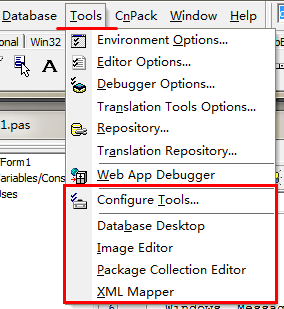
Delphi 的 Tools 選單 不只是啟動「Databa