利用 Windows API ExtractIcon 從可執行檔(.exe/.dll)中提取圖示資源,顯示於 `TImage` 元件,再透過 `SaveDialog` 另存為 `.ico` 檔案。
procedure TForm1.GetIcon;
var
  Count: Integer;
  FileName: String;
  I: Integer;
begin
  if FileName <> Edit1.Text then
  begin
    FileName := Edit1.Text;
    I := 0;
    Count := ExtractIcon(Application.Handle, PChar(FileName), $FFFFFFFF); // 取得圖示總數
  end
  else
    Inc(I);

  if I < Count then
    Image1.Picture.Icon.Handle := ExtractIcon(Application.Handle, PChar(FileName), I)
  else
    ShowMessage('沒有找到!');
end;

procedure TForm1.Button1Click(Sender: TObject);
begin
  GetIcon; // 顯示下一個圖示
end;

procedure TForm1.Button2Click(Sender: TObject);
begin
  OpenDialog1.Execute;
  Edit1.Text := OpenDialog1.FileName; // 選取目標 EXE
end;

procedure TForm1.Button3Click(Sender: TObject);
begin
  SaveDialog1.Execute;
  Image1.Picture.SaveToFile(SaveDialog1.FileName); // 存為 ICO
end;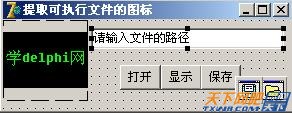
ExtractIcon(hInst, lpszExeFileName, nIconIndex):可進一步結合 `TImageList` 批次匯出所有圖示,或整合至安裝程式建立捷徑時自動指定圖示。