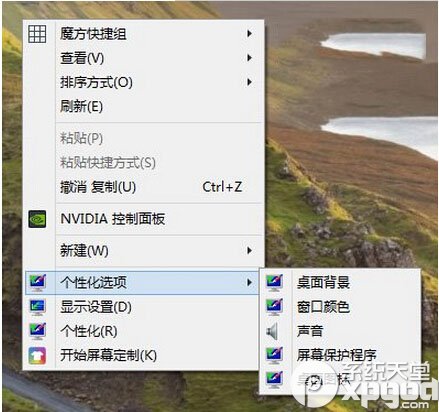
Windows 10 推出後,微軟逐步將傳統控制面板的入口隱藏,改以「設定」App 取代,這讓習慣 Windows 7 或 8.1 操作邏輯的用戶感到不便。好消息是,系統底層仍保留傳統控制面板元件,只需透過註冊表修改,即可在桌面右鍵選單中快速呼叫常用設定項目。
「設定」App 雖然介面現代化,但部分進階選項(如裝置管理員、電源選項詳細設定、網路介面卡屬性等)仍需透過傳統控制面板存取。對資深用戶而言,直接在桌面右鍵選單點擊「個人化設定」下的子選單,比在多層選單中尋找更高效。
以下提供完整註冊表代碼,可一次新增「桌面背景」、「視窗顏色」、「螢幕保護程式」、「聲音」、「桌面圖示」五個常用快捷入口至桌面右鍵選單底部:
Windows Registry Editor Version 5.00

; Created by https://winaero.com, reedited by https://ithome.com

[HKEY_CLASSES_ROOT\DesktopBackground\Shell\Appearance]
"MUIVerb"="個性化設定"
"SubCommands"="Wallpaper;Colors;Sounds;Screensaver;Icons"
"icon"="desk.cpl"
"Position"="Bottom"

[HKEY_LOCAL_MACHINE\SOFTWARE\Microsoft\Windows\CurrentVersion\Explorer\CommandStore\shell\Screensaver]
@="螢幕保護程式"
"Position"="Bottom"
"Icon"="desk.cpl"

[HKEY_LOCAL_MACHINE\SOFTWARE\Microsoft\Windows\CurrentVersion\Explorer\CommandStore\shell\Screensaver\Command]
@="rundll32.exe shell32.dll,Control_RunDLL desk.cpl,screensaver,@screensaver"

[HKEY_LOCAL_MACHINE\SOFTWARE\Microsoft\Windows\CurrentVersion\Explorer\CommandStore\shell\Sounds]
@="聲音"
"Position"="Bottom"
"Icon"="mmsys.cpl"

[HKEY_LOCAL_MACHINE\SOFTWARE\Microsoft\Windows\CurrentVersion\Explorer\CommandStore\shell\Sounds\Command]
@="rundll32.exe shell32.dll,Control_RunDLL mmsys.cpl ,2"

[HKEY_LOCAL_MACHINE\SOFTWARE\Microsoft\Windows\CurrentVersion\Explorer\CommandStore\shell\Wallpaper]
@="桌面背景"
"Icon"="%SystemRoot%\\System32\\desk.cpl"
"Position"="Bottom"

[HKEY_LOCAL_MACHINE\SOFTWARE\Microsoft\Windows\CurrentVersion\Explorer\CommandStore\shell\Wallpaper\Command]
@="control.exe /NAME Microsoft.Personalization /PAGE pageWallpaper"

[HKEY_LOCAL_MACHINE\SOFTWARE\Microsoft\Windows\CurrentVersion\Explorer\CommandStore\shell\Icons]
@="桌面圖示"
"Icon"="%SystemRoot%\\System32\\desk.cpl"
"Position"="Bottom"

[HKEY_LOCAL_MACHINE\SOFTWARE\Microsoft\Windows\CurrentVersion\Explorer\CommandStore\shell\Icons\Command]
@="rundll32 shell32.dll,Control_RunDLL desk.cpl,,0"

[HKEY_LOCAL_MACHINE\SOFTWARE\Microsoft\Windows\CurrentVersion\Explorer\CommandStore\shell\Colors]
@="視窗顏色"
"Icon"="%SystemRoot%\\System32\\desk.cpl"
"Position"="Bottom"

[HKEY_LOCAL_MACHINE\SOFTWARE\Microsoft\Windows\CurrentVersion\Explorer\CommandStore\shell\Colors\command]
@="control.exe /NAME Microsoft.Personalization /PAGE pageColorization"
ClassicControlPanel.reg),副檔名務必為 .reg若需移除新增的右鍵選單項目,請執行以下註冊表代碼(同樣存為 .reg 檔執行):
Windows Registry Editor Version 5.00

[-HKEY_CLASSES_ROOT\DesktopBackground\Shell\Appearance]
[-HKEY_LOCAL_MACHINE\SOFTWARE\Microsoft\Windows\CurrentVersion\Explorer\CommandStore\shell\Screensaver]
[-HKEY_LOCAL_MACHINE\SOFTWARE\Microsoft\Windows\CurrentVersion\Explorer\CommandStore\shell\Sounds]
[-HKEY_LOCAL_MACHINE\SOFTWARE\Microsoft\Windows\CurrentVersion\Explorer\CommandStore\shell\Wallpaper]
[-HKEY_LOCAL_MACHINE\SOFTWARE\Microsoft\Windows\CurrentVersion\Explorer\CommandStore\shell\Icons]
[-HKEY_LOCAL_MACHINE\SOFTWARE\Microsoft\Windows\CurrentVersion\Explorer\CommandStore\shell\Colors]
control 快速開啟傳統控制面板