在互動式繪圖應用中,矩形命中測試 是滑鼠選取、拖曳、調整圖形的基礎。本範例示範使用 PtInRect API 搭配動態矩形陣列,實現矩形的建立、繪製與滑鼠懸停檢測。
PtInRect(Rect, Point):Windows API,判斷點是否在矩形內array of TRect:運行時增減矩形數量Canvas.DrawFocusRect:繪製虛線框回饋 (滑鼠拖曳時)DrawRectangle:正式繪製矩形unit Unit1;
interface
uses
Windows, Messages, SysUtils, Variants, Classes, Graphics, Controls, Forms,
Dialogs;
type
TForm1 = class(TForm)
procedure FormMouseDown(Sender: TObject; Button: TMouseButton;
Shift: TShiftState; X, Y: Integer);
procedure FormMouseMove(Sender: TObject; Shift: TShiftState; X, Y: Integer);
procedure FormMouseUp(Sender: TObject; Button: TMouseButton;
Shift: TShiftState; X, Y: Integer);
procedure FormPaint(Sender: TObject);
end;
var
Form1: TForm1;
implementation
{$R *.dfm}
uses GDIPOBJ, GDIPAPI;
var
f: Boolean;
x1, y1, x2, y2: Integer;
RectArr: array of TRect;
procedure TForm1.FormMouseDown(Sender: TObject; Button: TMouseButton;
Shift: TShiftState; X, Y: Integer);
begin
f := True;
x1 := X; y1 := Y;
x2 := X; y2 := Y;
end;
procedure TForm1.FormMouseMove(Sender: TObject; Shift: TShiftState; X, Y: Integer);
var
i: Integer;
begin
if f then
begin
Canvas.DrawFocusRect(Rect(x1, y1, x2, y2));
x2 := X; y2 := Y;
Canvas.DrawFocusRect(Rect(x1, y1, x2, y2));
end
else
begin
Text := '';
for i := Low(RectArr) to High(RectArr) do
if PtInRect(RectArr[i], Point(X, Y)) then
Text := Format('在第 %d 個矩形中', [i + 1]);
end;
end;
procedure TForm1.FormMouseUp(Sender: TObject; Button: TMouseButton;
Shift: TShiftState; X, Y: Integer);
begin
if not f then Exit;
SetLength(RectArr, Length(RectArr) + 1);
RectArr[High(RectArr)] := Rect(x1, y1, x2, y2);
f := False;
Repaint;
end;
procedure TForm1.FormPaint(Sender: TObject);
var
g: TGPGraphics;
p: TGPPen;
i: Integer;
begin
g := TGPGraphics.Create(Canvas.Handle);
p := TGPPen.Create(aclRed, 1);
g.Clear(aclWhite);
for i := Low(RectArr) to High(RectArr) do
g.DrawRectangle(p, MakeRect(RectArr[i]));
g.Free;
p.Free;
end;
end.
object Form1: TForm1
  Left = 0
  Top = 0
  Caption = 'Form1'
  ClientHeight = 179
  ClientWidth = 277
  Color = clBtnFace
  Font.Charset = DEFAULT_CHARSET
  Font.Color = clWindowText
  Font.Height = -11
  Font.Name = 'Tahoma'
  Font.Style = []
  OldCreateOrder = False
  Position = poDesktopCenter
  OnMouseDown = FormMouseDown
  OnMouseMove = FormMouseMove
  OnMouseUp = FormMouseUp
  OnPaint = FormPaint
  PixelsPerInch = 96
  TextHeight = 13
end
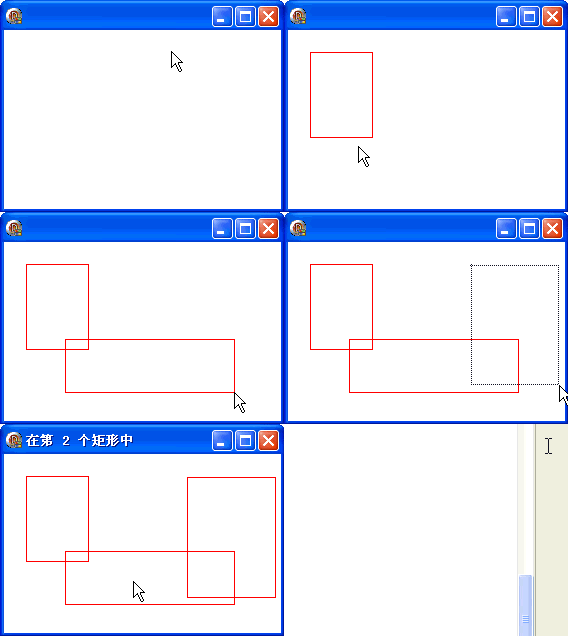
此模式可擴展至橢圓、多邊形、路徑等任意形狀的命中測試 (使用 TGPGraphicsPath + IsVisible)。