TGPTextureBrush 允許使用任意圖像 (BMP、JPG、PNG 等) 作為填充紋理,是實現豐富視覺效果的關鍵工具。最簡單的建構子僅需一個 TGPImage 參數。
TGPTextureBrush.Create(
  image: TGPImage; { 用於筆刷的圖像 }
);
最精簡範例:載入 JPG 圖片填充整個表單橢圓區域:
unit Unit1;

interface

uses
  Windows, Messages, SysUtils, Variants, Classes, Graphics, Controls, Forms,
  Dialogs;

type
  TForm1 = class(TForm)
    procedure FormPaint(Sender: TObject);
  end;

var
  Form1: TForm1;

implementation

{$R *.dfm}
uses GDIPOBJ, GDIPAPI;

procedure TForm1.FormPaint(Sender: TObject);
var
  g: TGPGraphics;
  img: TGPImage;
  tb: TGPTextureBrush;
begin
  g := TGPGraphics.Create(Canvas.Handle);
  img := TGPImage.Create('c:\temp\small.jpg');
  tb := TGPTextureBrush.Create(img);
  g.FillEllipse(tb, 0, 0, Self.ClientWidth, Self.ClientHeight);
  img.Free;
  tb.Free;
  g.Free;
end;

end.
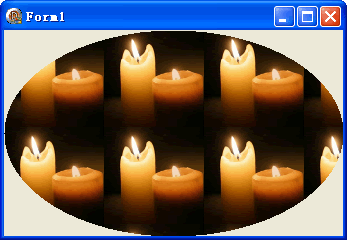
圖像會自動平鋪填充 (預設 WrapModeTile)。實際應用中建議:
FormCreate 載入圖像並建立筆刷,FormDestroy 釋放,避免重複建構開銷WrapMode 與 Transform 矩陣