此建構子以矩形區域 定義漸層填充範圍,搭配旋轉角度 參數控制漸層方向,並可選擇是否受 TLinearGradientMode 影響。適合在固定矩形區域內建立任意角度漸層。
TGPLinearGradientBrush.Create(
  rect: TGPRect;           { 變化範圍 }
  color1, color2: TGPColor; { 起始色與終止色 }
  angle: Single;            { 旋轉角度 }
  isAngleScalable: BOOL = FALSE { 是否受 LinearGradientMode 影響 }
);
TGPLinearGradientBrush.Create(
  rect: TGPRectF;
  color1, color2: TGPColor;
  angle: Single;
  isAngleScalable: BOOL = FALSE
);
範例使用軌跡條 (0-360 度) 即時調整漸層旋轉角度:
unit Unit1;

interface

uses
  Windows, Messages, SysUtils, Variants, Classes, Graphics, Controls, Forms,
  Dialogs, StdCtrls, TeCanvas, ExtCtrls, ComCtrls;

type
  TForm1 = class(TForm)
    ButtonColor1: TButtonColor;
    ButtonColor2: TButtonColor;
    TrackBar1: TTrackBar;
    procedure FormCreate(Sender: TObject);
    procedure FormPaint(Sender: TObject);
    procedure TrackBar1Change(Sender: TObject);
    procedure ButtonColor1Click(Sender: TObject);
    procedure ButtonColor2Click(Sender: TObject);
  end;

var
  Form1: TForm1;

implementation

{$R *.dfm}
uses GDIPOBJ, GDIPAPI, TypInfo;

procedure TForm1.FormCreate(Sender: TObject);
begin
  ButtonColor1.Caption := '色1 ';
  ButtonColor2.Caption := '色2 ';
  ButtonColor1.SymbolColor := clLime;
  ButtonColor2.SymbolColor := clBlack;
  TrackBar1.ShowSelRange := False;
  TrackBar1.Min := 0;
  TrackBar1.Max := 360;
end;

procedure TForm1.FormPaint(Sender: TObject);
var
  g: TGPGraphics;
  lb: TGPLinearGradientBrush;
  c1, c2: TGPColor;
  r: TGPRect;
begin
  g := TGPGraphics.Create(Canvas.Handle);
  r := MakeRect(20, 40, ClientWidth - 40, ClientHeight - 50);
  c1 := ColorRefToARGB(ButtonColor1.SymbolColor);
  c2 := ColorRefToARGB(ButtonColor2.SymbolColor);
  lb := TGPLinearGradientBrush.Create(r, c1, c2, TrackBar1.Position);
  g.FillEllipse(lb, r);
  lb.Free;
  g.Free;
end;

procedure TForm1.TrackBar1Change(Sender: TObject);
begin
  Repaint;
end;

procedure TForm1.ButtonColor1Click(Sender: TObject);
begin
  Repaint;
end;

procedure TForm1.ButtonColor2Click(Sender: TObject);
begin
  Repaint;
end;

end.
object Form1: TForm1
  Left = 0
  Top = 0
  Caption = 'Form1'
  ClientHeight = 197
  ClientWidth = 253
  Color = clBtnFace
  Font.Charset = DEFAULT_CHARSET
  Font.Color = clWindowText
  Font.Height = -11
  Font.Name = 'Tahoma'
  Font.Style = []
  OldCreateOrder = False
  Position = poScreenCenter
  OnCreate = FormCreate
  OnPaint = FormPaint
  PixelsPerInch = 96
  TextHeight = 13
  object ButtonColor1: TButtonColor
    Left = 143
    Top = 8
    Width = 49
    Caption = 'ButtonColor1'
    TabOrder = 0
    OnClick = ButtonColor1Click
  end
  object ButtonColor2: TButtonColor
    Left = 198
    Top = 8
    Width = 49
    Caption = 'ButtonColor2'
    TabOrder = 1
    OnClick = ButtonColor2Click
  end
  object TrackBar1: TTrackBar
    Left = 1
    Top = 9
    Width = 137
    Height = 24
    TabOrder = 2
    OnChange = TrackBar1Change
  end
end
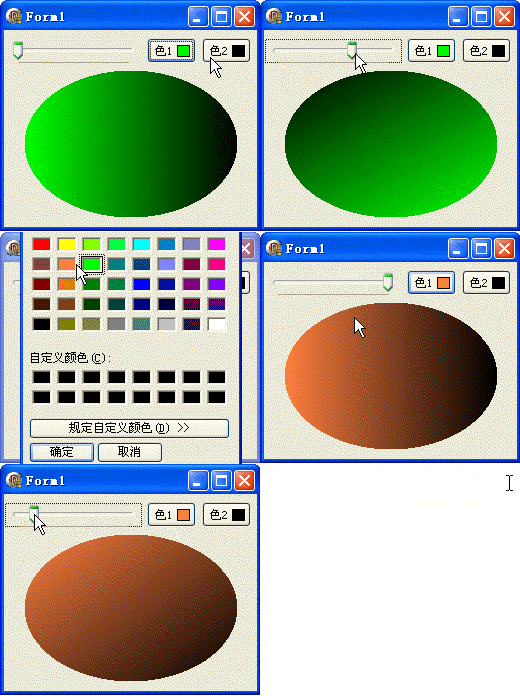
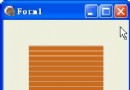
拖動軌跡條可見橢圓內漸層方向隨角度 (0°-360°) 平滑旋轉。isAngleScalable 參數預設為 FALSE,表示角度不受座標縮放影響;設為 TRUE 時,角度會隨矩形縮放比例調整。