繪製矩形、橢圓等封閉圖形時,畫筆寬度會導致線條向內、向外或置中延伸。TGPPen.SetAlignment 方法允許精確控制線條相對於幾何路徑的位置,這對像素級精度要求的繪圖應用至關重要。
| 常數 | 說明 |
|---|---|
| PenAlignmentCenter | 線條以理論路徑為中心 (預設) |
| PenAlignmentInset | 線條完全位於理論路徑內側 |
| PenAlignmentLeft | 線條位於路徑左側 (GDI+ 不支援) |
| PenAlignmentOutset | 線條位於路徑外側 (GDI+ 不支援) |
| PenAlignmentRight | 線條位於路徑右側 (GDI+ 不支援) |
實際可用的僅有 Center 與 Inset 兩種模式。
範例繪製粗寬度 (20 像素) 的紫色矩形,並疊加細黑框 (1.5 像素) 標示理論路徑位置:
unit Unit1;

interface

uses
  Windows, Messages, SysUtils, Variants, Classes, Graphics, Controls, Forms,
  Dialogs, StdCtrls, ExtCtrls;

type
  TForm1 = class(TForm)
    RadioGroup1: TRadioGroup;
    procedure FormPaint(Sender: TObject);
    procedure FormCreate(Sender: TObject);
    procedure RadioGroup1Click(Sender: TObject);
  end;

var
  Form1: TForm1;

implementation

{$R *.dfm}
uses GDIPOBJ, GDIPAPI;

procedure TForm1.FormCreate(Sender: TObject);
begin
  with RadioGroup1 do
  begin
    Align := alBottom;
    Items.Add('PenAlignmentCenter');
    Items.Add('PenAlignmentInset');
    Columns := 2;
    ItemIndex := 0;
  end;
end;

procedure TForm1.FormPaint(Sender: TObject);
var
  g: TGPGraphics;
  p: TGPPen;
  rect: TRect;
begin
  g := TGPGraphics.Create(Canvas.Handle);
  g.Clear($FFFFFFFF);
  p := TGPPen.Create($FFEE82EE, 20);  { 粉紫色,寬度 20 }
  rect := ClientRect;
  InflateRect(rect, -50, -50);
  OffsetRect(rect, 0, -20);
  p.SetAlignment(TPenAlignment(RadioGroup1.ItemIndex));
  g.DrawRectangle(p, MakeRect(rect));
  { 疊加細黑框標示理論路徑 }
  p.SetColor($FF000000);
  p.SetWidth(1.5);
  g.DrawRectangle(p, MakeRect(rect));
  p.Free;
  g.Free;
end;

procedure TForm1.RadioGroup1Click(Sender: TObject);
begin
  Repaint;
end;

end.
object Form1: TForm1
  Left = 0
  Top = 0
  Caption = 'Form1'
  ClientHeight = 198
  ClientWidth = 277
  Color = clBtnFace
  Font.Charset = DEFAULT_CHARSET
  Font.Color = clWindowText
  Font.Height = -11
  Font.Name = 'Tahoma'
  Font.Style = []
  OldCreateOrder = False
  Position = poDesktopCenter
  OnCreate = FormCreate
  OnPaint = FormPaint
  PixelsPerInch = 96
  TextHeight = 13
  object RadioGroup1: TRadioGroup
    Left = 8
    Top = 152
    Width = 185
    Height = 38
    Caption = 'RadioGroup1'
    TabOrder = 0
    OnClick = RadioGroup1Click
  end
end
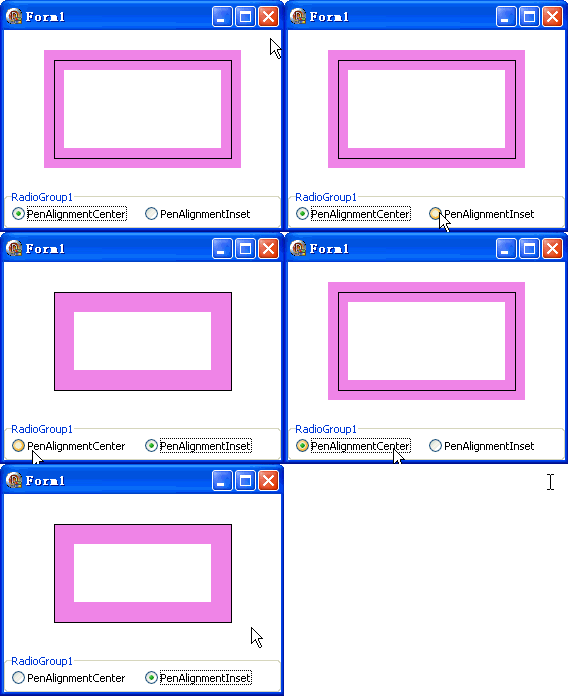
切換單選鈕可觀察到:Center 模式下粗線條對稱分佈於細框兩側;Inset 模式下粗線條完全內縮,不超出細框邊界。這在製作精確邊框、避免圖形超出邊界時非常實用。