TGPPen.SetTransform 接受 TGPMatrix 實現畫筆的完整仿射變換(旋轉、縮放、傾斜、平移)。注意:畫筆矩陣忽略 dx、dy 平移分量,僅應用線性變換部分。建議搭配 LineCapRound 獲得最佳視覺效果。
| 參數 | 矩陣位置 | 幾何意義 | TrackBar 對應 |
|---|---|---|---|
| m11 | [0,0] | X 縮放 + Y 傾斜耦合 | TrackBar1 |
| m12 | [0,1] | X 傾斜 | TrackBar2 |
| m21 | [1,0] | Y 傾斜 | TrackBar3 |
| m22 | [1,1] | Y 縮放 + X 傾斜耦合 | TrackBar4 |
procedure TForm1.FormPaint(Sender: TObject);
var g: TGPGraphics; b: TGPBrush; p: TGPPen; matrix: TGPMatrix;
    m11, m12, m21, m22: Single;
begin
  g := TGPGraphics.Create(Canvas.Handle);
  b := TGPHatchBrush.Create(HatchStyleLargeGrid, aclForestGreen);
  p := TGPPen.Create(b, 16);  {畫筆本身用漸層筆刷}
  m11 := TrackBar1.Position / 10; m12 := TrackBar2.Position / 10;
  m21 := TrackBar3.Position / 10; m22 := TrackBar4.Position / 10;
  matrix := TGPMatrix.Create(m11, m12, m21, m22, 0, 0);  {dx,dy=0}
  p.SetTransform(matrix);  {關鍵:套用矩陣變換}
  p.SetStartCap(LineCapRound); p.SetEndCap(LineCapRound);
  g.DrawLine(p, 30, 30, ClientWidth - Panel1.Width - 30, ClientHeight - 30);
  matrix.Free; b.Free; p.Free; g.Free;
end;
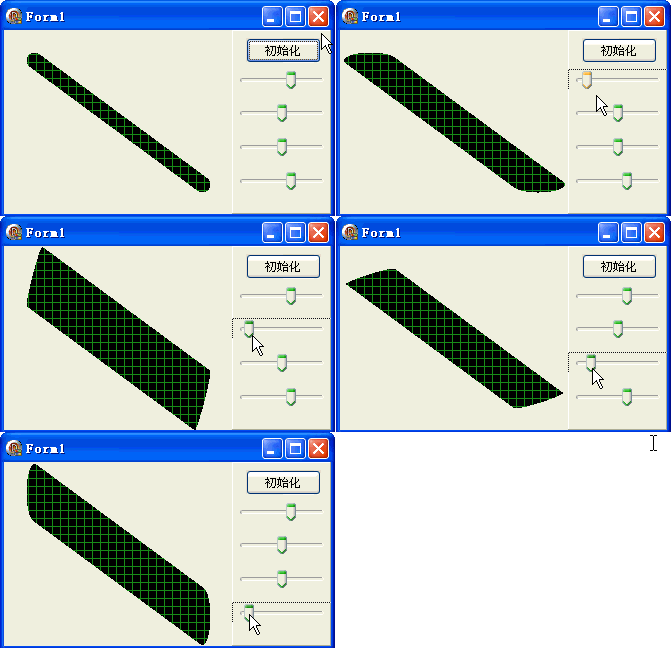
DrawLine 的端點座標object Form1: TForm1
Left = 0
Top = 0
Caption = 'Form1'
ClientHeight = 184
ClientWidth = 327
Color = clBtnFace
Font.Charset = DEFAULT_CHARSET
Font.Color = clWindowText
Font.Height = -11
Font.Name = 'Tahoma'
Font.Style = []
OldCreateOrder = False
Position = poDesktopCenter
OnCreate = FormCreate
OnPaint = FormPaint
PixelsPerInch = 96
TextHeight = 13
object Panel1: TPanel ... {右側四 TrackBar + 重置按鈕}
end