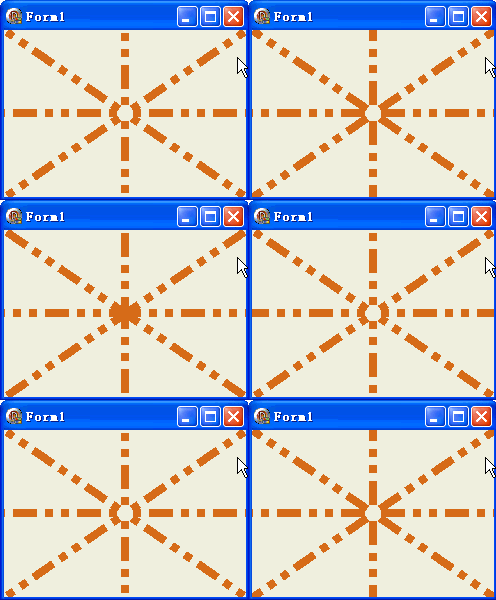
TGPPen.SetDashOffset 控制虛線模式的起始相位位移。透過定時器持續遞減 Offset,可實現經典的螞蟻線選取框、雷達掃描線、流動邊框等動畫效果。
var n: Integer;

procedure TForm1.FormPaint(Sender: TObject);
var g: TGPGraphics; p: TGPPen;
begin
  g := TGPGraphics.Create(Canvas.Handle);
  p := TGPPen.Create(aclChocolate, 8);
  p.SetDashStyle(DashStyleDashDotDot);  {長-短-短 模式}
  p.SetDashOffset(n);  {關鍵:動態位移}
  g.DrawLine(p, ClientWidth div 2, ClientHeight div 2, 0, 0);
  g.DrawLine(p, ClientWidth div 2, ClientHeight div 2, ClientWidth div 2, 0);
  g.DrawLine(p, ClientWidth div 2, ClientHeight div 2, ClientWidth, 0);
  g.DrawLine(p, ClientWidth div 2, ClientHeight div 2, ClientWidth, ClientHeight div 2);
  g.DrawLine(p, ClientWidth div 2, ClientHeight div 2, ClientWidth, ClientHeight);
  g.DrawLine(p, ClientWidth div 2, ClientHeight div 2, ClientWidth div 2, ClientHeight);
  g.DrawLine(p, ClientWidth div 2, ClientHeight div 2, 0, ClientHeight);
  g.DrawLine(p, ClientWidth div 2, ClientHeight div 2, 0, ClientHeight div 2);
  Dec(n);
  if n > Sqrt(Sqr(ClientWidth) + Sqr(ClientWidth)) then n := 0;  {重置週期}
  p.Free; g.Free;
end;

procedure TForm1.Timer1Timer(Sender: TObject);
begin Repaint; end;  {100ms 間隔}
| 常數 | 模式描述 | 典型用途 |
|---|---|---|
| DashStyleSolid | 實線 | 一般線條 |
| DashStyleDash | 長虛線 | 標準虛線 |
| DashStyleDot | 圓點線 | 輔助線、網格 |
| DashStyleDashDot | 長-短 | 工程圖隱藏線 |
| DashStyleDashDotDot | 長-短-短 | 工程圖中心線 |
| DashStyleCustom | 自定義陣列 | 專用模式 |
object Form1: TForm1
  Left = 0
  Top = 0
  Caption = 'Form1'
  ClientHeight = 167
  ClientWidth = 242
  Color = clBtnFace
  Font.Charset = DEFAULT_CHARSET
  Font.Color = clWindowText
  Font.Height = -11
  Font.Name = 'Tahoma'
  Font.Style = []
  OldCreateOrder = False
  Position = poDesktopCenter
  OnCreate = FormCreate
  OnPaint = FormPaint
  PixelsPerInch = 96
  TextHeight = 13
  object Timer1: TTimer ... {Interval=100, OnTimer=Timer1Timer}
end