SQLite 核心不支援使用者自定義函數,FireDAC TFDSQLiteFunction 元件封裝 sqlite3_create_function,讓開發者能在 SQL 中直接呼叫 Delphi 函數(如「總分」、「平均分」、「加密」、「格式化」),極大簡化業務邏輯與查詢耦合。
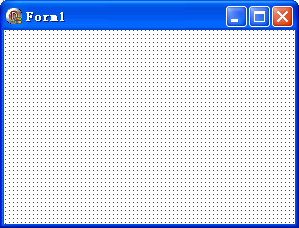
object DBGrid1: TDBGrid; Left = 8; Top = 88; Width = 321; Height = 89; DataSource = DataSource1; end
object Button1: TButton; Left = 382; Top = 88; Width = 75; Height = 25; Caption = '總分'; OnClick = Button1Click; end
object Button2: TButton; Left = 382; Top = 129; Width = 75; Height = 25; Caption = '平均分'; OnClick = Button2Click; end
object FDConnection1: TFDConnection; Left = 34; Top = 24; end
object FDPhysSQLiteDriverLink1: TFDPhysSQLiteDriverLink; Left = 143; Top = 24; end
object FDGUIxWaitCursor1: TFDGUIxWaitCursor; Provider = 'Forms'; Left = 260; Top = 24; end
object FDQuery1: TFDQuery; Connection = FDConnection1; Left = 344; Top = 24; end
object DataSource1: TDataSource; DataSet = FDQuery1; Left = 420; Top = 24; end
object FDSQLiteFunction1: TFDSQLiteFunction;
  DriverLink = FDPhysSQLiteDriverLink1; Active = True
  FunctionName = 'MyFun1'; ArgumentsCount = 3; OnCalculate = FDSQLiteFunction1Calculate; end
object FDSQLiteFunction2: TFDSQLiteFunction;
  DriverLink = FDPhysSQLiteDriverLink1; Active = True
FunctionName = 'MyFun2'; ArgumentsCount = 3; OnCalculate = FDSQLiteFunction2Calculate; endunit Unit1;
interface
uses
Winapi.Windows, Winapi.Messages, System.SysUtils, System.Variants, System.Classes,
Vcl.Graphics, Vcl.Controls, Vcl.Forms, Vcl.Dialogs,
FireDAC.Stan.Intf, FireDAC.Stan.Option, FireDAC.Stan.Error, FireDAC.UI.Intf,
FireDAC.Phys.Intf, FireDAC.Stan.Def, FireDAC.Stan.Pool, FireDAC.Stan.Async,
FireDAC.Phys, FireDAC.Stan.ExprFuncs, FireDAC.VCLUI.Wait, FireDAC.Stan.Param,
FireDAC.DatS, FireDAC.DApt.Intf, FireDAC.DApt,
Vcl.Grids, Vcl.DBGrids, Data.DB, FireDAC.Comp.DataSet, FireDAC.Comp.Client,
FireDAC.Comp.UI, FireDAC.Phys.SQLite, Vcl.StdCtrls, FireDAC.Phys.SQLiteWrapper;
type
TForm1 = class(TForm)
FDConnection1: TFDConnection;
FDPhysSQLiteDriverLink1: TFDPhysSQLiteDriverLink;
FDGUIxWaitCursor1: TFDGUIxWaitCursor;
FDQuery1: TFDQuery;
DataSource1: TDataSource;
DBGrid1: TDBGrid;
Button1: TButton;
Button2: TButton;
FDSQLiteFunction1: TFDSQLiteFunction;
FDSQLiteFunction2: TFDSQLiteFunction;
procedure FormCreate(Sender: TObject);
procedure Button1Click(Sender: TObject);
procedure Button2Click(Sender: TObject);
procedure FDSQLiteFunction1Calculate(AFunc: TSQLiteFunctionInstance; AInputs: TSQLiteInputs; AOutput: TSQLiteOutput; var AUserData: TObject);
procedure FDSQLiteFunction2Calculate(AFunc: TSQLiteFunctionInstance; AInputs: TSQLiteInputs; AOutput: TSQLiteOutput; var AUserData: TObject);
private { Private declarations } public { Public declarations } end;
var Form1: TForm1;
implementation {$R *.dfm}
procedure TForm1.FormCreate(Sender: TObject);
const
strTable = 'CREATE TABLE MyTable(姓名 STRING(10), 語文 INTEGER, 數學 INTEGER, 英語 INTEGER)';
begin
FDConnection1.Params.Add('DriverID=SQLite');
FDConnection1.ExecSQL(strTable);
FDQuery1.ExecSQL('INSERT INTO MyTable(姓名, 語文, 數學, 英語) VALUES(:1, :2, :3, :4)', ['張三', 66, 77, 88]);
FDQuery1.ExecSQL('INSERT INTO MyTable(姓名, 語文, 數學, 英語) VALUES(:1, :2, :3, :4)', ['李四', 77, 88, 99]);
FDQuery1.Open('SELECT * FROM MyTable');
// 註冊函數 MyFun1 (總分)
FDSQLiteFunction1.DriverLink := FDPhysSQLiteDriverLink1;
FDSQLiteFunction1.FunctionName := 'MyFun1';
FDSQLiteFunction1.ArgumentsCount := 3;
FDSQLiteFunction1.Active := True;
// 註冊函數 MyFun2 (平均分)
FDSQLiteFunction2.DriverLink := FDPhysSQLiteDriverLink1;
FDSQLiteFunction2.FunctionName := 'MyFun2';
FDSQLiteFunction2.ArgumentsCount := 3;
FDSQLiteFunction2.Active := True;
end;
procedure TForm1.Button1Click(Sender: TObject);
begin FDQuery1.Open('SELECT 姓名, MyFun1(語文, 數學, 英語) AS 總分 FROM MyTable'); end;
procedure TForm1.Button2Click(Sender: TObject);
begin FDQuery1.Open('SELECT 姓名, MyFun2(語文, 數學, 英語) AS 平均分 FROM MyTable'); end;
procedure TForm1.FDSQLiteFunction1Calculate(AFunc: TSQLiteFunctionInstance; AInputs: TSQLiteInputs; AOutput: TSQLiteOutput; var AUserData: TObject);
begin AOutput.AsInteger := AInputs[0].AsInteger + AInputs[1].AsInteger + AInputs[2].AsInteger; end;
procedure TForm1.FDSQLiteFunction2Calculate(AFunc: TSQLiteFunctionInstance; AInputs: TSQLiteInputs; AOutput: TSQLiteOutput; var AUserData: TObject);
begin AOutput.AsFloat := (AInputs[0].AsInteger + AInputs[1].AsInteger + AInputs[2].AsInteger) / 3; end;
end.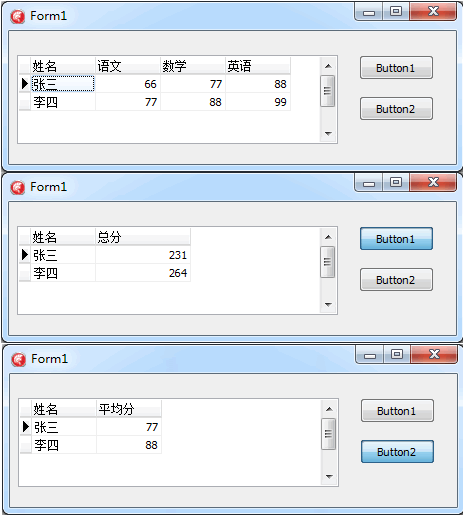
FunctionName:SQL 中呼叫的函數名(區分大小寫)。ArgumentsCount:固定參數個數,-1 表示可變參數。OnCalculate:核心邏輯,AInputs[0..N-1] 取得參數,AOutput.AsInteger/AsFloat/AsText/AsBlob 回傳結果。Active := True:啟用註冊,False 註銷。MyEncrypt(PlainText, Key)、MyDecrypt(CipherText, Key)。MyDateFmt(DateTime, 'YYYY-MM-DD')。MyRegexMatch(Text, Pattern)。CalcBonus(Salary, Level, Years) 直接在 SQL 計算獎金。TFDSQLiteFunction 將 Delphi 運算能力無縫延伸至 SQLite 引擎內部,讓 SQL 查詢能直接表達複雜業務邏輯,減少資料往返應用層的開銷。三個屬性 + 一個事件,即可輕鬆擁有專屬 SQL 函數庫。