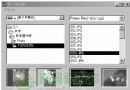
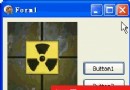
視窗標題列左上角圖示點擊彈出的選單為系統選單(System Menu),預設含還原、移動、大小、最小化、最大化、關閉。透過 GetSystemMenu 取得選單控制代碼,AppendMenu 追加項目,WM_SYSCOMMAND 攔截命令。
TMainMenu (MainMenu1) 設計自訂項目(如「檔案」→「退出」)。FormCreate 將 MainMenu1 項目附加至系統選單:
procedure TForm1.FormCreate(Sender: TObject);
var I: Integer;
begin
  AppendMenu(GetSystemMenu(Handle, False), MF_SEPARATOR, 0, ''); // 分隔線
  with MainMenu1 do
    for I := 0 to Items.Count - 1 do
      AppendMenu(GetSystemMenu(Handle, False), MF_POPUP,
        Items[I].Handle, PAnsiChar(Items[I].Caption));
end;WM_SYSCOMMAND 處理器:
type TForm1 = class(TForm)
  ...
  procedure WMSysCommand(var Msg: TWMSysCommand); message WM_SYSCOMMAND;
end;

procedure TForm1.WMSysCommand(var Msg: TWMSysCommand);
var Item: TMenuItem;
begin
  Item := MainMenu1.FindItem(Msg.CmdType, fkCommand);
  if Item <> nil then Item.Click; // 轉發至 TMenuItem.OnClick
  inherited;
end;Exit1Click 等事件關閉程式。unit Unit1;
interface uses SysUtils, Windows, Messages, Classes, Graphics, Controls, Forms, Dialogs, Menus, StdCtrls;
type TForm1 = class(TForm)
MainMenu1: TMainMenu; File1, Exit1: TMenuItem;
procedure Exit1Click(Sender: TObject);
procedure FormCreate(Sender: TObject);
private procedure WMSysCommand(var Msg: TWMSysCommand); message WM_SYSCOMMAND;
end;
var Form1: TForm1;
implementation {$R *.DFM}
procedure TForm1.WMSysCommand(var Msg: TWMSysCommand);
var Item: TMenuItem;
begin
Item := MainMenu1.FindItem(Msg.CmdType, fkCommand);
if Item <> nil then Item.Click;
inherited;
end;
procedure TForm1.Exit1Click(Sender: TObject); begin Close; end;
procedure TForm1.FormCreate(Sender: TObject);
var I: Integer;
begin
AppendMenu(GetSystemMenu(Handle, False), MF_SEPARATOR, 0, '');
with MainMenu1 do
for I := 0 to Items.Count - 1 do
AppendMenu(GetSystemMenu(Handle, False), MF_POPUP, Items[I].Handle, PAnsiChar(Items[I].Caption));
end;
end.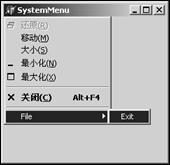
ModifyMenu 更改文字、啟用狀態、圖示。DeleteMenu 移除預設「關閉」等命令,強制使用者透過自訂邏輯退出。SetMenuItemBitmaps 為自訂項目指定位圖。MF_POPUP 配合 CreatePopupMenu 建立多層級。